
Google’s Core Web Vitals are the benchmark for high-performing websites. By focusing on loading (LCP), interactivity (INP), and visual stability (CLS), you can significantly boost your SEO. This guide covers everything from running a performance audit to using industry-standard tools and applying WordPress-specific fixes that deliver measurable results.
What Are Core Web Vitals?
Core Web Vitals are a set of specific real-world signals that Google uses to measure a user’s experience on your website. Unlike “lab data” (simulated tests), these metrics reflect how actual visitors interact with your pages, focusing on how fast they load, how quickly they respond, and how stable they remain as they render.
From an SEO perspective, Core Web Vitals represent the intersection of technical performance and user satisfaction. While high-quality content remains a top priority, Google’s ranking algorithm significantly favours sites that provide a seamless experience. Poor performance often leads to higher bounce rates and lost conversions, making these vitals a critical pillar of any modern digital strategy.
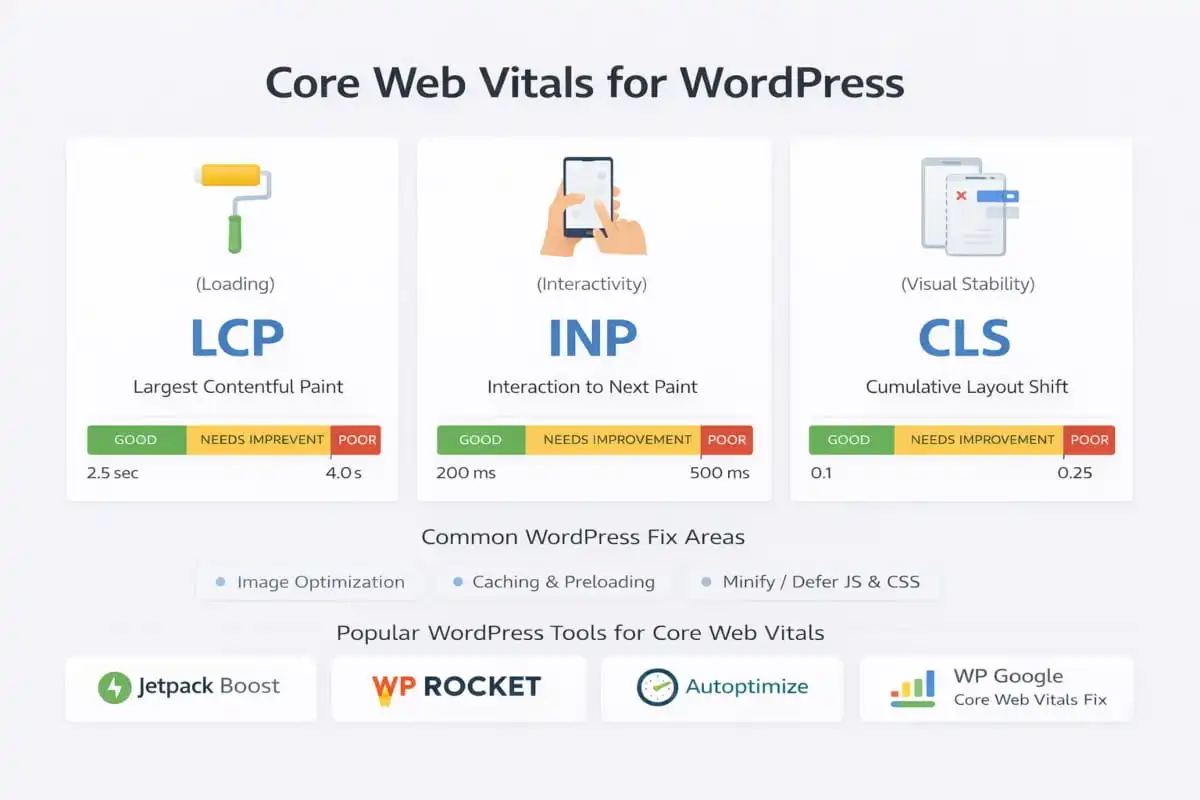
The 3 Core Web Vitals Metrics You Need to Know
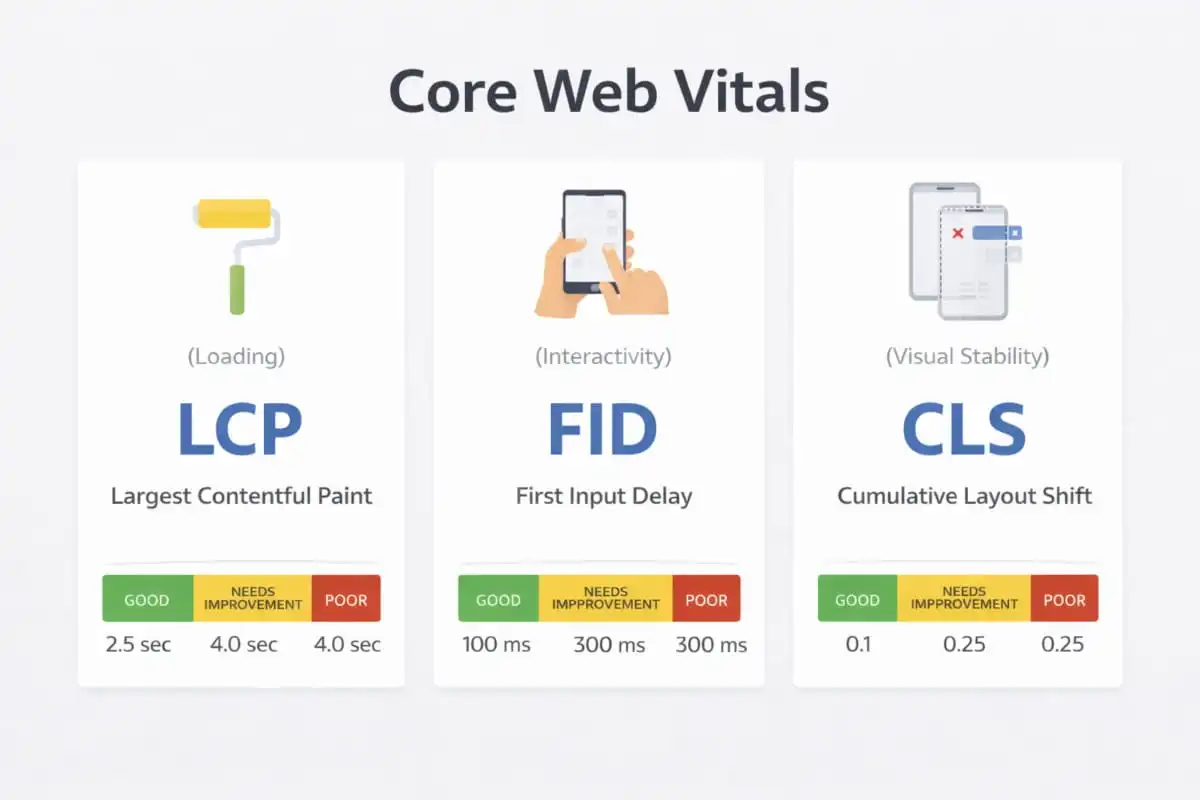
1) What is (Largest Contentful Paint) LCP in Core Web Vitals?
LCP measures how fast the main, most prominent content on the page becomes visible to the user. This is often your hero image, a featured banner, or the primary headline/content block. If that main moment loads slowly, users feel the page is stalled, leading to abandonment. A strong LCP is one of the most direct indicators of perceived speed, which is why it’s closely tied to searches like how to improve core web vitals and how to fix core web vitals issues.
2)What is CLS (Cumulative Layout Shift) in Core Web Vitals?
CLS measures how much a page layout shifts unexpectedly while it loads. Common CLS problems include buttons moving right before a click, images popping in without reserved space, late-loading banners pushing content down, or font swapping that changes spacing. Poor CLS creates frustration and misclicks, which can impact user trust and conversions. That’s why fixing CLS is often part of a broader core web vitals audit and a key step in how to pass core web vitals for important page templates.
What is INP (Interaction to Next Paint) in Core Web Vitals?
INP measures how responsive your website feels when users interact by clicking buttons, selecting menus, typing in fields, or opening filters. If the browser is overloaded (often due to heavy JavaScript), interactions feel delayed and laggy.
INP is especially important for dynamic websites like WordPress and ecommerce stores, which is why many site owners search for what it is and how to improve INP core web vitals. Improving INP typically requires reducing main-thread blocking, minimizing unnecessary scripts, and optimizing frontend execution.
Note on FID vs INP (2026)
If you’re researching what FID is in core web vitals or asking if FID is fid still a core web vital in 2026, the practical reality is that the industry focus has shifted from FID to INP as the primary responsiveness metric. In simple terms, INP captures real interaction delays more comprehensively.
The good news is that the same performance improvements, like reducing JavaScript bloat, deferring non-critical scripts, and optimizing third-party tools, support both responsiveness metrics and help with how to optimize core web vitals overall.
 Why Are Core Web Vitals Important?
 Why Are Core Web Vitals Important?
Core Web Vitals are important because they directly measure how users experience your website, not just how it looks in a design mockup or performs in isolated tests. When businesses ask why are core web vitals important, why core web vitals are important, the answer comes down to three core areas: user experience, SEO performance, and business results.
Core Web Vitals and User Experience
At their core, Core Web Vitals exist to ensure websites feel fast, stable, and responsive for real users. A page that loads slowly, shifts unexpectedly, or lags when clicked creates frustration, even if the content itself is strong.
From a user perspective:
- A slow LCP makes a page feel broken or stuck
- Poor CLS causes accidental clicks and visual confusion
- Weak INP makes interactions feel delayed and unreliable
These experiences lead to higher bounce rates and lower engagement, which is why Core Web Vitals are central to modern UX-focused SEO strategies.
Do Core Web Vitals Matter for SEO?
A common question among site owners is, Do core web vitals matter for seo. The answer is yes, Core Web Vitals are part of Google’s broader page experience signals. Core web vitals are a ranking factor in 2026, as Google reflects growing awareness that performance influences rankings, especially when content relevance is similar across competing pages.
While Core Web Vitals alone won’t outrank better content, they can:
- Help your pages compete more effectively in crowded SERPs
- Reduce performance-related ranking disadvantages
- Support stronger engagement signals that indirectly benefit SEO
Core Web Vitals and Conversion Performance
Beyond rankings, Core Web Vitals play a direct role in conversions. Faster, more stable pages:
- Build trust more quickly
- Reduce friction during navigation and checkout
- Improve form completion and user flow
For service-based websites, e-commerce stores, and lead-generation pages, improving Core Web Vitals often results in measurable gains in inquiries, sign-ups, and sales, making optimization a revenue-focused initiative, not just a technical task.
Why Google Emphasises Core Web Vitals
Google prioritizes Core Web Vitals because they reflect real-world usability at scale.
Rather than rewarding sites that test well, Google evaluates:
- How quickly meaningful content appears
- Whether the layout stays stable during loading
- How smoothly users can interact with the page
This aligns SEO incentives with better web experiences, benefiting both users and businesses.
How Important Are Core Web Vitals in 2026?
If you’re asking how important core web vitals are today, the practical answer is: important enough to be non-optional for competitive websites. As frameworks, themes, and plugins grow more complex, performance issues can quietly erode SEO gains if left unaddressed.
For WordPress websites in particular, Core Web Vitals are often the difference between:
- Good content that underperforms and
- Well-optimized pages that convert and rank consistently
Core Web Vitals are important because they connect technical performance, user experience, and SEO outcomes into a single, measurable framework. They help ensure your website not only ranks but also delivers a smooth, trustworthy experience that keeps users engaged.
For businesses focused on sustainable SEO growth, Core Web Vitals optimization isn’t optional; it’s a foundational part of modern on-page and technical SEO.
Does Core Web Vitals Affect SEO?
Yes, Core Web Vitals affect SEO, but usually in a practical, competitive way rather than as a standalone magic switch. Site owners want to know whether performance can actually influence rankings, and the answer is that it can, especially when everything else is equal.
Core Web Vitals as Part of Google’s Page Experience Signals
Core Web Vitals are included within Google’s broader page experience framework. In real-world terms, this means your website’s loading speed, interactivity, and visual stability can contribute to how Google evaluates the overall usability of a page.
So, the best way to interpret it is:
- Core Web Vitals can influence rankings, particularly when multiple pages offer similar relevance, content depth, and backlink strength.
- They help Google identify pages that provide a smoother experience for users, especially on mobile.
Is Page Speed a Google Ranking Factor?
Speed impacts more than just user perception; it impacts how efficiently Google can crawl, render, and evaluate pages.
Core Web Vitals make speed more specific by measuring key experience moments:
- LCP for how fast the main content loads
- INP for how responsive the page feels
- CLS for visual stability (preventing layout shifts)
This turns the broad idea of page speed into measurable, actionable SEO benchmarks.
Why Core Web Vitals Matter for SEO Beyond Rankings
Even when rankings don’t shift overnight, Core Web Vitals improvements often boost SEO outcomes indirectly. That’s why core web vitals matter for seo is a strong question because the impact shows up in multiple ways:
- Lower bounce rates when pages load smoothly and feel instant
- Better engagement (more pages per session, longer time on site)
- Higher conversion rates due to reduced friction
- Improved crawl efficiency on large sites (Google spends crawl budget more effectively)
In other words, improving Core Web Vitals doesn’t just help you pass scores; it helps your pages perform better once they do get traffic.
So, do core web vitals affect seo? Yes, Core Web Vitals can influence rankings as part of page experience, and they often improve SEO performance indirectly through stronger engagement and better technical efficiency. If your content is competitive, fixing performance bottlenecks can be the difference between sitting on page two and consistently competing on page one.
Are Core Web Vitals a Ranking Factor?
Yes, Core Web Vitals are a ranking factor, but they work more like a tie-breaker than the main driver of rankings. Businesses want to know whether improving performance will directly move positions in Google.
In practice, Core Web Vitals sit inside Google’s broader page experience signals. That means they can influence rankings, especially when:
- Two pages are similarly relevant to the query
- Content quality, intent match, and authority are comparable
- One page provides a clearly better user experience (faster, more stable, more responsive)
How Core Web Vitals Connect to Page Speed Ranking
Speed affects both user behaviour and search performance. Core Web Vitals take speed beyond a vague concept and quantify it through real experience metrics like:
- LCP (loading experience)
- CLS (visual stability)
- INP (interactivity and responsiveness)
This is why core web vitals affect seo and whether core web vitals matter for seo are valid questions. The impact shows up in rankings and in engagement signals that support SEO outcomes.
What This Means for SEO Strategy
If your site has strong content but weak performance, improving Core Web Vitals can remove friction that holds rankings back. More importantly, it typically improves:
- Bounce rate and time on site
- Mobile usability and conversion rates
- Crawl efficiency on larger websites
So while Core Web Vitals won’t outrank better content on their own, they absolutely matter in competitive SERPs, especially for businesses trying to win high-intent traffic with high-performing landing pages.
Ready to Align SEO Services With Core Web Vitals?
If your site is already investing in content but performance is holding it back, the next step is combining technical fixes with a focused SEO plan. Professional SEO services that include Core Web Vitals optimization help improve LCP, CLS, and INP while strengthening on-page signals so your pages load faster, feel smoother on mobile, and compete more effectively in high-intent searches. The result is a site that ranks on relevance and keeps users engaged once they arrive.
How to Test Core Web Vitals (The Right Way)
The most important step is understanding that Core Web Vitals can be evaluated using two different data types, and they don’t always match.
A strong Core Web Vitals strategy uses both field data to confirm real-world performance and lab data to diagnose and fix what’s causing issues.
Field Data vs Lab Data
Field data (real users)
Field data reflects how actual visitors experience your site on real devices, real networks, and real browsers. This is the most reliable source when you want to know whether you’re truly meeting Core Web Vitals standards.
Field data is critical for:
- Confirming whether URLs pass or fail at scale
- Understanding real mobile performance (often the biggest challenge)
- Tracking whether improvements are working over time
If your goal is to pass core web vitals, field data is the benchmark that ultimately matters.
Lab data (simulated tests)
Lab data is collected in a controlled environment using simulated devices and network conditions. It’s extremely useful for diagnosing problems because it shows you why a page is slow or unstable.
Lab data is best for:
- Finding render-blocking resources (CSS/JS)
- Identifying oversized images and inefficient media delivery
- Spotting unused JavaScript and long main-thread tasks
- Troubleshooting CLS causes (late-loading elements, font swaps, layout shifts)
When you’re trying to figure out how to fix core web vitals or run a proper core web vitals audit, lab testing gives you the actionable breakdown you need.
The Right Testing Approach (Best Practice)
To test Core Web Vitals properly and avoid misleading conclusions:
- Start with field data to see the real performance outcome across your site
- Use lab data to pinpoint what’s driving poor LCP, CLS, or INP
- Fix the root cause (templates, scripts, images, third-party tools)
- Re-test the lab tools to confirm the technical improvement
- Monitor field data over time to validate that real users are now seeing better results
This balanced approach is the most effective way to check core web vitals, understand what’s failing, and implement fixes that stick, especially for WordPress sites and performance-heavy templates.
How to Check Core Web Vitals in Google Search Console
Google Search Console is one of the most reliable tools available. It uses real-world field data to help site owners quickly identify performance issues at scale making it especially valuable for ongoing SEO and website optimization.
Where to Find the Core Web Vitals Report
Inside Google Search Console, navigate to the Core Web Vitals section under the Experience menu. You’ll see separate reports for mobile and desktop, reflecting how real users experience your site on different devices.
This is one of the fastest ways to check core web vitals of a website and understand whether performance issues are isolated or affecting entire sections of your site.
How the Core Web Vitals Report Works
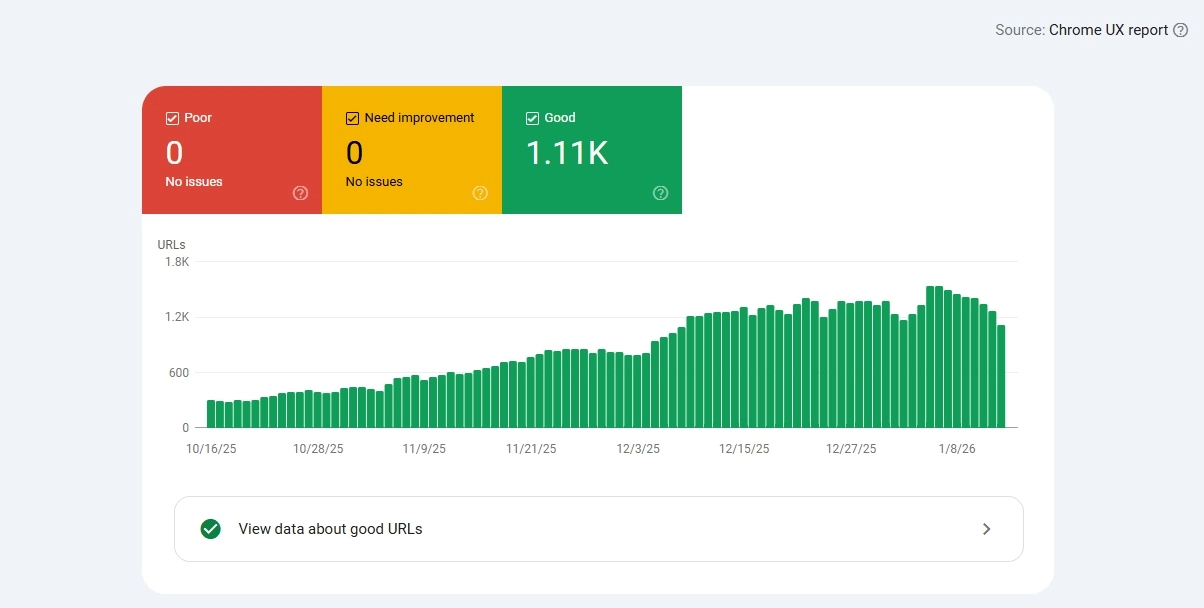
The Core Web Vitals report groups URLs based on similar performance issues and classifies them into three clear categories:
- Good – Pages meet Core Web Vitals thresholds
- Needs Improvement – Pages are close but falling short
- Poor – Pages fail one or more Core Web Vitals metrics
Instead of listing every URL individually, Search Console highlights patterns, which is why it’s so effective for diagnosing problems caused by a shared theme, plugin, or page template.
Why Google Search Console Is So Valuable for Core Web Vitals
Search Console is particularly useful when you want to:
- Identify site-wide issues affecting multiple URLs
- Prioritize fixes that will improve large sections of your site
- Track progress after a Core Web Vitals audit or optimization effort
- Monitor mobile performance, where most failures occur
If you’re trying to figure out how to fix a core web vitals assessment that failed, Search Console helps you focus on root causes rather than chasing individual pages.
Best Practice Tip
Use Google Search Console to identify the problem, then use diagnostic tools (like lab testing) to understand why it’s happening. This combination makes it easier to fix Core Web Vitals issues efficiently and verify improvements over time without guesswork.
 How to Audit Core Web Vitals: A Practical Workflow
 How to Audit Core Web Vitals: A Practical Workflow
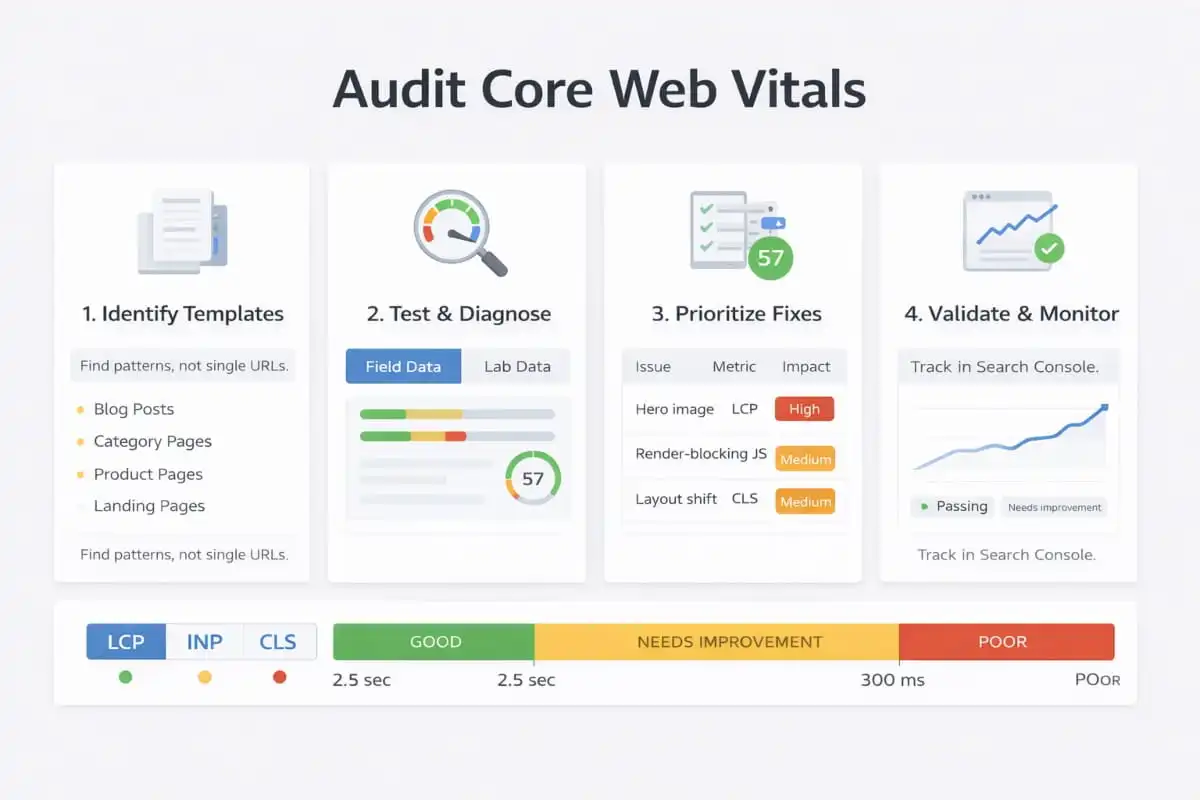
The key is to avoid chasing one bad URL at a time. A proper audit focuses on templates and patterns because shared layouts, scripts, and page components usually cause Core Web Vitals issues.
This workflow is the most reliable way to check core web vitals, identify why you’re failing, and create fixes that scale across the site.
Step 1: Identify the Worst Templates (Not Just One URL)
Start inside Google Search Console to find which groups of pages are failing. This is often the fastest way to spot performance problems tied to a theme, plugin, or layout structure.
Most sites see Core Web Vitals issues clustered on:
- Blog post templates
- Category/archive pages
- Product pages (WooCommerce)
- Landing pages built with heavy page builders
This approach is far more effective than treating every failing page as a separate issue because one template-level fix can improve dozens or hundreds of URLs.
Step 2: Confirm With PageSpeed Insights + Lighthouse (Lab Diagnostics)
Once you’ve identified the worst template groups, use lab tools to diagnose what’s driving the failures. This is where how to test core web vitals and how to measure core web vitals becomes actionable.
Prioritize these diagnostic signals:
- LCP element type (is it a hero image, headline block, slider, or banner?)
- Render-blocking CSS/JS delays content display
- Third-party scripts (chat widgets, analytics stacks, trackers, heatmaps) are increasing the load and interaction delay
Lab testing is essential when you’re figuring out how to fix core web vitals issues, because it breaks down the specific causes behind poor LCP, CLS, or INP.
Step 3: Prioritize Fixes by Impact (Template-Level Wins)
Not all fixes produce the same results. A smart audit prioritizes improvements that raise performance across an entire template, not just one page.
High-impact priorities usually include:
- Optimizing the LCP element (often your hero image or featured content block)
- Reducing JavaScript execution and unnecessary scripts (critical for INP)
- Preventing layout shifts caused by images, ads, dynamic modules, or font loading (CLS)
This is the difference between small improvements and genuinely learning how to improve core web vitals at scale.
Step 4: Validate and Monitor Results (Field Data Takes Time)
After implementing changes, validate improvements in both lab tools and Search Console.
A strong post-fix workflow includes:
- Retest key templates in PageSpeed Insights/Lighthouse
- Track affected URL groups in Search Console (mobile and desktop)
- Watch trend lines over time, because field data reflects real users and updates gradually
The most effective way to audit core web vitals is to work from template-level problems → diagnose with lab tools → apply high-impact fixes → validate with real-user data. This workflow helps you move from testing to real optimization that supports SEO performance and user experience.
How to Improve Core Web Vitals: Actionable Fixes That Move the Needle
If you’re looking for how to improve core web vitals, how to optimize core web vitals, or what is core web vitals optimization, the fastest wins usually come from fixing the issues that impact your most important templates (home, services, blog posts, product pages). Instead of chasing dozens of minor tweaks, focus on the changes that consistently deliver measurable gains across LCP, CLS, and INP.
The high-impact improvements IT Leadz typically prioritises during a core web vitals audit because they address the root causes of slow loading, layout instability, and interaction lag.
Improve LCP: Make the Main Content Load Faster
When users ask what LCP is in core web vitals, the practical goal is simple: ensure the primary content (often the hero image or main headline block) loads quickly, especially on mobile. If LCP is weak, your page feels stuck, and that can undermine both UX and SEO.
Common LCP fixes that move the needle:
- Compress and resize hero images so you’re serving the exact dimensions needed (not oversized uploads)
- Use next-gen formats like WebP or AVIF where supported
- Reduce server response time with better hosting, caching, and database optimization
- Preload the LCP resource (often the hero image or critical above-the-fold asset)
- Remove heavy sliders (or replace them with a lightweight static hero section)
These improvements are often the quickest path for brands trying to pass core web vitals or recover from a failed core web vitals assessment due to slow above-the-fold loading.
Improve CLS: Stop Layout Shifts Before They Happen
If you’re researching what CLS is in core web vitals, you’re likely dealing with frustrating layout shifts, buttons moving, text jumping, or sections pushing down as the page loads. CLS problems are common on WordPress sites due to themes, dynamic modules, and late-loading elements.
CLS fixes that prevent most shifting issues:
- Define image and video dimensions so the browser reserves space before assets load
- Avoid late-loading banners/popups that push content down after the page is visible
- Use stable font loading to reduce late font swaps that change spacing
- Ensure ad containers have fixed sizes or placeholders so they don’t cause sudden jumps
Because CLS often comes from multiple small issues, the goal is consistency: remove the causes of movement at the template level so the improvement applies across many pages.
Improve INP: Reduce Main-Thread Blocking
How to improve INP core web vitals, think about responsiveness. INP gets worse when the browser is busy processing heavy JavaScript and can’t respond quickly to clicks, taps, and typing.
High-impact INP improvements:
- Remove unused JavaScript and defer non-critical JS so essential interactions stay fast
- Break up long tasks, especially those created by page builders and animation-heavy sections
- Minimize third-party scripts (chat, tracking, heatmaps) or load them conditionally
- Optimize WooCommerce scripts so they load only where needed (product/cart/checkout)
- Reduce DOM complexity, simpler page structures render and respond faster
For WordPress and e-commerce sites, INP is often the biggest hidden issue because pages can look fine visually but still feel laggy when users interact.
What Actually Works
When businesses ask how to optimize for core web vitals, the most effective approach is to fix the biggest constraints first:
- Make above-the-fold assets load fast (LCP)
- Eliminate layout movement (CLS)
- Reduce heavy scripts and interaction delays (INP)
That’s how you create improvements that are noticeable for users, measurable in tools, and strong enough to support SEO performance.
Core Web Vitals Best Practices (Checklist)
 Core Web Vitals Best Practices (Checklist)
How to fix Google Core Web Vitals: these quick wins are the most reliable starting point. They’re designed to create noticeable improvements without turning your site into a full rebuild, especially for WordPress sites, where performance issues often come from themes, plugins, and third-party scripts.
Core Web Vitals Optimization Checklist (High-Impact, Fast to Implement)
- Use page caching + browser caching to reduce repeat load time and improve real-user performance (field data).
- Enable a CDN to deliver static assets (images, CSS, JS) faster across regions and reduce latency.
- Compress images aggressively and avoid oversized uploads. Image weight is one of the most common LCP killers.
- Lazy-load below-the-fold images, but never lazy-load your LCP hero (the main above-the-fold element must load immediately).
- Defer or delay non-essential JavaScript, especially third-party scripts that increase main-thread blocking and hurt INP.
- Reduce plugin bloat; each extra plugin can inject site-wide scripts/styles and weaken performance.
- Optimize your theme by using a lightweight, well-coded build with fewer dependencies and cleaner assets.
- Limit popups and dynamic banners that load late and trigger CLS through unexpected layout shifts.
- Preconnect to critical third-party domains (fonts, analytics, tag managers) when needed to reduce connection overhead.
- Monitor mobile first, because mobile performance is usually the limiting factor for passing Core Web Vitals.
Why These Quick Wins Matter
This checklist directly supports the three Core Web Vitals outcomes that searchers care about most:
- Better LCP (faster visible loading)
- Lower CLS (stable layout and fewer shifts)
- Improved INP (snappier interactions and less lag)
If your goal is to improve core web vitals efficiently, these changes usually deliver the biggest early gains before moving into deeper technical fixes.
WordPress Core Web Vitals: What Typically Breaks (and How to Fix It)
It’s no surprise that people frequently search for how to improve core web vitals WordPress, WordPress core web vitals, core web vitals WordPress, and fix core web vitals failing on WordPress. WordPress is powerful, but its flexibility often leads to performance problems that repeat across sites, especially when themes, builders, plugins, and third-party scripts pile up over time.
The good news: WordPress Core Web Vitals issues are usually fixable with a structured approach that targets templates, assets, and script behaviour.
What Typically Breaks WordPress Core Web Vitals
1) Page builders are injecting heavy JS/CSS
Many page builders add large CSS and JavaScript bundles to support design elements, often across every page. This increases load time (hurting LCP) and can create long tasks that delay interactions (hurting INP).
2) Multiple font families and weights
Loading several font families or too many weights increases render time and can trigger layout shifts if fonts swap late, impacting both LCP and CLS.
3) Unoptimized images on templates (especially hero sections)
Oversized hero images are one of the most common reasons WordPress sites fail LCP. If your above-the-fold image is heavy, the page will feel slow even if everything else is optimized.
4) Too many global scripts are loaded on every page
It’s common for scripts intended for specific pages (forms, sliders, WooCommerce, analytics add-ons) to load site-wide. This adds unnecessary requests and main-thread work that can drag down INP and overall responsiveness.
5) Cheap hosting + no caching strategy
Weak server response time and inconsistent caching are major causes of slow initial loads. Even well-built pages can fail Core Web Vitals if the hosting stack can’t deliver assets quickly.
The Most Effective WordPress Improvements (That Actually Move Scores)
If you’re focused on improving core web vitals WordPress and want reliable results, these are the optimizations that typically create the biggest improvements:
1) Use a performance-focused caching solution
Implement page caching plus asset optimization (minification, defer, delay, and critical CSS handling where appropriate). This reduces load time, repeat visits, and improves real-user field data.
2) Switch to a lighter theme (or strip unused features)
A lightweight theme with clean code often outperforms feature-heavy themes. If switching isn’t possible, removing unused theme modules and assets can still produce meaningful gains.
3) Load scripts conditionally (only where needed)
Conditional loading is one of the most powerful WordPress tactics:
- Only load WooCommerce scripts on product/cart/checkout pages
- Only load form scripts where the form exists
- Limit slider, animation, and builder assets to relevant templates
This reduces JavaScript overhead and improves INP significantly.
4) Reduce third-party tools
Third-party scripts (chat widgets, heatmaps, aggressive tracking stacks) are frequent Core Web Vitals killers. Each one adds latency, CPU work, and potential layout shifts. Keep what you need, remove what you don’t, and load the rest conditionally.
5) Optimize database and autoloaded options
On older WordPress sites, the database can slow everything down especially if autoloaded options become bloated. Cleaning this up improves backend performance and helps reduce server response time, which supports stronger LCP.
Don’t treat it like a one-page issue. WordPress performance problems are usually template and system-level driven by builders, assets, scripts, and hosting.
A proper approach to WordPress core web vitals focuses on:
- Faster above-the-fold loading (LCP)
- Fewer layout shifts (CLS)
- Less JavaScript blocking (INP)
That combination is what consistently improves both real-user experience and SEO outcomes.
Improve your WordPress rankings and user experience with WordPress SEO services built around real performance wins. We optimize WordPress Core Web Vitals LCP, CLS, and INP so your pages load faster, stay stable, and feel responsive on mobile. Get a clear roadmap and implementation plan that aligns technical fixes with on-page SEO goals.
How to Fix Core Web Vitals Assessment Failed (Without Guesswork)
 How to Fix Core Web Vitals Assessment Failed (Without Guesswork)
Seeing a core web vitals assessment fail in Google Search Console can be frustrating, especially when you’ve already improved speed, and the status still won’t change. Why the core web vitals assessment failed, the key is to stop treating it like a single-page problem and start fixing it at the template level, using the right combination of field data and lab diagnostics.
Below is the systematic approach IT Leadz uses to fix core web vitals and improve real-user performance without random plugin installs or trial-and-error tweaks.
Common Reasons Pages Fail Core Web Vitals
When a page fails, it’s typically because it falls short on one (or more) of the three Core Web Vitals metrics:
1) High LCP (Largest Contentful Paint)
High LCP usually comes from:
- A slow or oversized hero image
- Weak hosting or server response delays (TTFB-related issues)
- Render-blocking CSS/JS that prevents the main content from appearing quickly
If your LCP element is heavy or delayed, the page feels stuck, which is one of the most common reasons sites fail performance assessments.
2) CLS (Cumulative Layout Shift)
CLS failures often happen due to:
- Images or videos without defined dimensions (no reserved space)
- Late-loading banners, popups, or dynamic modules pushing content down
- Unstable ads or embeds that resize after initial render
CLS is especially common on WordPress sites where themes and plugins inject elements after page load.
3) INP (Interaction to Next Paint)
INP failures are usually caused by:
- Long JavaScript tasks that block the main thread
- Heavy page builders are adding unnecessary scripts
- Too many third-party scripts (tracking, heatmaps, chat widgets) are running immediately
If the browser can’t respond quickly to clicks and taps, users experience lag even when the page looks loaded.
How to Solve Core Web Vitals Systematically
If your goal is to fix the core web vitals assessment that failed and move toward how to pass core web vitals, use this structured plan:
1) Start with templates (fix across a page type)
Search Console groups failing URLs because the issue is usually shared across:
- Blog templates
- Service pages
- Product pages (WooCommerce)
- Builder-based landing pages
Fixing the template improves dozens (or hundreds) of URLs at once.
2) Reduce main-thread work (JavaScript and layout complexity)
To improve responsiveness and address how to improve INP core web vitals:
- Remove unused scripts
- Defer non-critical JavaScript
- Minimize third-party tools or load them conditionally
- Simplify heavy layouts and animations
This often produces the fastest INP gains.
3) Optimize the LCP element (usually one key asset)
For most pages, the largest element is:
- A hero image
- A featured banner
- A headline block tied to a background image
Improving this one element, compressing, resizing, serving next-gen formats, and preloading when appropriate, can dramatically improve LCP.
4) Retest on mobile (where failures happen most)
Many sites pass on desktop but fail on mobile. Always validate fixes using mobile testing because mobile devices and networks amplify:
- heavy images
- render-blocking resources
- JavaScript delays
If you want to know how to measure core web vitals accurately, mobile testing is non-negotiable.
5) Monitor field data (Search Console and real-user reporting)
One of the biggest misconceptions is expecting instant Pass results. Core Web Vitals assessments depend on field data (real users), so status changes typically lag behind your fixes.
Best practice:
- Use lab tools to confirm technical improvements immediately
- Use Search Console and real-user metrics to verify sustained performance gains over time
If you’re dealing with a core web vitals assessment failure, the fastest path forward is systematic:
- Fix templates, not isolated URLs
- Reduce JavaScript and third-party overhead (INP)
- Optimize the main above-the-fold element (LCP)
- Eliminate layout shifts (CLS)
- Validate on mobile and monitor field data
That’s how you fix Core Web Vitals issues in a way that supports both real UX improvements and long-term SEO performance.
How to Benchmark Core Web Vitals Against Competitors
The goal isn’t to copy what others are doing; it’s to understand what good performance looks like in your market and identify why certain sites consistently feel faster and smoother. Benchmarking is especially useful when you’re trying to optimize core web vitals, recover from a failed core web vitals assessment, or build a roadmap for core web vitals optimization that supports SEO growth.
A proper benchmark helps you answer high-impact questions like:
Are competitors loading faster because of lighter builds?
Many sites win on performance simply because they use:
- Lightweight themes
- Smaller hero sections
- Fewer scripts and UI effects
- Cleaner page templates
If their LCP is consistently stronger, it often points to better image handling, simpler above-the-fold layouts, and faster delivery.
Are they using fewer third-party scripts?
Third-party scripts are a major reason sites struggle with INP and overall responsiveness. If competitors feel snappier, it may be because they load fewer tools (or load them conditionally), such as:
- Chat widgets
- Heatmaps
- Tracking stacks
- Marketing pixels
This is directly tied to queries like how to improve INP core web vitals.
Is your site carrying extra weight from plugins, builders, or tracking tools?
For WordPress sites, competitive benchmarking often reveals invisible bloat:
- Page builders are injecting global CSS/JS
- Plugins loading assets site-wide
- Multiple fonts/weights increase load time
- Heavy animations and dynamic elements affecting CLS
This is why WordPress core web vitals issues tend to repeat and why benchmarking helps clarify what’s holding your site back.
How to Benchmark Core Web Vitals the Right Way
To benchmark effectively, focus on comparable pages:
- Your service page vs their service page
- Your blog template vs their blog template
- Your product page vs their product page (if applicable)
This keeps the comparison fair and helps you isolate whether differences come from content layout, design complexity, or technical performance.
Why Benchmarking Helps SEO and Conversions
Benchmarking supports smarter decision-making because it shows you where to prioritize:
- If competitors have better LCP, your roadmap should prioritize above-the-fold assets and delivery speed
- If their pages are more responsive, your roadmap should reduce JS workload and third-party scripts to improve INP
- If their pages feel stable, CLS fixes (image dimensions, font loading, late banners) become a priority
That insight is what turns generic advice like speed up your site into a focused plan to fix core web vitals and improve real outcomes, rankings, engagement, and leads.
Benchmarking Core Web Vitals against competitors gives you context: what performance level users (and Google) are already getting in your niche. It helps you pinpoint whether your biggest gaps come from theme weight, third-party scripts, plugin bloat, or template design, and it guides a realistic optimization roadmap that improves both SEO performance and conversion rates.
Core Web Vitals + On-Page SEO: Why They Work Better Together
Core Web Vitals and on-page SEO are most effective when they’re treated as one system, not two separate projects. Core Web Vitals don’t replace content quality, keyword targeting, internal linking, or technical SEO essentials. But they amplify them. That’s why many businesses researching whether core web vitals affect seo or do core web vitals matter for seo eventually realize the real win comes from combining performance optimization with strong on-page execution.
A page can be well-structured, keyword-aligned, and fully optimized and still underperform if it’s slow to load, shifts while rendering, or feels laggy on mobile. In competitive SERPs, those experience gaps can hold rankings and conversions back.
Why On-Page SEO Alone Isn’t Always Enough
On-page SEO focuses on helping Google understand your page: relevance, intent match, content depth, headings, internal links, and topical coverage. But user experience determines what happens after the click.
If Core Web Vitals are weak:
- Users bounce before engaging with your content (hurting real performance outcomes)
- The page feels unreliable (reducing trust and conversion rate)
- Interactive elements (forms, buttons, navigation) feel delayed (hurting INP-driven responsiveness)
That’s why core web vitals is no longer a theoretical SEO question; it’s a practical performance issue tied directly to results.
How Core Web Vitals Strengthen On-Page SEO Results
When you optimize core web vitals, you improve the environment your on-page content operates in. This typically creates measurable gains in three areas:
1) Better crawl efficiency and indexing consistency
Fast, clean pages are easier for Google to fetch, render, and evaluate, especially at scale. Reducing heavy scripts and excess bloat improves technical efficiency, which supports stronger site-wide SEO performance.
2) Better engagement signals
Core Web Vitals improvements often lead to:
- Lower bounce rates
- More time on site
- Higher interaction rates
- Improved conversion actions
That’s the indirect side of whether core web vitals affect seo performance improvements, making users more likely to stay and engage, which supports the overall success of your on-page work.
3) A smoother path from click to conversion
On-page SEO wins you the click. Core Web Vitals help you keep the visitor. Faster LCP, stable CLS, and responsive INP reduce friction, making it easier for users to read, browse, and convert.
Core Web Vitals and on-page SEO work better together because they solve different parts of the same problem:
- On-page SEO drives visibility and relevance in search
- Core Web Vitals improve real user experience and performance after the click
If your goal is to compete for high-intent keywords and generate consistent leads, the strongest approach is to align both, so your pages rank well and deliver a fast, stable, conversion-friendly experience.
Book a Free Core Web Vitals Audit
Want to know exactly how to fix core web vitals issues on your website and what to prioritize first for fast, measurable on-page SEO gains?
Book a free SEO audit with IT Leadz. We’ll run a full core web vitals audit, show you what’s impacting LCP, CLS, and INP, and identify the technical and on-page fixes that will move the needle. You’ll get a clear, practical action plan to optimize core web vitals, improve user experience, and strengthen search visibility, especially on mobile, where performance issues usually hit hardest.
Conclusion
So, how important are core web vitals? Important enough that they belong on every serious SEO and website optimization checklist, especially for businesses running WordPress, where themes, plugins, page builders, and third-party scripts can quietly chip away at performance over time.
The most effective approach is to focus on the outcomes that matter most for real users and search performance:
- A faster LCP so the main content loads quickly and the page doesn’t feel stuck
- A stable CLS so layouts don’t shift, and users can interact confidently
- A responsive INP so clicks, taps, and forms feel instant, not delayed
When you improve these three areas, you’re not just trying to pass Core Web Vitals. You’re improving user experience, reducing friction across key pages, and supporting stronger SEO results because better performance helps visitors stay engaged and convert.
Frequently Asked Questions (FAQ’s)
What are Core Web Vitals?
Core Web Vitals are Google performance metrics that measure real-user experience for loading speed, visual stability, and responsiveness. They focus on LCP (Largest Contentful Paint), CLS (Cumulative Layout Shift), and INP (Interaction to Next Paint). Google uses these metrics to evaluate whether pages feel fast and stable for users.
Are Core Web Vitals a ranking factor?
Core Web Vitals are a ranking factor as part of Google’s page experience signals. They influence rankings most when multiple pages match search intent equally well. Improving Core Web Vitals also supports better engagement, which aligns with SEO goals.
Do Core Web Vitals affect SEO?
Core Web Vitals affect SEO by measuring performance signals tied to user experience. Faster loading, fewer layout shifts, and better responsiveness reduce friction that leads to bounces and poor engagement. Strong Core Web Vitals also help technical performance by improving how efficiently pages render and load.
How do I test Core Web Vitals?
Test Core Web Vitals using both field data and lab data. Field data shows real-user results from actual devices and networks, while lab data provides diagnostic detail for fixing issues. Using both is the most accurate way to measure and improve performance.
How do I check Core Web Vitals in Google Search Console?
Check Core Web Vitals in Google Search Console under the Experience section in the Core Web Vitals report. The report separates mobile and desktop results and groups affected URLs by issue type. It labels groups as Good, Needs improvement, or Poor to help pprioritizefixes.
What is LCP in Core Web Vitals?
LCP (Largest Contentful Paint) measures how quickly the largest visible content element loads in the viewport. It typically represents a hero image, featured media, or main heading block. A faster LCP indicates that primary content becomes visible quickly.
What is CLS in Core Web Vitals?
CLS (Cumulative Layout Shift) measures how much a page’s layout moves unexpectedly during loading. It increases when images, ads, banners, or fonts load without reserved space and push content around. Lower CLS indicates a stable page that avoids surprise shifts.
What is INP in Core Web Vitals?
INP (Interaction to Next Paint) measures how quickly a page responds visually after a user interaction, such as clicking, tapping, or typing. High INP means the page feels laggy because the browser is busy processing tasks. Improving INP requires reducing main-thread blocking and unnecessary JavaScript work.
Is FID still a Core Web Vital in 2026?
FID is no longer the primary Core Web Vitals responsiveness metric; INP replaced it as the main interactivity measure. INP captures a broader range of interaction delays across the full page lifecycle. Performance work that reduces JavaScript blocking improves responsiveness for INP-based evaluation.
How do I fix a Core Web Vitals assessment failed status?
Fix a Core Web Vitals assessment failed status by identifying which metric is failing (LCP, CLS, or INP) and addressing the root cause at the template level. Common fixes include optimizing the LCP element, reserving space for images and embeds to reduce CLS, and reducing heavy JavaScript to improve INP. Results change after field data updates reflect real-user improvements.