What is on-page SEO? On-page SEO is the technique of optimizing the content, HTML and structure of an individual web page so search engines understand it and people find it useful. It covers titles, headings, copy, images, internal links and page experience and it is the part of SEO you fully control.
Every page on your site sends signals about what it covers and who it is for. On-page optimization (optimization in the UK) makes those signals clear, the words you choose, how you organize them and the technical details working behind the scenes. Backlinks and authority matter, but a vague, slow or off-topic page gives them little to build on.
Small details carry real weight. A Zyppy study of more than 80,000 title tags found that Google rewrote 61.6 percent of them at least partially, while titles that matched the page’s H1 were rewritten far less often. Clean, consistent page elements leave search engines less to guess about.
This guide covers what on-page SEO includes, the techniques worth your time in 2026, a checklist you can run on any page and before-and-after examples for UK and US sites. Each section is written to stand on its own, so you can jump to the part you need and the formatting is built to be picked up by AI answers as well as traditional results. If you would rather have a team handle your on page SEO, IT Leadz can audit and fix your pages for you.
What Is On-Page SEO?
On-page SEO is the work of improving everything on a single web page, including its copy, HTML tags, structure, images, links and loading experience, so search engines can tell what the page is about and searchers find it worth clicking. It is the part of SEO you control directly, which is why most ranking work starts here.
On-page SEO in plain English
Imagine handing a stranger a book with no cover, no chapter titles and no index. They could read it, but they would struggle to say what it covers or whether it answers their question. A search engine faces the same problem with a poorly prepared page. On-page SEO provides the cover, chapter titles and index, a clear title tag, headings that describe each section, descriptive image labels and internal links that show how pages relate.
It also covers the quality of the writing itself. A page needs to answer the question it targets, in language its audience actually uses, on a site that loads fast and works excellently on a phone. Headings carry real weight here, as Google’s John Mueller has said that headings help Google better understand what each section of a page is about.
The easiest way to separate it from its counterpart is by location. On-page SEO happens on your own pages and sits entirely in your hands. Off-page SEO covers signals from elsewhere, such as backlinks and brand mentions, which you can influence but never fully control.
On-page optimization vs optimisation
“Optimization” and “optimisation” mean exactly the same thing, the first is American spelling and the second is British. Search engines treat them as one topic, so a guide written in either spelling can appear for both, though the results shown to a searcher in London and a searcher in Chicago may differ slightly because of local pages and language settings.
In practice, choose one spelling for the body of your page and match it to your largest audience. Then use the other variant once, in a natural spot such as the definition, so both versions are covered. Avoid writing two separate pages, one per spelling. They would compete with each other for the same searches and split your ranking strength. The abbreviation “SEO” is spelling-neutral, which makes it the safest choice for titles, headings and URLs.
In-page SEO vs “on-page SEO which is correct?
“On-page SEO” is the correct, standard term. “In-page SEO” is not a recognized SEO discipline and people who search for it almost always mean on-page SEO, which is why the two queries tend to return the same kind of guide.
The confusion has a source. “In-page” is a real term elsewhere in web work, where it can describe links that jump to a section of the same page or behavior reports that show where visitors click on a page. That is a different idea from optimizing a page for search. A small style note, hyphenate the term when it modifies a noun, as in “on-page SEO,” and expect the same page to rank for “on page SEO” and “onpage SEO,” since search engines read all three as one phrase.
Why On-Page SEO Is Important
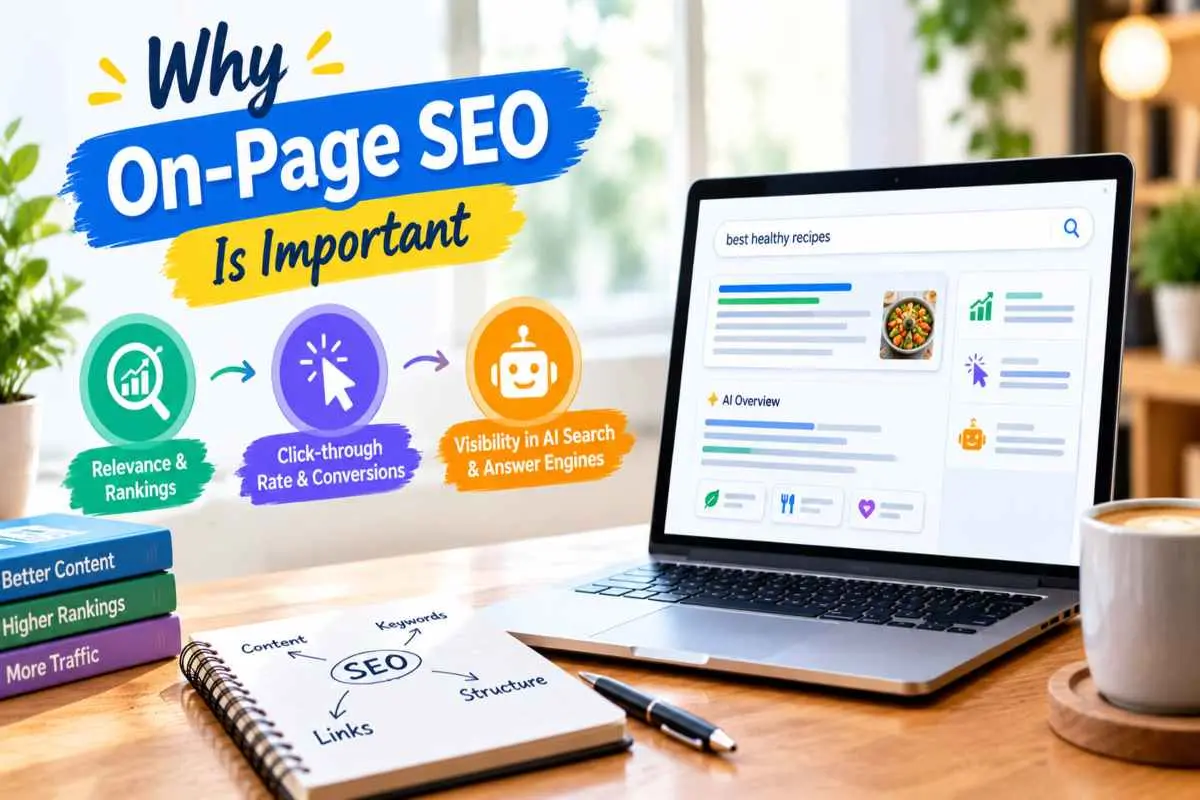
On-page SEO matters because it determines whether a page can earn rankings, clicks and citations. It reveals search engines what the page is about, makes the result worth clicking and gives AI systems clear passages to quote. Strong backlinks and a big content library can’t make up for a page that is vague or hard to read.
Relevance and rankings
A search engine has to match a page to a query before anything else about the page counts and on-page elements are how that match happens. The title tag, headings, opening sentences and body copy tell it which topic the page covers, which questions it answers and what kind of searcher it suits. A page about trail running shoes that never mentions fit, terrain or width will struggle against one that covers them, even if the first page has more links pointing to it.
Relevance is also the foundation everything else builds on. Links, brand mentions and regular publishing all work better when the page they point to is clear about its subject. Small fixes, like a sharper heading or a title that matches the query’s real intent, can improve results without new content, though no single change guarantees a ranking.
Click through rate and conversions
A ranking only becomes a visit when someone chooses your result and the title and description are what make that choice. The position effect is steep, in one large study of Google results, the first organic result averaged a 28.5% click-through rate, while the tenth averaged just 2.5%. That gap is why a clear, accurate title is worth the effort and why a result that looks relevant can outperform one that ranks slightly higher. Google may rewrite your description to match the query, so make the page itself answer it too.
The same attention to detail carries through after the click. A page whose heading repeats the promise made in the search result, loads quickly on a phone and puts the key answer and next step where visitors can see them keeps people reading and acting. Mismatched promises and cluttered layouts send them back to the results.
Visibility in AI search and answer engines
On-page SEO matters for AI search because systems such as Google’s AI Overviews and AI Mode, ChatGPT and Perplexity build answers from passages they can find and understand. Pages with direct answers under descriptive headings, clean structure, structured data and a named author are easier for those systems to extract and trust.
Ranking helps but is no longer the whole story. Ahrefs found that 37.9% of URLs cited in AI Overviews also appeared in the top 10 results, down from about 76% in an earlier study. A page that covers a topic thoroughly, with each section able to stand on its own, can be cited even when it doesn’t hold the top spot for the main query. Once you start earning those citations, it helps to know how to track brand visibility in AI Mode, so you can see which pages are getting picked up.
On-Page SEO Elements and Ranking Factors
The on-page SEO elements that matter most are content that matches search intent, the title tag, headings, internal links and page experience. Meta descriptions, URLs, images, structured data and trust signals play smaller but real supporting roles. The table gives the quick version and each element is explained below.
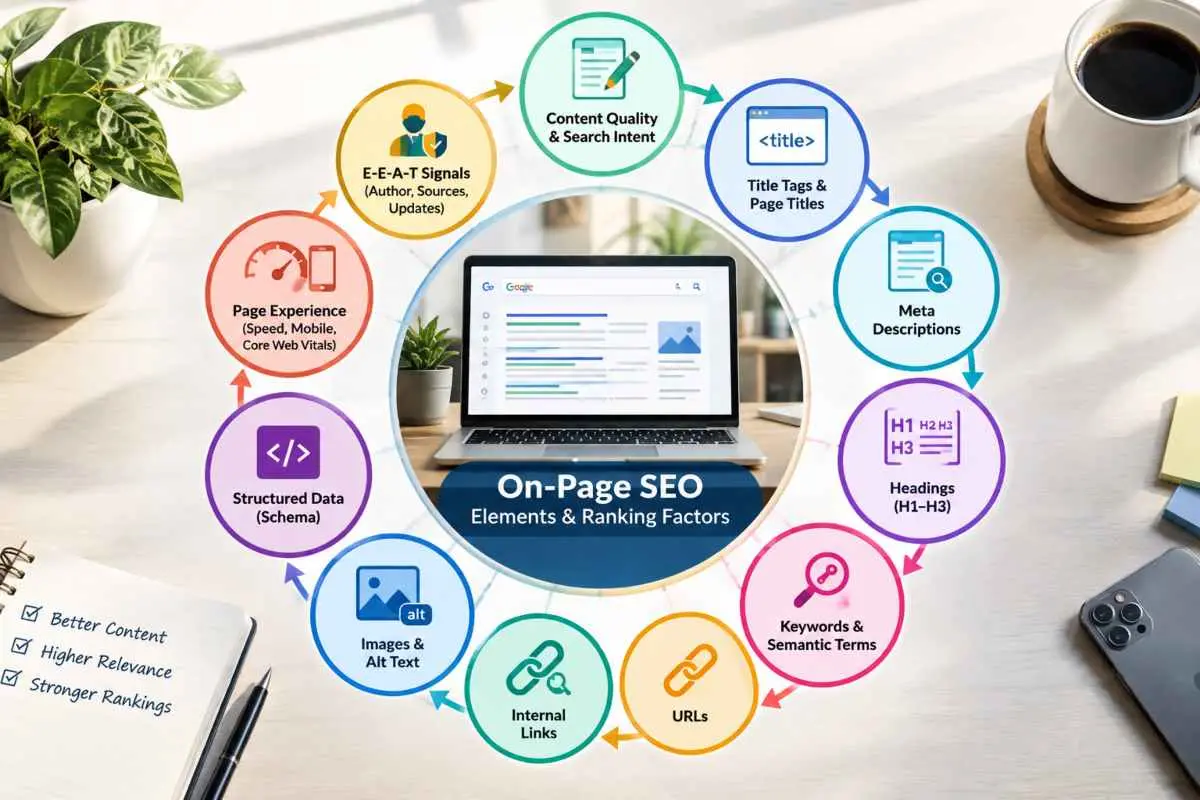
| Element | What to do | Typical impact |
| Content and search intent | Answer the query fully, in the format searchers expect | Very high |
| Title tag | Write one unique, descriptive title of about 50–60 characters, with the main keyword near the front | High |
| Meta description | Summarize the page’s benefit in about 150 characters | Indirect (clicks) |
| Headings (H1–H3) | Use one clear H1, H2s for main sections, H3s for subtopics | Medium to high |
| Keywords and semantic terms | Use the primary term naturally, plus related terms and questions | Medium |
| URL | Keep it short, lowercase, hyphenated, and readable | Low to medium |
| Internal links | Add descriptive anchors to and from related pages | Medium to high |
| Images and alt text | Compress, name clearly, and describe each image accurately | Medium |
| Structured data | Add valid JSON-LD that matches the visible content | Medium (rich results, AI clarity) |
| Page experience | Pass the Core Web Vitals and work well on mobile | Medium (tiebreaker) |
| E-E-A-T signals | Show a named author, cited sources, and update dates | High on trust-sensitive topics |
Content quality and search intent
Content quality means the page fully answers what the searcher came for, in the format they expect, without padding or copied material. Before writing, look at what already ranks to see whether people want a guide, a list, a comparison or a service page and match that format. Then add what the others lack, such as original examples, current figures and a clear answer near the top and keep each section understandable on its own.
Title tags and page titles
A title tag should describe the page in one clear line, usually 50–60 characters, with the main keyword near the front and a reason to click. Make it unique for every page and consistent with the H1, because Google may substitute its own wording when a title is vague, stuffed or at odds with the page.
Meta descriptions
A meta description is a short summary of the page, about 150 characters, written to win the click rather than to rank. Ahrefs notes that meta descriptions aren’t a ranking factor and in its comparison of 20,000 keywords Google rewrote them 62.78% of the time. They are still worth writing because a relevant one can attract more clicks and the best protection against a rewrite is a page that clearly answers the query.
Headings (H1–H3)
Headings give a page its outline, one H1 that states the topic, H2s for each main section and H3s for the details beneath them. Write them as descriptive labels, ideally close to the question the section answers, so a reader, a search engine or an AI system can lift a section out and still understand it. Google has said its systems cope with multiple H1 headings, but a single clear H1 keeps the structure easiest to follow.
Keywords and semantic terms
Use your primary keyword where it belongs naturally, in the title, H1, opening paragraph and a few headings, then cover the related terms, synonyms and questions that a complete answer would include. Repeating the exact phrase more often won’t help. Covering the topic more thoroughly will.
URLs
A good URL is short, lowercase and hyphen-separated, such as /on-page-seo-guide/, so people and search engines can tell what the page contains at a glance. Leave established URLs alone unless there is a strong reason to change them and if you do, set up a 301 redirect so rankings and links carry over.
Internal links
Internal links connect related pages through descriptive anchor text, which helps search engines discover pages, understand how they relate and share authority between them, while also sending readers to the next useful step. Link where it genuinely helps the reader, use anchors that describe the target page rather than “click here,” and fix broken links, which waste crawl attention and frustrate visitors.
Images and alt text
Images support on-page SEO when they are compressed, clearly named, set to the right dimensions and described with accurate alt text. Alt text is first an accessibility feature that tells screen reader users what an image shows and it also helps search engines interpret the image. Write it as a plain description rather than a list of keywords and give images fixed dimensions so the page doesn’t jump as they load.
Structured data (schema)
Structured data is code, usually JSON-LD, that labels what a page contains, such as an article, its author, an organization or a set of questions, so machines can read it without guessing. It does not raise rankings by itself and it must match what visitors can see, but it can make a page eligible for rich results and give AI systems a clearer picture of the content. Don’t count on any single type producing a rich result and test your markup with Google’s Rich Results Test before publishing.
Page experience (speed, mobile, Core Web Vitals)
Page experience means a page that loads quickly, responds promptly to taps and stays visually stable, measured through the Core Web Vitals. The “good” targets are a Largest Contentful Paint under 2.5 seconds, an Interaction to Next Paint under 200 milliseconds and a Cumulative Layout Shift under 0.1 and a page passes when at least 75% of its visitors meet them. Because Google indexes mobile version of your pages, check performance on a phone first. A fast page won’t beat clearly better content, but it can decide the outcome between pages of similar quality.
E-E-A-T signals (author, sources, updates)
E-E-A-T stands for experience, expertise, authoritativeness and trust, the qualities Google’s quality guidelines ask human raters to look for, with trust treated as the most important. It is not a single score you can optimize, but pages show it through a named author with relevant credentials, cited sources for factual claims, honest and accurate “last updated” dates and clear company and contact details. These signals matter most on topics where bad advice could cost people money or health and they help any page earn trust from both readers and AI systems.
On-Page vs Off-Page vs Technical SEO
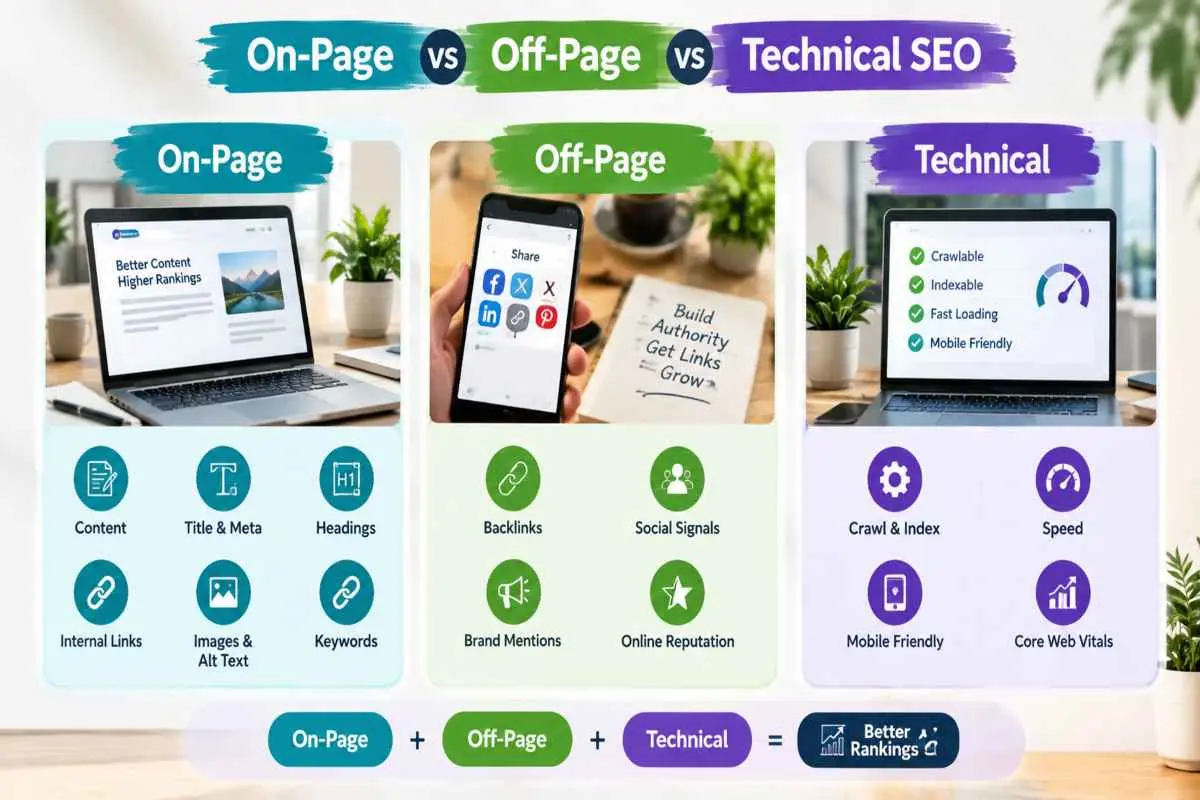
On-page SEO improves what is on a page, off-page SEO builds authority through signals from other websites and technical SEO makes sure search engines can crawl, render and index your site. They work as a chain, technical access comes first, on-page relevance makes a page worth ranking and off-page trust helps it hold its position.
On-page vs off-page
On-page SEO covers everything you control on your own pages, including the content, titles, headings, links, images and page experience. Off-page SEO covers signals that happen elsewhere, mainly backlinks from other sites, but also brand mentions, reviews and digital PR. In short, on-page work builds relevance and off-page work builds authority.
Both matter and the data shows how closely they are tied. In an Ahrefs analysis of about 14 billion pages, 96.55% got no traffic from Google and of roughly 20 million pages with no referring domains, only 2,997 received more than 1,000 search visits a month. That is a correlation rather than proof that links cause traffic, but it fits what most practitioners see. A page with no external trust rarely competes for a contested query.
The order still matters. Links pointing at a vague, slow or off-topic page are wasted effort, because the page can’t hold the position they help it reach. Fix the page first, then promote it.
On-page vs technical
On-page SEO decides what a page says and how it is presented, while technical SEO decides whether search engines can reach and understand your site in the first place. Technical work covers crawling and indexing, XML sitemaps, robots rules, canonical tags, redirects, HTTPS, site architecture and server performance. These are mostly site-wide systems handled by developers, hosting and your CMS.
The two overlap in a few places. Page speed, structured data and URLs all affect both. A simple way to split them is by who controls the choice. If an editor can change it on a single page, it is on-page and if it is a site-wide setting or system, it is technical.
The practical point is sequence. A page that is blocked, returns errors or isn’t indexed gets no benefit from excellent on-page work. If a page isn’t appearing in search at all, check technical access before rewriting the copy.
Where “on-site SEO” fits
“On-site SEO” is an umbrella term for everything you do on your own website, which in practice means on-page SEO plus technical SEO, as opposed to off-page work done elsewhere. Some writers use it as a plain synonym for on-page SEO, so read the context before assuming which they mean.
For clarity in your own planning, use “on-page” when you are working on a single page’s content and markup, “technical” for site-wide access and performance and “on-site” only when you mean both together.
How To Do On Page Step by Step
To do on-page SEO, pick one primary keyword and confirm what searchers want from it, then work down the page, title, meta description, H1, URL, headings, copy, images and internal links. Doing it in this order means every later choice supports the same topic and intent.
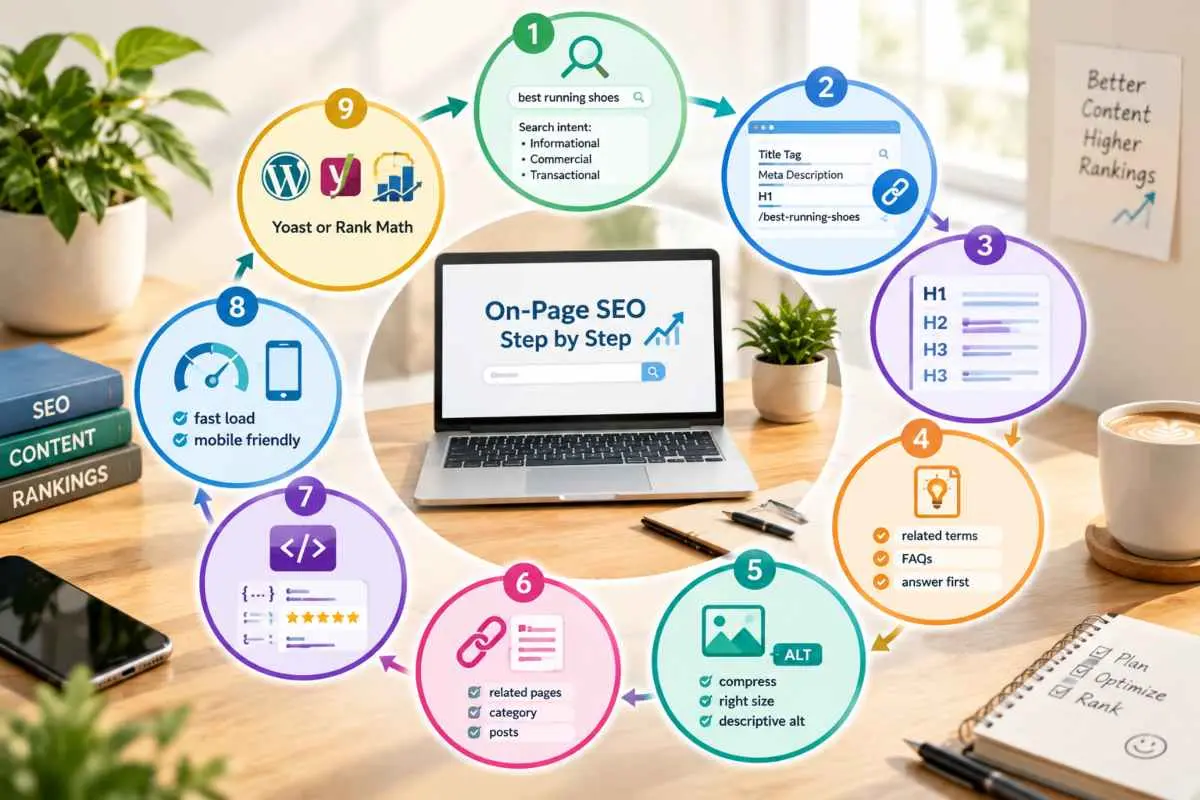
Step 1 Choose one primary keyword and match its intent
Choose the single phrase that best balances relevance to your page, real search demand and a difficulty level you can realistically compete at and make it the primary keyword for that page only. Keep the other phrases as supporting terms, because two pages chasing the same keyword end up competing with each other.
Then search the phrase yourself and study the first page of results. Notice whether the top pages are guides, lists, comparisons or product and service pages and how recent and detailed they are. If the results are all service pages and you’re writing a tutorial, the intent doesn’t match, so choose a different phrase or a different format. Finally, check your own site for an existing page that already targets the term, using Search Console’s query report, so you improve that page rather than create a rival.
Step 2 Fix the title, meta, H1 and URL
These four elements are the page’s headline signals, so settle them before touching the body. Write a title of about 50–60 characters with the primary keyword near the front, add a meta description of about 150 characters that states the benefit, make the H1 a clear statement of the same promise and shorten the URL to the few words that name the topic.
The URL is easy to overlook but may be worth the effort. A study of 5 million Google results by Top4 found that URLs containing a keyword had a 45% higher click-through rate than those without one. That is a correlation from a single dataset, so treat it as a nudge toward clear, descriptive URLs rather than a guarantee. If the page already has an established URL, leave it alone unless you add a 301 redirect.
Step 3 Structure the content with headings
Build the outline before you write, drawing each heading from a real question searchers ask. Use the related searches and “People also ask” boxes on the results page to find them, give each main question an H2 and use H3s for the points beneath it.
Read the headings alone, as if they were a table of contents. A stranger should be able to tell what the page covers and in what order. Keep headings specific rather than clever, work the primary keyword into a few of them where it fits and avoid skipping heading levels, which makes the structure harder for both readers and machines to follow.
Step 4 Add semantic terms and answer-first sections
Open every section with a one- or two-sentence direct answer, then add the detail, example or evidence that backs it up. This answer-first pattern serves skimming readers, featured snippets and AI systems that lift a single passage out of the page.
For semantic terms, gather the related words and questions that come up in top-ranking pages, the “People also ask” box and your own Search Console queries, then include the ones that genuinely belong. The aim is completeness, not repetition. If a point has already been made in an earlier section, link back to it instead of explaining it again.
Step 5 Optimize images
Choose images that add information, such as screenshots, diagrams or real examples, rather than decoration. Compress each one, save it in a modern format such as WebP or AVIF and give the file a descriptive name, like title-tag-example.webp rather than IMG_4021.webp.
Write alt text that plainly describes what the image shows and set the width and height so the layout doesn’t shift as it loads. Lazy-load images lower on the page, but leave the main image near the top unlazied so it appears quickly. Where it helps the reader, add a caption, since captions are read more often than body text.
Step 6 Add internal links
Add a few contextual links from the new page to related pages on your site and just as importantly, add links back to it from older pages on the same topic. Those links help search engines find the page, understand where it sits in your site and pass authority to it.
Use anchor text that describes the destination, such as “title tag guidelines” rather than “click here,” and place links where they help the reader at that moment. Three to five relevant links usually serve a long page better than a crowd of them. Finish by clicking each one to confirm it works and points to the right page.
Step 7 Add schema
Add schema by labeling the page with JSON-LD structured data that describes what is actually on it, then testing that the markup is valid. For a guide like this one, the usual set is Article (with the author and publish and update dates) organization and BreadcrumbList, plus FAQPage if the page carries a real Q&A block. Service and local pages use their own types, such as LocalBusiness or Service.
Choose the types first, then generate them with your SEO plugin or write the code by hand and mark up only content that visitors can see. Markup for information that isn’t on the page can cause the rich results to be withheld. Before publishing, check the page in Google’s Rich Results Test and the Schema Markup Validator and afterward watch the enhancement reports in Search Console for errors. Schema doesn’t raise rankings on its own, but it clarifies the page for search engines and AI systems.
Step 8 Check speed and mobile
Check speed and mobile by running the page through PageSpeed Insights, reading the real-user data before the lab test and then opening the page on an actual phone. Aim for a “Good” rating on all three Core Web Vitals, which cover loading, responsiveness and visual stability.
When something fails, the cause is usually one of a few familiar problems, oversized images, render-blocking scripts, heavy plugins or page-builder code, no reserved space for images and embeds or slow hosting. Fix the largest one first and retest rather than chasing every suggestion. On the phone, confirm that the text is readable without zooming, buttons are easily tapable, nothing scrolls sideways and no pop-up covers the content. Recheck after every major change, since a new plugin or script can undo earlier gains.
On-page SEO in WordPress (Yoast or Rank Math)
In WordPress, you do on-page SEO through an SEO plugin such as Yoast SEO or Rank Math, which adds fields for the title, meta description, focus keyword and schema, along with XML sitemaps and basic checks. The platform is worth knowing well, because W3Techs reports that about 42.6% of all websites run on WordPress.
Start with the core settings. Set permalinks to the post-name structure so URLs stay short, create default title and meta templates and decide which archives, such as tags and author pages, should stay out of the index to avoid thin duplicates. Then work through each page’s own fields, the focus keyword, title, description, headings in the block editor and alt text in the media library.
The two plugins overlap heavily, so the choice is mostly about workflow. Yoast’s free version analyzes one focus keyword per post and Rank Math includes a redirection manager in its free version, while Yoast keeps redirects in Premium. Feature sets change, so compare the current plans before you commit.
Whichever you pick, run only one SEO plugin at a time, since two will output duplicate tags and schema. And treat the green lights as guidance rather than a goal. A page can pass every check and still fail to answer the searcher.
On-Page SEO Techniques That Work in 2026
The on-page SEO techniques that work best in 2026 start with matching search intent, then cover a topic through related entities and questions, format sections as direct answers, refresh pages that are losing ground and connect related pages with internal links. Each one helps in traditional search and in AI-generated answers.
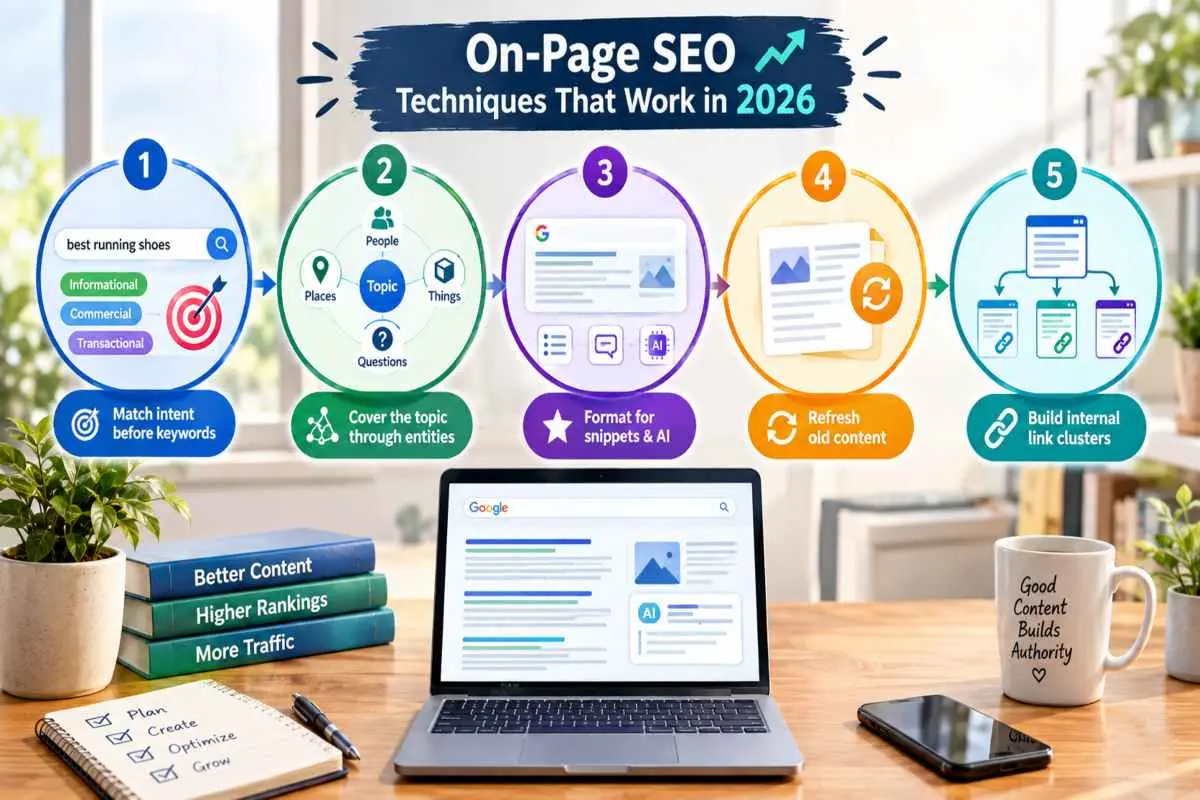
Match intent before keywords
Matching intent means deciding what the searcher wants to do, whether that is to learn, compare, buy or find something, before choosing words, then building the page in the format that satisfies it. The fastest check is the results page itself. If the top ten are all step-by-step guides, a sales page won’t compete, however well its keywords are placed.
Many queries mix intents, so decide on one primary format and let a short secondary section serve the rest. A guide can end with a brief note on when to hire help, for example, without turning into a service page. Intent also drifts as searchers and search features change, so recheck the results for your main terms every few months and adjust the page when the dominant format shifts.
Cover the topic through entities and related questions
Cover a topic by naming the main entities involved, meaning the concepts, tools, standards and terms that belong to it and by answering the questions searchers ask next. Search engines and AI systems build their understanding from these relationships rather than from isolated keywords and AI answers commonly break a question into smaller sub-questions before assembling a response.
To find them, collect the “People also ask” questions, related searches and the real queries already showing up in the Search Console for the page. Then answer each one under its own heading, with a definition, a comparison or an example rather than a restatement. Write for both spelling variants where it matters, such as optimization and optimisation and skip anything you can’t explain with substance. A shorter page that answers ten real questions well beats a longer one that repeats the same point.
Format for featured snippets and AI answers
To format for snippets and AI answers, place a concise, self-contained answer of about 40–60 words directly under a heading phrased like the question, then follow it with detail, a table for comparisons or numbered steps for processes. Ranking alone doesn’t secure a citation, since Ahrefs found that even pages ranking first appear among the top three AI Overview citations only about half the time. Clear, extractable passages give you a better chance.
Write each section so it makes sense on its own. Name the subject instead of saying “this” or “as mentioned above,” include dates and sources for factual claims and keep one idea per paragraph. If you’d like help applying this across your whole site, IT Leadz offers AI optimization services built around these formats.
Refresh old content
To refresh old content, find pages whose clicks or impressions are declining, rewrite the outdated or thin parts, update facts and examples and republish with an honest update date rather than just changing the date. HubSpot’s well-known program of this kind produced an average 106% increase in organic search views on refreshed posts, with monthly leads more than doubling. That was one company’s own results, so treat it as proof that refreshing can pay off rather than a promise of the same lift.
Start with pages that have strong impressions but weak clicks, since a better title and a clearer opening often help quickly. Merge posts that overlap so they stop competing and redirect the retired URL. Not every page deserves effort, so leave out pages with no search demand and no purpose.
Build internal link clusters
An internal link cluster is a group of related pages that link to one central, comprehensive page and to each other, which shows search engines the depth of your coverage and helps visitors move through a topic. You can build one from pages you already have, such as related blog posts and the relevant service page, without publishing anything new.
Pick the strongest page on the topic as the hub, link out from it to each related page with anchors that describe the destination and link each of those pages back to the hub and to one or two close neighbors. Make sure no two pages in the cluster target the same query or they will compete. Finally, run a crawl to catch orphan pages and broken links and add links from older posts whenever you publish or update something relevant.
On-Page SEO Checklist (Copy and Use)
An on-page SEO checklist is a repeatable list of checks you run on a page before it goes live, shortly after and on a regular schedule. The lists below follow that order, so you can copy them into your own workflow and tick items off page by page.
Before you publish
Before you publish, confirm that the page targets one clear keyword, answers the search intent and has every on-page element set. Running this list on every page prevents the most common problems, such as duplicate titles, missing alt text and pages with no internal links.
- Primary keyword chosen, with no other page on your site already targeting it
- Search intent confirmed by checking the format of the current top results
- Title tag of about 50–60 characters, unique, with the keyword near the front
- Meta description of about 150 characters that states the benefit
- One H1 that matches the title’s promise, with H2s and H3s in a logical order
- Direct answer in the first one or two sentences under each main heading
- Related terms and questions covered, with no keyword stuffing
- Short, descriptive URL with hyphens and no unnecessary words
- Images compressed, named clearly, given accurate alt text and set to fixed dimensions
- Three to five internal links added, using descriptive anchor text
- At least one link to a credible outside source for key facts
- Author name, bio and publish date visible
- Schema added and validated in Google’s Rich Results Test
- Page tested on a phone for readability, tap targets and loading speed
- Canonical tag set and page not accidentally marked noindex
After you publish
After you publish, make sure the page can be found and that nothing broke, then give it time before judging results. Search is slow and an Ahrefs analysis reported by Geeks for Growth found that only about 1.7% of newly published pages reach Google’s top 10 within a year, so early checks should focus on whether the page is working technically rather than on its rankings.
- Open the live URL and confirm the title, description, headings and images appear correctly
- Click every link on the page to check it works and goes to the right place
- Inspect URL in Google Search Console and request indexing if it isn’t already indexed
- Confirm the page appears in your XML sitemap
- Add links to the new page from two or three older, relevant pages
- Share the page where your audience will see it, such as email, social or your newsletter
- Check Search Console after two to four weeks for impressions, clicks and the queries bringing visitors
- Note which queries the page ranks for that you didn’t target and add sections for the strongest ones
Quarterly review
A quarterly review is a scheduled pass through your key pages to catch decay, conflicts and technical slippage before they cost you traffic. Every three months is enough for most sites and monthly works better for pages that drive leads.
- Export Search Console data and sort pages by clicks, then flag any with a clear decline
- Find pages with high impressions but low click-through rate and rewrite their titles and descriptions
- Look for pages competing for the same query, then merge or differentiate them
- Update outdated statistics, screenshots, examples and tool names and change the date only when you have genuinely updated the content
- Re-run PageSpeed Insights on your top pages and fix any Core Web Vitals that have slipped
- Crawl the site for broken links, redirect chains, missing titles and duplicate meta descriptions
- Add internal links from new content to older pages that should be supporting them
- Revalidate your schema and fix any errors reported in Search Console
- Check for pages that are thin, outdated and getting no traffic, then improve, merge or remove them
- Record what you changed and the date, so you can tell later which updates helped
On-Page SEO Examples (Before and After)
A good on-page SEO example turns a generic element into one that says exactly what the page offers, then repeats that same promise in the title, meta description, H1, URL and headings. The examples below cover a blog post, a UK local service page and a US software page. The businesses and offers are fictional and for illustration only and the character counts are in parentheses.
Title and meta rewrite
A better title and meta description state what the page delivers in plain words, in the right length, without repeating the keyword. Here is a before and after for a blog post about trail running shoes.
| Element | Before | After |
| Title | Running Shoes | Best Running Shoes | Buy Running Shoes Online | Stride Store (76) | How Should Trail Running Shoes Fit? A 2026 Buying Guide (55) |
| Meta description | Welcome to Stride Store! We sell running shoes, trail shoes, road shoes and much more. Browse our range today. (110) | Learn how trail running shoes should fit: toe room, heel hold, grip and cushioning explained, plus a quick test to run before you buy. Updated for 2026. (152) |
The “before” title repeats the keyword three times and runs well past the point where it would be cut off in results and the description says nothing a shopper could use. The rewrite fits the length, names the exact topic and phrases the title as the question the searcher is asking. In Top4’s study of 5 million Google results, titles phrased as questions had a 14.1% higher click-through rate than titles without a question. That is a correlation from one dataset, so use it as a hint rather than a rule.
H1, URL and heading cleanup
Cleaning up the H1, URL and headings means making each one specific, consistent with the title and readable on its own. Here is the same trail shoe post before and after.
| Element | Before | After |
| H1 | Welcome to Our Blog Post About Shoes | How Should Trail Running Shoes Fit? |
| URL | /blog/2026/10/post-4821?ref=nav | /how-should-trail-running-shoes-fit/ |
| H2s | Introduction / More Info / Conclusion | Why trail shoes fit differently from road shoes / How much room should you leave at the toe? / How do you test grip and cushioning? |
The “before” version tells neither a reader nor a search engine anything. The rewrite makes the H1 match the title’s promise, turns the URL into a readable phrase and replaces filler headings with real questions. Read the headings alone and you can follow the whole page, which is also what makes each section easy for an AI system to lift out.
Internal link anchor examples
Good anchor text describes the page being linked to, so both readers and search engines know what to expect before they click. Compare these weak anchors with better ones.
| Weak anchor | Better anchor | Why it works |
| click here | trail running shoe sizing guide | Names the destination |
| read more | how to measure your foot at home | States the benefit |
| this page | our trail shoe range | Describes what’s there |
| shoes (used for every link) | men’s trail running shoes | Specific, so links don’t blur together |
Work the anchor into a natural sentence, such as “Before you order, use our trail running shoe sizing guide to check your fit,” instead of dropping in a bare keyword. Vary the wording across the site so the links read like a person wrote them.
UK local business example
For a local service page, put the service and the place in the title, prove the business is legitimate and keep its details consistent everywhere they appear. Here is a fictional Leeds heating company whose homepage was trying to do everything.
| Element | Before | After |
| Title | Home | Northside Heating Ltd (28) | Boiler Repair in Leeds | Same-Day | Northside Heating (53) |
| Meta description | (none) | Gas Safe registered boiler repair in Leeds. Same-day callouts, fixed-price quotes and a 12-month repair guarantee. Call Northside Heating for a fast fix. (153) |
| H1 | Welcome to Northside Heating | Boiler Repair in Leeds |
| URL | /home-2/ | /boiler-repair-leeds/ |
On the page itself, show the Gas Safe registration number, list the districts covered and include opening hours and a UK phone number in international format. Add LocalBusiness schema and make sure the business name, address and phone number match the Google Business Profile exactly. Include real customer reviews with first names and areas and link to the page from the boiler servicing and installation pages using anchors like “boiler repair in Leeds.”
US SaaS or ecommerce example
For software pages, name the product category and the audience, then answer the questions buyers ask before they sign up. Here is a fictional invoicing tool that led with a slogan.
| Element | Before | After |
| Title | InvoiceLoop – Powerful Invoicing Platform (41) | Invoice Software for Freelancers | InvoiceLoop (46) |
| Meta description | (none) | Create professional invoices in minutes, track payments and get paid faster. Try InvoiceLoop free for 14 days, no credit card needed. (133) |
| H1 | The Future of Billing | Invoice Software Built for Freelancers |
The rewrite names what the product is and who it is for, which is how searchers phrase the query. Below the H1, add clear pricing, a short comparison with using spreadsheets, an FAQ, screenshots with descriptive alt text and SoftwareApplication schema that includes the offer. For an ecommerce product page, the same logic means writing your own product description instead of using the manufacturer’s copy, adding Product schema with price, availability and ratings and pointing size and color variants to one main URL with a canonical tag.
How to Check and Analyze On-Page SEO
To check on-page SEO, review the page’s visible elements by hand, confirm in Google Search Console that Google can index it and is showing it for the right queries and use SEO scores only as a rough to-do list. Together these tell you what to fix and whether the fixes worked.
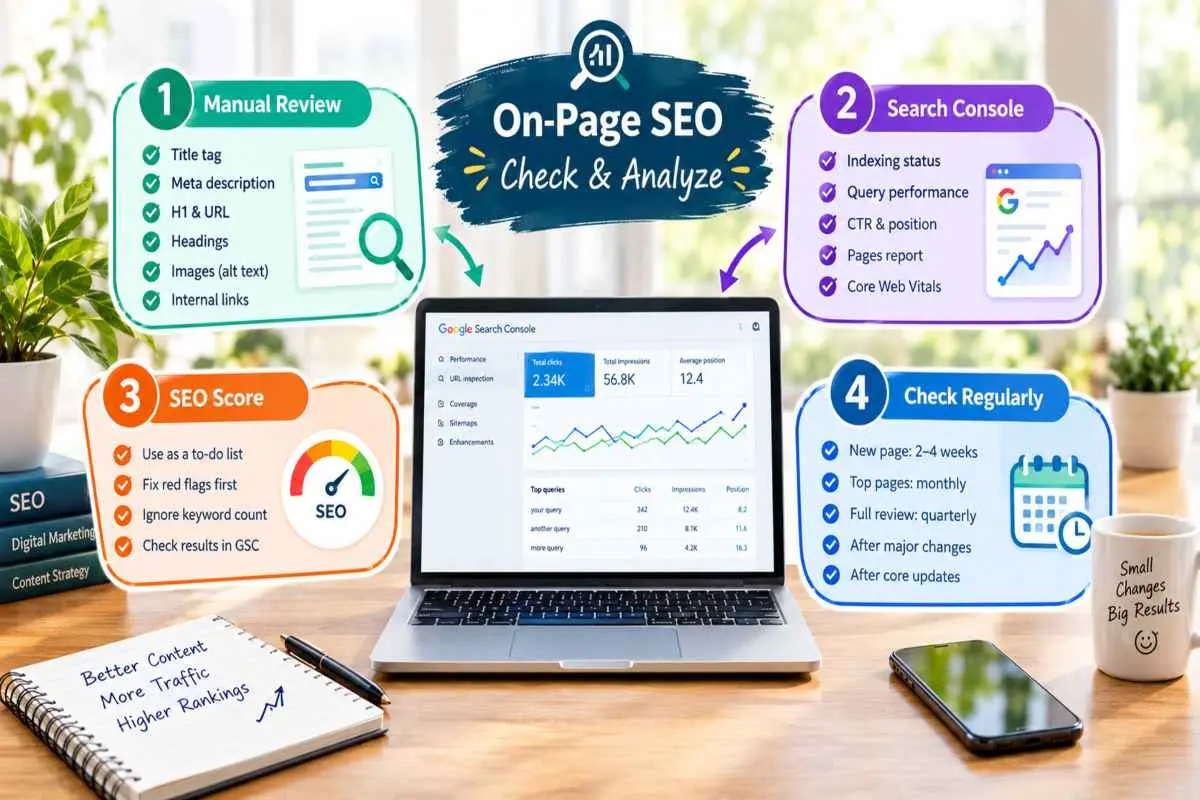
What to review manually
Review manually by opening the page and checking each element against its target. Start with the title tag, meta description, H1 and URL and confirm they agree on one topic. Then read the headings alone to see whether they form a clear outline, scan the opening lines under each one for a direct answer and check that images have descriptive alt text and the page has a few internal links.
Gaps are common even on strong pages. In Ahrefs’ study of 20,000 keywords, 25.02% of top-ranking pages had no meta description at all. Finish by viewing the page on a phone, clicking every link and viewing the page source to confirm the canonical tag points to the right URL and no stray noindex tag is present.
Using Google Search Console to find on-page problems
Search Console shows how Google actually treats a page, so start with the Performance report filtered to a single URL, using a clean address with no search operators in the filter. If the page shows no impressions at all, check indexing first with URL Inspection, since a page that isn’t indexed can’t appear for anything.
If it is indexed, sort its queries and look for patterns. Queries with high impressions but a low click-through rate usually point to a title or description that doesn’t match what searchers want. Queries averaging positions 8 to 20 are close enough that stronger headings, fuller answers and more internal links can lift them. Queries you never targeted suggest new sections worth adding and two of your pages appearing for the same query signals a conflict to resolve. Also check the Pages report for statuses such as “Crawled – currently not indexed” or duplicate canonical warnings and the Core Web Vitals report for slow templates.
How to read an on-page SEO score
An on-page SEO score is a rough summary of how many basic checks a page passes, such as whether it has a title, a keyword in the headings, alt text and enough links. It does not predict rankings and two tools can give the same page very different scores because each weights things differently.
Use the score as a to-do list, not a target. Fix red items on fundamentals first, like a missing title, a noindex tag or broken canonical and treat cosmetic items, such as an exact keyword-count suggestion, with caution. A page can reach a perfect score and still lose to one that answers the question better. Judge results by clicks, impressions, average position and conversions in Search Console and your analytics instead and compare your page against the ones that currently rank.
How often to check
Check a new page two to four weeks after publishing, review your top pages monthly and run a full on-page review every quarter. Add an immediate check whenever the site changes in a way that can affect many pages, such as a redesign, migration, theme change or major plugin update and take another look after a Google core update if your traffic moves sharply.
On-page checks work best as one part of a broader digital marketing routine, where you review search data alongside email, social and paid results in the same monthly report. Keep a short log of what you changed and when, so you can tell later which updates helped.
Common On-Page SEO Mistakes
The most common on-page SEO mistakes are stuffing keywords into the text, reusing the same titles and descriptions across pages, padding a page with thin or repeated sections and publishing the wrong type of page for the query. Each one is easy to spot and fix once you know what to look for.
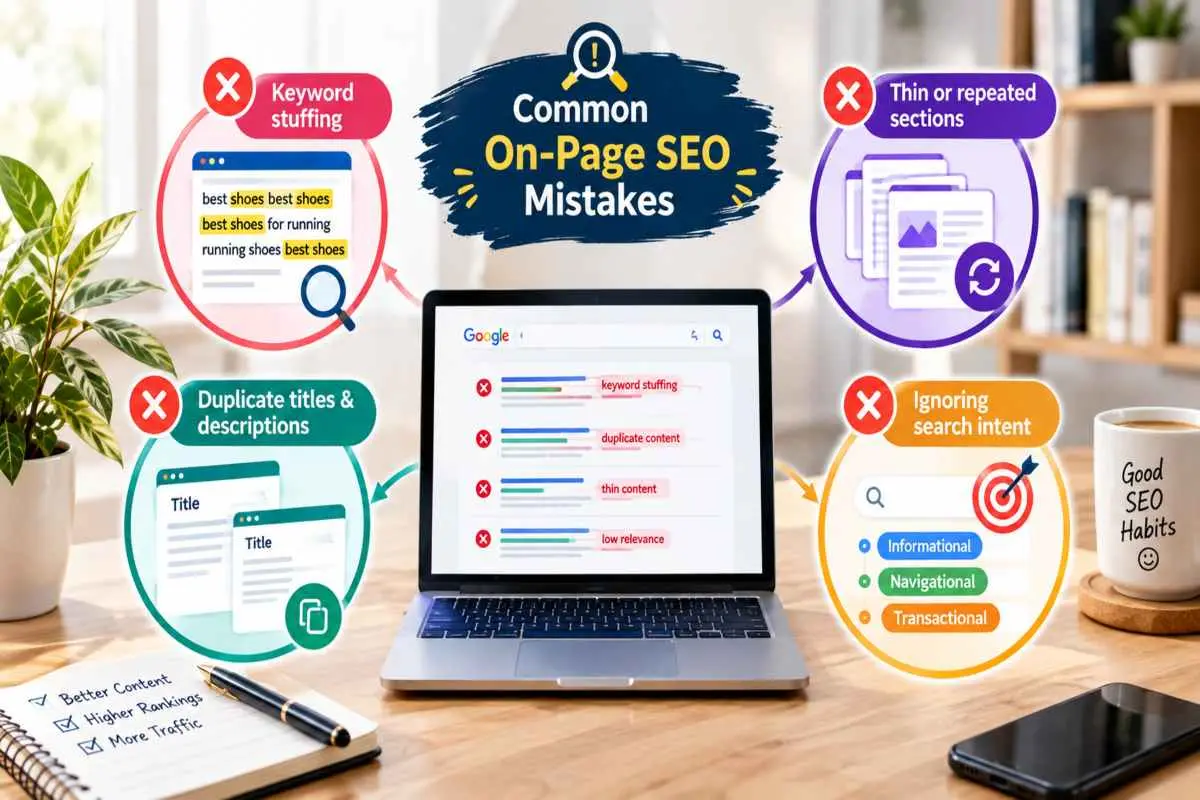
Keyword stuffing
Keyword stuffing is repeating a keyword so often or in such unnatural places, that the text reads as if it were written for a search engine. It makes pages tiresome to read and Google’s spam policies treat it as a violation, so it can hurt rather than help.
The fix is to write for the reader first. Use the primary keyword where it belongs naturally, such as the title, H1, opening paragraph and a few headings, then rely on synonyms, related terms and plain pronouns for the rest. Read the page aloud and if a phrase sounds odd when spoken, rewrite it. Avoid lists of keywords or locations tacked onto the end of a page and never hide text from visitors.
Duplicate titles and descriptions
Duplicate titles and descriptions give searchers and search engines no way to tell similar pages apart and they often lead Google to rewrite what you wrote. They are also very common. In a Semrush audit of 100,000 websites, duplicate title tags affected 35 percent of sites and duplicate meta descriptions affected 30 percent. The study is a few years old, so treat the exact rates as a sign of how widespread the problem is rather than a current benchmark.
To fix it, crawl your site and export every title and description, then sort for repeats. Give each page its own, based on what is unique about it. On large sites, set up templates in your CMS that combine the page name with a short brand tag and review the output rather than trusting it blindly. For filtered, sorted or paginated versions of the same page, use canonical tags so one version is the clear choice.
Thin or repeated sections
A thin section adds little a reader couldn’t guess and a repeated section restates the same point under a new heading. Both dilute a page and make it feel padded, which weakens its chances of being chosen over a more focused competitor.
Length is not the cure. Test each section by asking whether anything would be lost if it were deleted. If not, cut it or merge it into a stronger one. Where a section needs to exist, strengthen it with a specific example, a figure or a step the reader can use. Avoid repeating the same list under several headings and when a point is already covered elsewhere on the page, link to that section rather than explaining it again. The same applies across a site, near-identical pages that change only a city name or product name offer little to rank on.
Ignoring search intent
Ignoring search intent means publishing the wrong type of page for a query, such as a sales page for someone who wants a how-to or a broad overview for someone ready to compare options. A page like that can have perfect titles and clean headings and still fail, because it doesn’t match what the searcher came to do.
Before writing or rewriting, search the target phrase and study what already ranks. If the first page is full of step-by-step guides, write a guide. If it is full of product pages, build a product page. When a query mixes intents, lead with the dominant one and add a short section for the secondary one. Check again whenever rankings slide, since intent can shift over time as the results change.
How to Learn On-Page SEO (beginner path)
To learn on-page SEO as a beginner, start with how search engines read a page, then work through the core page elements one at a time on a real page of your own, using Google’s free documentation and a few trusted guides. Hands-on practice with Search Console teaches faster than reading alone.
The basics to learn first
Learn the basics in the order a search engine meets a page. First, understand how search works, a crawler finds your page, the page is indexed and it is then ranked against others for a query. Next, learn search intent and simple keyword research, so you know what people want before you write. Then learn the core elements one by one, title tag, meta description, headings, body copy, URL, images and internal links. Finish with page experience, meaning speed and mobile use and with measurement in Google Search Console.
Keep your expectations realistic. Google’s own starter guide says up front that it won’t reveal secrets that automatically rank a site and that framing helps, because on-page SEO is mostly about making a page clear, useful and easy to understand. Be wary of anyone promising tricks.
Practice as you go. Pick one page, record its clicks, impressions and average position in Search Console, then change one element at a time and give it a few weeks before you compare. Changing everything at once teaches you nothing about what worked.
Trusted free resources (Google Search Central, Moz and Backlinko)
Three free sources cover most of what a beginner needs and they work best in this order.
Google Search Central is the primary source, because it is Google’s own documentation. Start with the SEO Starter Guide, then read the pages on title links, snippets, structured data and page experience when you reach those topics. It states what Google recommends, so it should be your reference when other sources disagree.
Moz’s Beginner’s Guide to SEO is the best chapter-by-chapter introduction. It runs eight chapters covering how search engines work, keyword research, on-page SEO, technical SEO, link building and measurement. Read it straight through once for the big picture.
Backlinko publishes long, tactical guides with screenshots and worked examples, including a guide to on-page SEO. Use it once you know the basics and want to see techniques applied step by step.
Moz and Backlinko are both run by SEO software companies, so check any specific claim against Google’s documentation before you act on it. Alongside all three, set up a free Search Console account for your own site, since real data from your own pages will teach you more than any guide.
Conclusion
If you would rather have specialists fix your pages than work through this guide yourself, IT Leadz On-Page SEO Services cover the full process, auditing titles, headings, content, internal links, schema and page speed, then making the changes and tracking the results in Search Console. The company reports more than 10 years of experience and 300+ completed projects and it works with businesses in the US and UK. A good place to start is a free SEO audit, which shows which pages have the biggest gaps and what to fix first, with no commitment to go further.
Frequently Asked Questions (FAQs)
What is on-page SEO?
On-page SEO is optimizing a single web page’s content, HTML and structure so search engines understand it and people find it useful. It covers titles, headings, copy, images, internal links and page experience.
Why is on-page SEO important?
It tells search engines what a page is about, helps the page match search intent and makes the result worth clicking. Strong on-page work also supports backlinks and AI visibility, since both depend on a page being clear and useful.
What are the most important on-page SEO factors?
Content that matches search intent comes first, followed by the title tag, headings, internal links and page experience (speed and mobile use). Meta descriptions, URLs, image alt text, schema and trust signals such as a named author play supporting roles.
What is the difference between on-page, off-page and technical SEO?
On-page SEO improves what is on a page, off-page SEO builds authority through backlinks and mentions from other sites and technical SEO makes sure search engines can crawl, render and index your site. Together they cover relevance, authority and access.
How do I check my on-page SEO?
Review the title, meta description, headings, URL, images and links by hand, then use Google Search Console to confirm the page is indexed and see which queries it appears for. Treat SEO scores as a to-do list, not a ranking prediction.
Is it on-page SEO or in-page SEO?
“On-page SEO” is the correct, standard term. “In-page SEO” isn’t a recognized discipline and people who search for it usually mean on-page SEO. “Onpage SEO” and “on page SEO” are spelling variants of the same term.
How long does on-page SEO take to work?
Indexing changes can appear within days to a few weeks, but rankings usually take a few months to reflect on-page updates and longer for competitive keywords or brand-new pages. Check Search Console after two to four weeks, then compare again at three months.
Does on-page SEO matter for AI search?
Yes. AI systems quote pages they can parse easily, so answer-first sections, clear headings, structured data and credible sources improve your chances of being cited. Ranking helps, but it doesn’t guarantee a citation.