How to Track Brand Visibility in AI Mode?
You track AI visibility by running a fixed set of customer style prompts across ChatGPT, Gemini, Perplexity, Google AI Overviews and AI Mode on a regular schedule, then recording whether your brand is mentioned, cited or recommended. Compare those results against competitors over time and connect them to traffic and leads.
Search no longer ends with a list of ten blue links. A growing share of questions are now answered directly by ChatGPT, Gemini, Perplexity, Google AI Overviews and Google AI Mode and the brands named in those answers collect attention that never shows up as a ranking position. If your reporting still stops at keyword rankings and organic sessions, you are missing the layer where buying decisions are increasingly shaped.
- AI search visibility measures how often AI answer engines mention, cite or recommend your brand, which is separate from where your pages rank in a list of links.
- Reliable tracking needs a fixed prompt set, repeated runs and a record of mentions, citations, sentiment and competitors.
- Mention rate, citation rate and share of voice are the core metrics and results should be reviewed monthly because AI answers shift between runs.
- Tracking only pays off when findings feed back into content, entity signals and ai optimization work.
The clearest evidence comes from Pew Research Center. In its analysis of browsing data from 900 US adults, users clicked a traditional result in 8% of visits when Google showed an AI summary, compared with 15% when it did not. Only about 1% of visits included a click on a link inside the summary itself. In practice, the answer often is the whole visit, which means the real contest is whether your brand appears inside it.
That is what AI search visibility describes, how frequently, how prominently and how accurately AI answer engines mention, cite or recommend your brand when people ask questions in your category. It behaves differently from classic SEO visibility. Answers can change from one run to the next, differ by platform and vary by country, so a single screenshot proves very little. Meaningful tracking is closer to structured sampling than to checking a rank.
This guide shows you how to do that sampling properly. You will learn what AI visibility is and why it matters, which metrics are worth reporting and a step by step method for tracking brand mentions across each major engine, including Google AI Mode. It also covers how to compare tracking tools, how to judge whether their data is accurate and how to turn what you find into improvements. Examples reflect how UK and US audiences search, since the same prompt can return different brands on each side of the Atlantic.
Each section is written to stand on its own, so you can read the full guide from start to finish or jump straight to the part you need.
What Is AI Search Visibility?
AI search visibility is the degree to which AI answer engines such as ChatGPT, Gemini, Perplexity, Microsoft Copilot and Google AI Overviews mention, cite or recommend your brand when someone asks a question in your category. It is measured across many prompts and many runs, not by a single ranking position. A brand with strong AI visibility shows up repeatedly, accurately and favourably in the answers its buyers actually read.
AI visibility vs traditional search visibility
Traditional search visibility describes where your pages rank in a list of links, while AI visibility describes whether your brand appears inside a generated answer. In classic SEO, position one is a fixed, checkable result for a given keyword and location. In AI search there is no stable position to check. The same prompt can return a different set of brands from one run to the next and the answer may name your company without ever linking to your site.
The two are connected, but they are not the same. Strong rankings often help, because many engines draw on indexed web content, yet a page can rank well and be ignored in AI answers or the reverse. That is why rank trackers alone cannot tell you how you are performing here. You need to measure presence in the answer itself, which is the focus of the rest of this guide and of any serious plan for How to Rank on AI Search Engines.
How ChatGPT, Gemini, Perplexity, Copilot and Google AI Overviews decide who gets mentioned
Each engine combines what it has learned in training with what it retrieves from the web and the balance differs by platform. Treat the following as a practical summary rather than a published formula, because none of these companies discloses its exact ranking logic.
Perplexity retrieves live web sources for most queries and shows its citations prominently, so pages that are crawlable, clearly written and well supported tend to surface. ChatGPT can answer from its training knowledge or, when search is used, pull in current web results, which means long established brand signals and fresh, citable pages both matter. Copilot is closely tied to Bing’s index, while Gemini and Google AI Overviews build on Google’s own index and knowledge systems, which favours sites that already perform well in Google and have clear entity signals.
Across all of them, a few signals repeat: content that answers the question plainly, a brand that is described consistently across trusted third party sites and pages the engine can access and parse. Source preferences are also uneven. Pew Research found that Wikipedia, YouTube and Reddit together accounted for 15% of the sources cited in Google AI summaries, which shows how heavily these systems lean on a small group of familiar, high trust platforms. Being present on sites like these, not only on your own domain, improves your odds of being mentioned.
Mentions vs citations vs recommendations
A mention is your brand name appearing in an answer, a citation is a source link or attribution pointing to your content and a recommendation is the engine actively suggesting you as a good choice. They are different outcomes and should be tracked separately.
A mention builds awareness but gives the reader no path to you. A citation sends credit and sometimes traffic, to a specific page and signals that the engine trusts your content as evidence. A recommendation is the most valuable, since it places your brand on a shortlist at the moment of decision, for example when someone asks which provider to choose. A brand can be mentioned without being cited or cited without being recommended, so a report that lumps them together will hide real gaps. Measuring all three gives you a clearer view of where you are known, where you are trusted and where you are actually being chosen.
Why You Should Track AI Brand Visibility
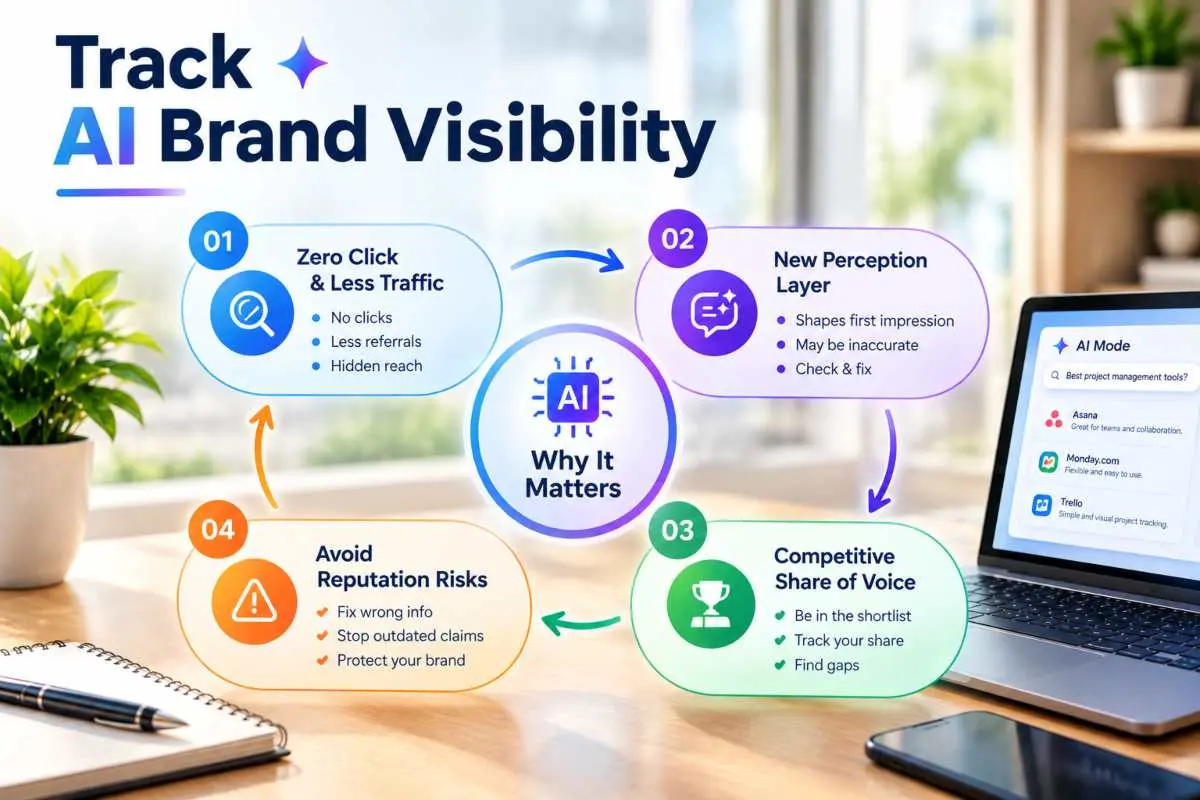
You should track AI brand visibility because AI answers now shape what buyers believe and shortlist before they ever visit a website and traditional analytics cannot see that influence. Without tracking, you cannot tell whether engines mention you, how they describe you or whether competitors are being recommended in your place.
Zero click search and shrinking referral traffic
Tracking matters first because a growing share of searches end without a click, so website traffic alone no longer reflects how much of your market you actually reach. Pew Research Center found that around two thirds of Google searches in its study ended with no click on any link, whether or not an AI summary appeared and users were more likely to end their session entirely after seeing one. When the answer is delivered on the results page or inside a chat window, the visit that used to happen simply does not.
This creates a reporting blind spot. Your organic sessions can slip while your brand is still being named or hold steady while competitors quietly take the mentions that feed future demand. Referral numbers will not tell you which is happening. Only direct measurement of AI answers shows whether you are present where the decision is increasingly being made.
AI answers as a new brand perception layer
AI answers act as a perception layer because they summarise your brand in a few sentences that many people accept without checking further. When someone asks an assistant what your company does, who it is for or whether it is any good, the reply becomes their first impression and it is built from whatever the engine has gathered about you across the web.
That summary may not match your own messaging. It might describe an old service line, place you in the wrong category or repeat a complaint from years ago. Because it is delivered in a confident, neutral voice, readers tend to trust it. Tracking lets you read these descriptions the way a prospect would, spot where the story differs from the one you want told and fix the sources behind it. Closing those gaps is a core part of learning how to do answer engine optimization.
Competitive share of voice in AI answers
Share of voice in AI answers is the proportion of relevant responses in which your brand appears compared with your competitors and tracking it shows who is winning the shortlist. Many buying questions are comparison prompts, such as which provider to choose or which option suits a particular need. AI engines typically name only a handful of brands in response, so each slot is valuable.
Unlike a search results page, an AI answer has no page two. If a competitor is consistently named and you are not, you lose consideration before the buyer has visited a single site. Measuring share of voice across a fixed prompt set also gives you a baseline, so you can see whether new content, mentions and fixes actually move you up and which rivals are gaining ground in specific topics or markets.
Risks of not monitoring (inaccurate or outdated brand info)
The main risk of not monitoring is that AI engines may repeat wrong, stale or unflattering information about your brand and you will not know until a customer raises it. Models can surface discontinued products, old pricing, a previous address or leadership team or confuse you with a similarly named business. They can also invent details that sound plausible, a failure commonly called hallucination.
These errors compound quietly. A prospect who reads an outdated claim may rule you out without telling you and a mistake repeated across several engines becomes harder to dislodge the longer it stands. Regular checks catch problems early, show which sources are feeding the error and give you evidence to correct it through updated pages, consistent profiles and clearer on site facts. In short, monitoring turns an invisible reputation risk into a routine maintenance task.
The AI Visibility Metrics That Matter
The AI visibility metrics that matter most are brand mention rate, citation rate, share of voice, sentiment and accuracy, prompt and platform coverage and the traffic and conversions that AI answers influence. Together they show whether you appear, whether you are trusted, whether you are described correctly and whether any of it affects revenue. Track them as percentages across many runs, not as single results.
Brand mention rate and citation rate
Brand mention rate is the percentage of tracked AI responses that name your brand and citation rate is the percentage that link to or attribute your content as a source. These are the foundation metrics because every other measure builds on them. If you are not mentioned or cited, there is nothing to evaluate for sentiment or position.
Calculate both against a fixed prompt set: divide the number of responses containing your brand (or a source link to your domain) by the total responses collected. Keep them separate, since a brand can be named often yet rarely cited, which suggests awareness without content authority. Break them down by prompt type as well. Your mention rate on branded questions will usually be high, so the figure that reveals real strength is your rate on unbranded category and comparison prompts, where buyers have not yet decided.
Share of voice and average position in AI answers
Share of voice is the proportion of relevant AI responses in which you appear compared with your competitors and it is a more dependable signal than average position. Position is the order in which a brand is listed inside an answer and it is far less stable than most reports suggest. SparkToro and Gumshoe.ai asked ChatGPT, Claude and Google’s AI the same brand recommendation prompts across nearly 3,000 runs and found less than a one in 100 chance of getting the same list twice and closer to one in 1,000 of getting the same list in the same order.
The practical lesson is to report how often you appear relative to rivals, not where you landed in one response. Calculate share of voice by counting total brand mentions across your prompt set and expressing yours as a percentage of the combined total. Use position only as a secondary indicator, averaged over many runs and never as a headline number.
Sentiment and accuracy of mentions
Sentiment measures whether AI answers describe your brand positively, neutrally or negatively, while accuracy measures whether the facts in those descriptions are correct. A mention is only valuable if it helps you, so each one should be scored on both dimensions.
For sentiment, classify the language around your brand and note recurring phrases, such as repeated praise for a strength or a persistent complaint. For accuracy, check specifics against your current reality: services offered, locations served, pricing approach, leadership and positioning. Report the share of mentions that are accurate and flag errors individually, because a single wrong claim repeated across engines can do more damage than a lower mention rate. These two scores also tell you what to fix, since they point back to the pages and third party sources the engines appear to be drawing on.
Prompt coverage and platform coverage
Prompt coverage is the share of your priority questions for which you appear at least occasionally and platform coverage is the number of AI engines on which you appear. Both guard against a misleading average. You might be strong on one engine and invisible on another or dominant on a handful of easy prompts while missing the high intent questions that drive enquiries.
Build the prompt set around the buying journey: problem aware questions, category and “best option” questions, comparisons and branded checks. Then report coverage as a grid of prompts against platforms, so gaps are obvious at a glance. Where your market spans the UK and US, include location specific prompt variants, since the brands named can differ between the two. Coverage metrics tell you where to invest next, while mention rate tells you how well you are doing where you already appear.
AI referral traffic and assisted conversions
AI referral traffic is the number of visits that arrive from AI platforms and assisted conversions are the leads or sales that AI exposure helped influence without producing the final click. These connect visibility to business results, but they only capture part of the picture because many AI influenced journeys are invisible to analytics.
In your analytics tool, segment sessions by referrers such as chatgpt.com, perplexity.ai, gemini.google.com and copilot.microsoft.com and watch conversion rate and engagement for those visits. Add a “how did you hear about us” field to forms and note any growth in branded search or direct traffic that follows improvements in AI visibility. Treat these numbers as directional evidence rather than complete attribution. A rise in mentions alongside rising branded demand is a stronger case than referral clicks alone.
Success benchmarks and reporting cadence
Success benchmarks should come from your own baseline and your closest competitors, not from industry averages, because AI answer patterns vary widely by category and market. Run an initial measurement across your full prompt set, then set targets as relative improvements, such as a higher mention rate on unbranded prompts or a larger share of voice against two or three named rivals.
Because individual answers fluctuate, repeat each prompt multiple times before treating any number as real and avoid reacting to one off changes. A sensible rhythm is light weekly spot checks to catch obvious errors, a full measurement run and report each month and a deeper review each quarter that links visibility trends to traffic, enquiries and the content changes you have made. Keep the method identical between periods, including prompts, engines, locations and run counts, so that any movement reflects real change rather than a shift in how you measured.
How to Track AI Search Visibility, Step by Step
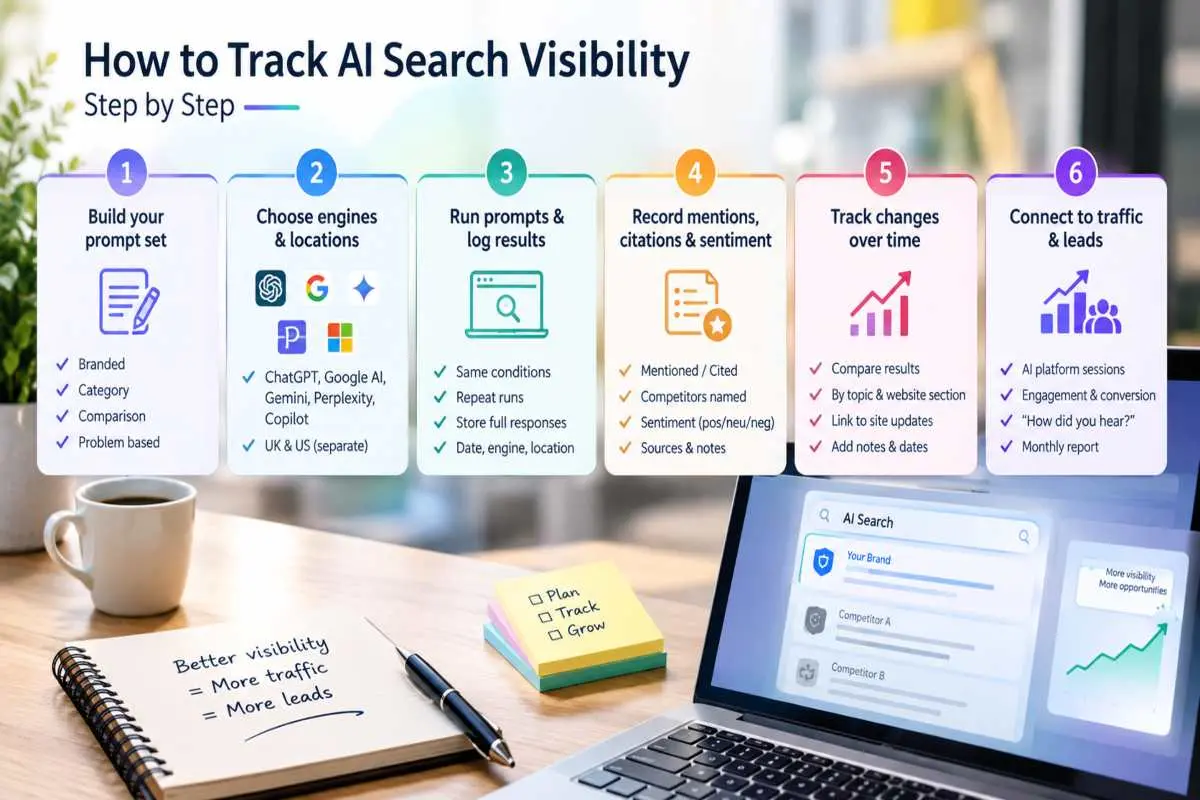
To track AI search visibility, build a fixed set of realistic customer prompts, run them across the AI engines and locations that matter to you, log every answer in a consistent format and compare the results month by month. Then tie the changes to traffic and leads. The six steps below turn that into a repeatable process that a small team can run without specialist software.
Step 1: Build your prompt set (branded, category, comparison, problem based)
Start by writing 30 to 50 prompts that mirror how real buyers ask questions, split into four types. Branded prompts name your company directly, such as “What does [your brand] do?” or “Is [your brand] any good?” Category prompts ask for options without naming anyone, like “best [service] providers for small businesses.” Comparison prompts set you against alternatives, for example “[your brand] vs [competitor].” Problem based prompts describe a need or frustration without mentioning a solution, such as “how do I get found in AI search results?”
Weight the set towards unbranded and problem based prompts, because those show whether engines introduce you to people who do not know you yet. Draw wording from sales calls, support tickets, Search Console queries and the “people also ask” boxes on Google. Write each prompt the way a person would type it, in plain language and lock the list once it is agreed, because changing the wording later breaks your ability to compare results over time.
Step 2: Choose engines and locations (UK vs US variations)
Choose the engines your buyers actually use, then decide which countries you need to measure separately. A sensible starting group is ChatGPT, Google AI Overviews and AI Mode, Gemini, Perplexity and Microsoft Copilot, trimmed or extended depending on your audience. B2B buyers often lean on ChatGPT and Copilot, while consumer research tends to flow through Google.
Location matters because the same prompt can return different brands, sources and spellings in the UK and the US. Run each market’s prompts from that country, using a VPN or location settings where needed and phrase them naturally for that audience, for example “organisation” and “optimisation” for UK prompts and the American spellings for US ones. Where you serve both markets, treat them as two separate datasets rather than blending them, otherwise a strong result in one can hide a weak one in the other.
Step 3: Run prompts consistently and log results
Run every prompt on every chosen engine several times, using the same conditions each round and record each response as it appears. Consistency matters more than volume at the start, so fix the day of the week, use a clean or logged out session where possible and avoid carrying over earlier conversation context, which can bias the answer.
Repetition is essential because AI answers change from run to run. SparkToro and Gumshoe.ai reported that brand visibility percentages looked statistically meaningful once they were measured across roughly 60 to 100 runs, even though individual answers varied widely. You do not need that many on day one, but the more runs you collect per prompt, the less a lucky or unlucky result will distort your picture. Store the full response text, date, engine, location and prompt in a spreadsheet or database so you can revisit the evidence later.
Step 4: Record mentions, citations, competitors and sentiment
For each logged response, record whether your brand was mentioned, whether your site or content was cited, which competitors appeared and how your brand was described. Use simple fixed fields: mentioned yes or no, cited yes or no, competitors named, sentiment as positive, neutral or negative and an accuracy flag for any incorrect statement.
Also capture the sources an engine cites, even when they are not yours. These show which review sites, directories, forums and publications are shaping answers in your category and they become a ready list of places where your brand needs a stronger presence. Keep a short notes column for anything unusual, such as a wrong service description or a competitor appearing where you expected to. Having a person review a sample of the scoring helps catch automated misreads.
Step 5: Track changes over time and per website section
Compare each round of results against the previous one and against your first baseline and break the data down by topic and by the section of your website that supports it. A single overall score hides what is happening, so group prompts by theme, such as services, pricing, locations or industries and match each group to the pages meant to win it.
This lets you see cause and effect. If you publish or update a guide and mention rate on the related prompts rises a month later, that is evidence the work helped. If a section stays flat, look at whether the page answers the question plainly, is easy to crawl and is supported by third party mentions. Annotate your tracking sheet with dates of site changes, launches and press coverage so that movements in the data can be explained rather than guessed at.
Step 6: Connect visibility to traffic and leads
Finish by linking visibility trends to business outcomes, so the tracking earns its keep. In your analytics, segment sessions from AI platforms and compare their engagement and conversion rates with other channels. Add a “how did you hear about us” question to enquiry forms and look for movement in branded search and direct visits following periods of improved visibility.
Attribution will be imperfect, since many people read an AI answer, remember a brand name and search for it later. Treat the evidence as a pattern rather than a precise count: rising mentions on high intent prompts, followed by more branded searches and enquiries, is a credible story. Summarise this in a short monthly report that pairs the visibility metrics with traffic and lead numbers and use it to decide where to publish, update or earn mentions next.
How to Track Brand Mentions in ChatGPT, Gemini and Perplexity
To track brand mentions in ChatGPT, Gemini and Perplexity, run the same set of customer style prompts on each engine, record whether your brand is named or cited and repeat the process on a schedule. Each platform behaves differently, so the method for reading the results changes slightly from one to the next, as the sections below explain.
Checking brand visibility in ChatGPT (manual vs automated)
You can check brand visibility in ChatGPT either by entering prompts yourself and logging the answers or by using software that runs prompts on your behalf at scale. Manual checking is free and useful for a first baseline, while automation becomes worthwhile once you need many prompts, repeated runs and regular reporting.
The scale of the audience explains why this engine deserves attention first: OpenAI has reported more than 900 million weekly active users for ChatGPT as of early 2026. For a manual check, open a fresh, logged out or clean session, enter each prompt exactly as written in your prompt set and note whether your brand appears, how it is described and which competitors share the answer. Test with search switched on and off, because answers drawn from training knowledge can differ from those built on live web results.
Manual work breaks down quickly. Answers vary between runs, so one check proves little and a set of 40 prompts repeated several times is hours of copying and pasting. Automated tools solve this by running prompts repeatedly, storing the responses and calculating mention rates and trends. Whichever route you take, keep the prompts, settings and timing identical between rounds so that changes reflect real movement and not a change in method.
Tracking brand mentions in Gemini
To track brand mentions in Gemini, prompt the Gemini app with your standard question set and log whether your brand is named, then separately check the Google surfaces that use Gemini powered answers. Because Gemini sits close to Google’s index and knowledge systems, your standing in classic search and your entity signals tend to influence what it says.
Start by running the same prompts used for ChatGPT, signed in and signed out if your audience includes both kinds of users and record the wording used about your brand. Pay attention to how Gemini describes your company’s category, location and services, since entity information such as a consistent business name, a complete Google Business Profile and clear structured data feeds these summaries. Where Gemini cites or links to sources, note which pages appear. Also spot check the same queries in Google AI Overviews and AI Mode, as results across these Google surfaces can differ even for near identical questions.
Tracking Perplexity citations
Perplexity is the easiest major engine to audit for sources, because it retrieves live web pages for most queries and displays numbered citations beside its answer. Tracking it means recording both whether your brand is mentioned in the text and whether your own pages appear in the source list.
Run each prompt, then capture the full list of cited URLs, noting which belong to you, which belong to competitors and which come from third party sites such as review platforms, directories, news outlets and forums. The third party sources are especially valuable, since they show where Perplexity looks for evidence in your category and therefore where your brand needs a stronger presence.
Perplexity also lets you narrow results by source type, so repeat important prompts in different modes to see how the citations change. Log citation counts per domain over time and watch for pages of yours that earn citations repeatedly, because they reveal what format and depth of content the engine trusts.
Tracking Microsoft Copilot and other engines
Copilot, Claude, Meta AI, Grok and similar assistants can be tracked with the same method: run the standard prompt set, log mentions, citations, competitors and sentiment and compare results to your other engines. You do not need to monitor every platform equally, so prioritise by where your customers actually spend time.
Microsoft Copilot is worth including for business audiences, as it is built into Windows, Edge and Microsoft 365 and draws on Bing’s index, so improving your Bing visibility and ensuring your site is indexed there can help.
For the remaining assistants, run a smaller subset of high intent prompts each month and add an engine to your full tracking set once it shows up in your analytics referrals or customer conversations. If you would rather not build and maintain this process in house, specialist geo services can handle prompt design, multi engine monitoring and reporting, leaving your team to act on the findings.
How to Track Visibility in Google AI Overviews
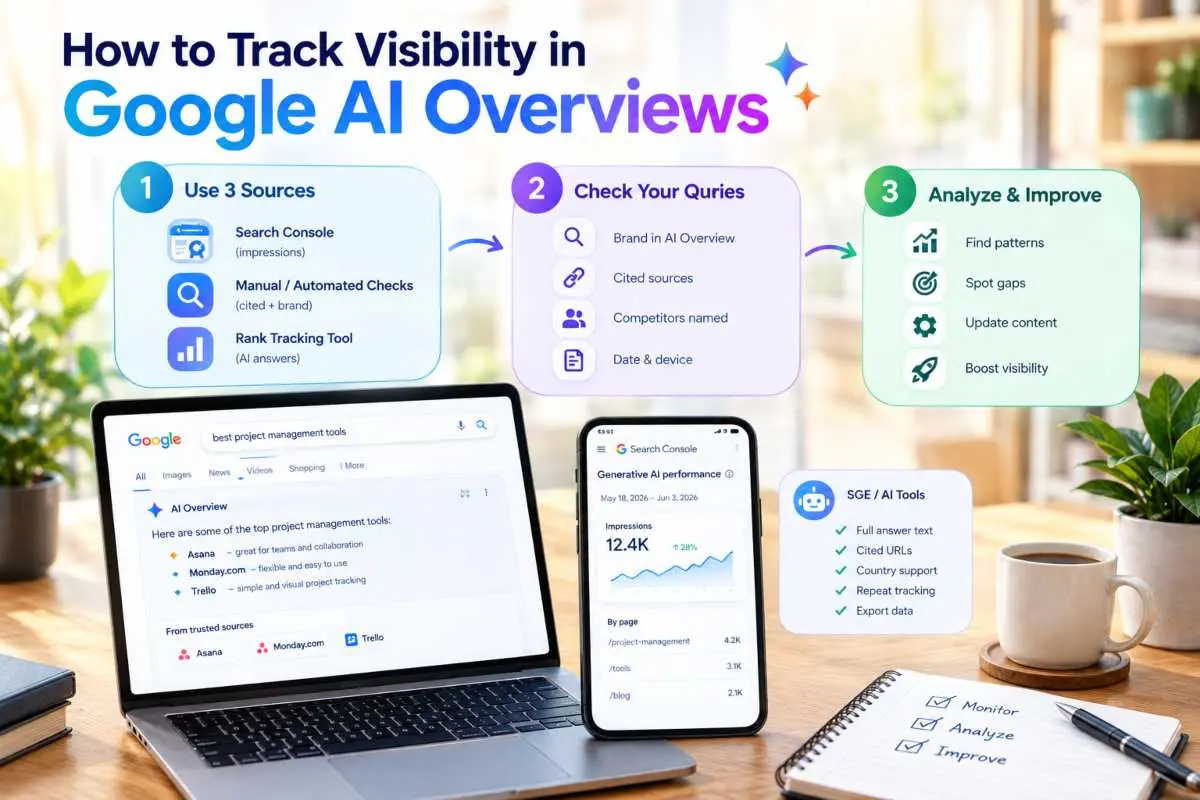
To track visibility in Google AI Overviews, combine three sources: Search Console’s generative AI reporting for impressions, regular manual or automated checks of your priority queries to see who is cited and a rank tracking tool that records AI answers. No single source gives the full picture, so using all three shows both how often you appear and what the answer actually says.
Detecting when your pages appear in AI Overviews
The most direct way to detect an appearance is to search your priority queries and look for your brand or URL in the AI Overview and its source links. Do this from the right country, in a clean browser session and repeat it, because Overviews do not appear for every query and can change between checks.
Build a list of the questions your buyers ask, especially longer, conversational ones, since Google has said AI Mode queries average about three times the length of traditional searches. For each query, record whether an Overview shows, whether your page is among the cited sources, which competitors are named and what the summary says about your topic.
Note the date and device, as results can differ on mobile and desktop. A page that holds a strong organic ranking but never appears in the Overview is a useful finding, because it points to a content gap, such as an answer that is buried, vague or missing, rather than a ranking problem. Over a few weeks, this log shows which pages earn citations repeatedly and which never do.
What Search Console does and doesn’t show
Search Console now offers dedicated generative AI performance reports, but they show impressions only, with no click or query data. Google launched them on 3 June 2026 for Search, covering AI Overviews and AI Mode together and for Discover, with data starting from 18 May 2026. They break impressions down by page, country and device, so you can see which URLs are surfacing in AI features and where.
Several limits matter when you read them. Because AI Overviews and AI Mode are combined in the Search view, you cannot report a figure as an AI Overviews number alone. Without clicks or queries, the reports cannot tell you whether an appearance drove a visit or which question triggered it.
Availability has also been rolling out in stages, so confirm that the report appears in your own property before building a process around it. These same impressions also remain counted inside your main Performance report under the Web search type, so existing totals are not removed. Treat Search Console as proof that you are being shown and pair it with your own query checks to understand context.
SGE style answer monitoring and rank tracker support
Dedicated monitoring tools fill the gap by running your queries on a schedule and storing the AI generated answer, the cited sources and your brand’s presence. The label “SGE” comes from Google’s earlier Search Generative Experience, which was the name for what is now called AI Overviews and many tools still use that term for the feature.
When you compare options, check whether the tool captures the full text of the Overview, lists every cited URL, supports the countries you target, lets you track the same query repeatedly and exports data you can analyse. Several mainstream SEO rank trackers now flag whether a query triggers an Overview and whether your domain is cited, which suits teams that want AI data inside existing reports.
Specialist AI visibility platforms go further on prompts, platforms and sentiment. Whichever you choose, validate it first by spot checking a sample of its results against what you see in a live search, since AI features change often and tools can lag behind. Teams that want the findings turned into content and technical fixes can pair monitoring with answer engine optimization support so that tracking leads to action.
How to Track Google AI Mode Rankings
To track Google AI Mode rankings, record whether your brand or pages appear in AI Mode answers for a fixed set of queries, which links are cited and how often that happens across repeated runs. AI Mode has no fixed ranking positions like a results page, so “rank” here means inclusion and citation frequency, supported by Search Console impressions and, where needed, a dedicated tracker.
How AI Mode differs from classic rankings
AI Mode differs from classic rankings because it generates a conversational answer from several sources instead of listing ten links in a fixed order. There is no stable position one to monitor. The answer changes with the exact wording, the follow up questions asked and the person’s context, so two people can see different sources for the same topic.
This matters because the audience is large and growing. Google said at I/O 2026 that AI Mode has passed one billion monthly users, so even a small share of visibility is significant. Queries are also longer and more conversational than traditional keywords and users can continue the conversation, which means a single topic can produce a chain of related answers. Your tracking therefore has to follow topics and question families rather than one keyword and one position. A page ranking first in classic results may not be cited in AI Mode, while a lower ranking page with a clear, well structured answer might be, so classic rank trackers alone will miss what is happening.
Free vs paid AI Mode rank trackers
Free methods are enough to start an AI Mode rank tracking routine and paid trackers become worthwhile when you need volume, repetition and history. The right choice depends on how many queries you track and how often you need to check them.
The free route has two parts. Search Console now includes generative AI performance reporting, which gives impressions by page, country and device for AI Overviews and AI Mode combined, but no clicks or queries, so it confirms you are being shown without explaining why. Alongside it, you can search your priority questions in AI Mode yourself and log the cited sources in a spreadsheet. This costs only time and it breaks down once you pass a few dozen queries or need repeated runs.
Paid trackers automate that work. They run your queries on a schedule, store the full answer and its cited links, record whether your domain appears and chart changes over time, often across several countries. When comparing them, check that they capture AI Mode specifically and not only AI Overviews, support the markets you serve, keep historical data, export results and show how they collect responses. Test any tool by comparing a sample of its output with live results before you rely on it, because this is a fast changing area and tools can lag behind product updates.
What to measure in AI Mode (inclusion, citations, position)
The three things to measure in AI Mode are inclusion, citations and position and they should be reported as frequencies over many runs, not as single observations. Inclusion is whether your brand is named in the answer, citations are whether your pages appear among the linked sources and position is where in the response or source list you appear.
Inclusion tells you whether you are part of the conversation for a topic, so calculate the percentage of runs in which you are mentioned. Citation tells you whether Google trusts your content as evidence, so track which URLs are linked and how often and note competitors cited on the same queries.
Position is the least reliable of the three. SparkToro and Gumshoe.ai found that AI tools, including Google’s AI features, almost never repeat the same brand list or order across repeated runs, which suggests that appearing often matters more than appearing first. Record position as a rough indicator, such as whether you appear early or late in the answer and weight it far below inclusion and citation rate. Finally, group results by topic and market, since UK and US users may see different sources for the same question.
AI Visibility Tracking Tools and Checkers Compared
AI visibility tracking tools fall into four groups: manual spreadsheets, free checkers, dedicated AI monitoring platforms and add ons inside classic SEO suites. The right one depends on how many prompts you track, how often you need results and how much history you want. Most teams start free, then move to a paid platform once manual work becomes the bottleneck.
Manual tracking (spreadsheet method)
Manual tracking means running your prompts by hand on each AI engine and logging the answers in a spreadsheet. It is the cheapest option, it needs no tool approval and it teaches you what AI answers actually look like for your category before you pay for anything.
A workable sheet has one row per response, with columns for the date, engine, country, prompt, whether your brand was mentioned, whether your site was cited, competitors named, sentiment and any inaccurate claims. Add a column for the full response text so you can recheck scoring later.
The method suits a small prompt set of 20 to 30 questions checked monthly. Its weaknesses appear quickly: it is slow, answers vary from run to run so one check proves little and different people phrase or score things differently. If you stay manual, write down your scoring rules and have one person do the logging, so the data stays comparable from month to month.
Free AI visibility checkers
Free AI visibility checkers are lightweight web tools that test a brand or domain against a few prompts and return a quick snapshot of whether AI engines mention it. They are useful for a first look or for a client conversation, but they are rarely suitable for ongoing measurement.
Most free checkers limit the number of prompts, engines or checks per day. They often run a single query once, which makes the result a snapshot, not a reliable rate and they usually offer no history, no location control and no export. Treat the output as a prompt for further investigation rather than a verdict. Some free checkers also require an email address and feed you into a sales process, so check what you are agreeing to. They work best for sanity checks, such as confirming whether an engine knows your brand at all or has the right description of what you do.
Dedicated AI search monitoring platforms
Dedicated AI search monitoring platforms are paid tools built specifically to run prompts across several AI engines on a schedule, store the responses and report mentions, citations, share of voice and sentiment. They suit teams that need volume, repetition and trend data.
Their main advantage is repeated sampling. Because AI answers change between runs, a platform that asks the same prompt many times and reports a mention percentage gives you a far sounder number than a single check. Many also show which sources engines cite, track named competitors and support several countries. Be sceptical of claims of precise ranking data, though.
When SparkToro and Gumshoe.ai published their research on inconsistent AI recommendation lists, co-author Rand Fishkin advised marketers to be wary of tools that promise exact rankings in AI answers and to favour visibility measured as how often a brand appears. Note too that Gumshoe.ai is itself an AI tracking company, so read all vendor linked research with that in mind. Prefer platforms that explain how they collect responses and let you inspect the raw answers behind each score.
Add ons from classic SEO suites
Add ons from classic SEO suites bring AI visibility features into the platforms many teams already use for rankings, backlinks and site audits. They are convenient when you want AI data alongside existing reports and do not want another login or contract.
These modules typically flag whether a query triggers an AI Overview, show whether your domain is cited and add a limited set of tracked prompts for other engines. The trade off is depth. Suite add ons can cover fewer engines, fewer prompts or less detail than a specialist platform and their AI features are often newer and still developing.
They make sense when your needs are modest, your main concern is Google’s AI features or your reporting is already built around that suite. If you find yourself exporting data into spreadsheets to fill the gaps, that is a sign a dedicated platform would serve you better.
Evaluation checklist (coverage, update frequency, location support, export)
Evaluate any AI visibility tool on four things first: which engines it covers, how often it refreshes, whether it supports your target countries and whether you can export your data. Weakness in any of these limits how far you can trust or use the results.
Coverage means the engines you actually care about, such as ChatGPT, Gemini, Perplexity, Copilot, Google AI Overviews and AI Mode and whether it records the full answer and every cited source. Update frequency decides how quickly you notice change and the tool should run each prompt repeatedly instead of once.
Location support matters for UK and US targeting, since results differ by market, so confirm it can test from each country and that you can separate the datasets. Export lets you keep your own history and combine the data with traffic and lead numbers, so check for CSV or API access and ask what happens to your data if you cancel. Finally, test the tool before committing by comparing a sample of its results with live searches you run yourself and check whether a trial or short contract is available.
How to Evaluate the Accuracy of AI Visibility Tracking
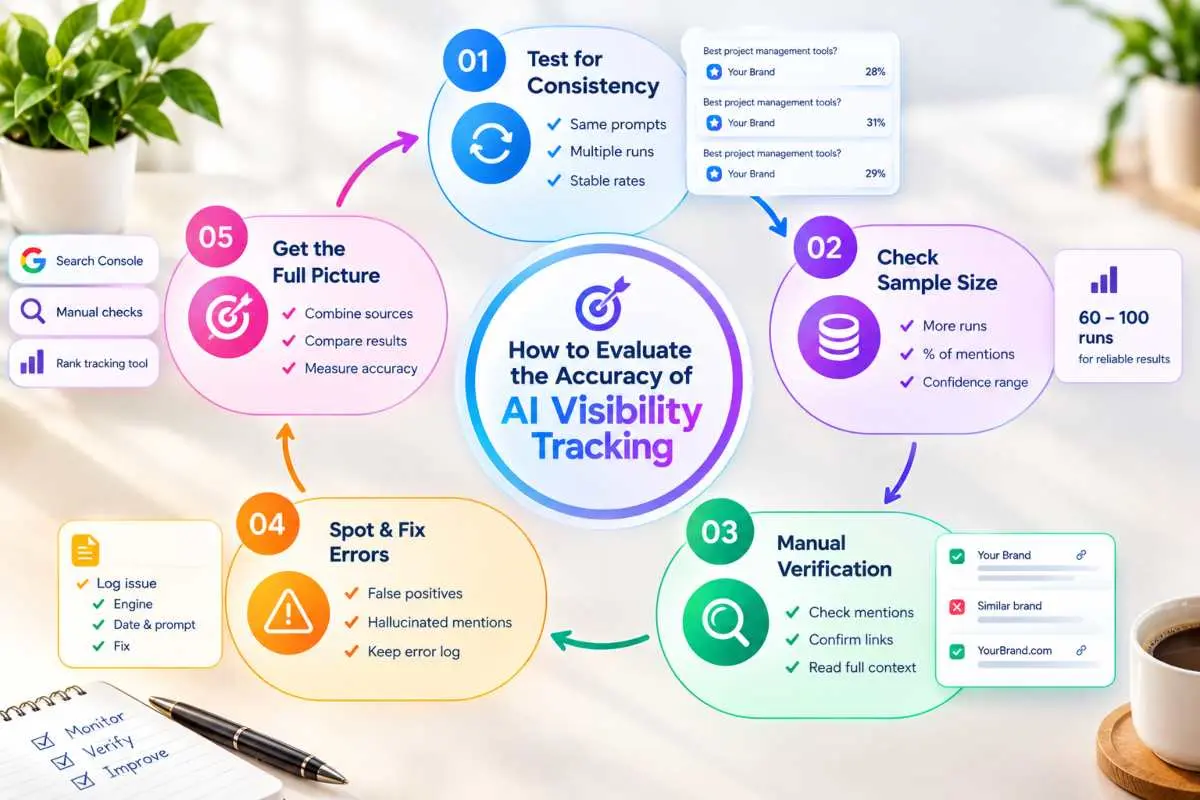
To evaluate the accuracy of AI visibility tracking, test whether the same prompts produce stable mention rates across many runs, check how many samples each score is based on and manually verify a sample of the tool’s results against live answers. Accurate tracking reports frequencies with enough repetition behind them and it lets you inspect the raw responses that produced each number.
Why AI answers vary between runs
AI answers vary between runs because generative models build each response probabilistically, so the same question can return different wording, different sources and different brands each time. Retrieval adds more variation, since engines that search the live web can pull different pages from one moment to the next.
Other factors layer on top. Answers can change with the engine and model version, the country, the device, whether search is switched on, the person’s conversation history and any personalisation. Even a small change in prompt wording can shift which brands appear. The scale of this is striking.
In SparkToro and Gumshoe.ai’s study of nearly 3,000 runs, the chance of getting the identical brand list twice was well under 2% for every tool tested, with ChatGPT at roughly 0.7%, Google’s AI at about 0.8% and Claude at about 1.7%, according to coverage of the report. The practical conclusion is that any single response is a sample, not a fact. Accuracy therefore depends on how a tool handles this noise, not on whether it can produce a clean result for one prompt.
Sampling size and repeat testing
Reliable AI visibility data needs each prompt run many times, with results reported as a percentage of runs, not as one pass or fail. The more runs behind a number, the less a lucky or unlucky response can distort it.
The same research found that brand appearance rates looked statistically meaningful when measured across roughly 60 to 100 runs of similar prompts, even though lists and order changed constantly and its authors left open how many runs are truly needed. Use that as a guide, not a rule. A tool that runs each prompt once a month and reports an average position should be treated with caution, while one that shows the number of runs, the date range and a confidence range for each mention rate is far more credible.
To test a tool yourself, pick five prompts and run each ten or more times, then compare your mention rate with the tool’s. If your results differ widely from its numbers, ask why. Also confirm that settings stay constant between periods, including country, engine, prompt wording and run count, since a change in method can look like a change in visibility.
Spotting false positives and hallucinated mentions
False positives occur when a tool reports a brand mention or citation that is not really there, while hallucinated mentions occur when the AI itself invents facts about your brand. Both distort accuracy, in different ways and both need manual checks.
On the tool side, false positives usually come from loose matching. A name that resembles a common word, a similarly named company or a mention in a different context can be counted as yours. Review a sample of flagged mentions each month and read the surrounding text to confirm it refers to your business. Also check that a “citation” is a real link to your page and not a mention of your domain in passing.
On the AI side, hallucinations include invented awards, wrong locations, discontinued services, incorrect pricing or credit given to the wrong company. Verify specifics against your own records, log each error with the engine, date and prompt and note whether it repeats. A repeated error across runs points to a source feeding the mistake, which you can then correct, while a one off error is more likely random noise. Keeping a short error log alongside your visibility data gives you both an accuracy score for the tool and a fix list for your brand.
How to Improve AI Search Visibility Using What You Track
To improve AI search visibility using what you track, turn each gap in your data into a specific fix: make the pages behind weak prompts answer the question plainly, strengthen the signals that identify your brand, correct inaccurate sources and re measure on a regular schedule. Tracking only pays off when every finding leads to a change you can test.
Content patterns AI engines cite (clear definitions, data, structured answers)
AI engines tend to cite pages that answer a question directly, define terms clearly, support claims with evidence and organise information so a passage can stand on its own. You can see this in your own tracking data: the pages that earn repeated citations usually share these traits.
Start by opening each section with a one or two sentence answer, then add detail beneath it. State definitions in plain language, such as “X is…” followed by what it does and who it is for. Back key claims with specific, attributable data, such as a named study, a dated figure or your own original findings, since engines favour content that gives them something concrete to quote.
Use descriptive headings that match the questions people ask, short paragraphs and comparison tables where options are being weighed. Each section should make sense if lifted out of the page, because AI systems extract passages and not whole articles. Review the pages your competitors get cited for on your target prompts and compare their structure and depth with yours to see what you are missing.
Entity and brand signal strengthening (schema, citations, third party mentions)
Entity strengthening means making it easy for engines to recognise who you are, what you do and where you fit, using consistent facts on your site, structured data and mentions from trusted third parties. An engine that is unsure what your brand is will often leave it out.
On your own site, use one consistent business name, description, address and set of services across the homepage, About page, contact page and key service pages. Add Organization, LocalBusiness, Person and Article schema where they apply and make sure the markup matches what is visible on the page. Google’s own documentation for its AI features says there are no special requirements beyond standard search guidance, so schema supports understanding but does not guarantee inclusion.
Beyond your site, build consistent profiles on the directories, review platforms and industry sites your tracking shows engines citing and earn mentions from reputable publications and communities. Third party descriptions carry weight because engines treat them as independent evidence. Check that the way others describe you matches how you want to be described and correct profiles that are out of date.
Fixing gaps found in tracking
Fixing gaps starts by sorting your tracking results into the type of problem each one reveals, then applying the matching remedy. A prompt where you never appear needs a different fix from one where you appear but are described wrongly.
If you are absent from a prompt, check whether you have a page that answers it directly. If not, create one and if so, improve its clarity, depth and evidence. If you are mentioned but never cited, strengthen the page authority and make the key answer easy to extract. If competitors dominate, study the sources behind their mentions and look for ways to earn presence on the same platforms.
If an engine states something inaccurate, trace it to the likely source, such as an old directory listing or an outdated page, correct it there and make the right information prominent on your own site. Prioritise by business value, starting with high intent comparison and “best option” prompts and log each change with its date so you can link results to actions later.
Refresh cycles and monitoring the impact
Refresh your priority content on a regular schedule and re measure the related prompts after each change to see whether visibility actually moved. Because AI answers fluctuate, judge impact over several weeks and many runs, never from a single check.
A sensible rhythm is to review high value pages quarterly, update statistics and examples and refresh the published and modified dates only when the content has genuinely changed. After a significant update, wait a few weeks for engines to recrawl and reflect it, then compare mention and citation rates on the connected prompts against your baseline. Keep the rest of your method steady so that any movement can be credited to your changes. Treat results as evidence rather than proof and keep a simple change log that pairs each edit with the visibility shift that followed. Over time, this shows which tactics work for your category and which are not worth repeating.
Tracking Product Visibility in AI Shopping Engines (Ecommerce)
To track product visibility in AI shopping engines, run product and category prompts on ChatGPT, Google AI Mode, Gemini and Perplexity and record whether your products are shown, in what context and with what price, details and link. Because these engines rely heavily on structured product data, your feed and markup are the first things to check when results are weak.
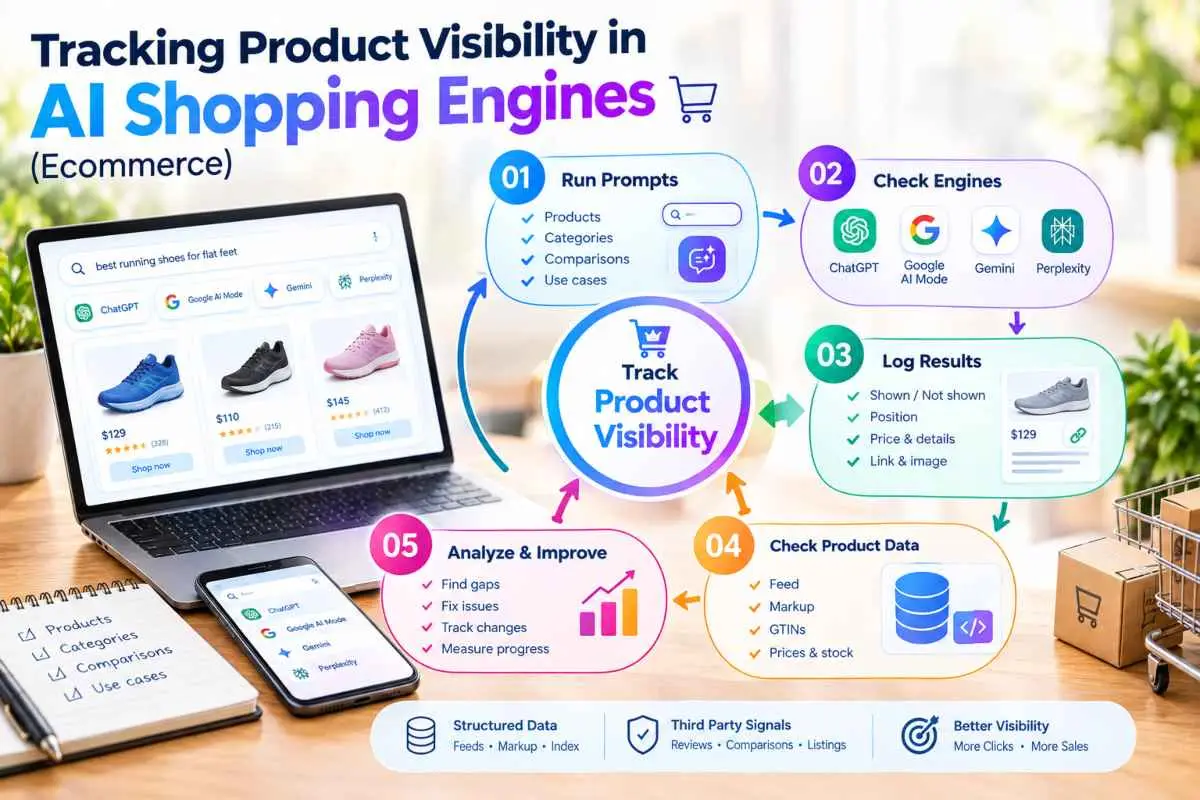
How AI shopping answers pull product data
AI shopping answers pull product data mainly from structured sources such as merchant feeds, Google’s Shopping index and the schema markup on your product pages and then combine it with reviews and third party content. Engines favour product information they can read as settled facts, rather than details they must infer from messy page copy.
The link between Google’s product data and ChatGPT is closer than many retailers assume. Peec AI analysed more than 43,000 products shown in ChatGPT’s shopping carousels, a study published by Search Engine Land in March 2026 and found that 83% matched Google’s top 40 organic Shopping positions. That suggests the feed you already maintain for Google Merchant Center can influence visibility well beyond Google. Google’s AI Mode builds recommendations from the same Shopping data and Google’s own guidance says no special markup is needed for generative AI features, while recommending Merchant Center feeds for product information.
ChatGPT has also opened a way for merchants to submit product feeds directly, though its first checkout feature was retired in March 2026, so purchases still complete on the merchant’s own site. Specifications in this area change often, so check each platform’s current documentation.
This has a practical consequence for tracking. If a product is missing from an AI answer, the cause is often a feed or markup problem, such as incomplete attributes, missing identifiers like GTINs, outdated prices, weak titles or thin descriptions and not a content problem. Perplexity and other engines also draw on retailer pages and review sites, so reviews, comparison articles and listings on other platforms can shape which products are named and how they are described.
Tracking product and category prompts
Tracking product visibility means testing a fixed set of shopper style prompts and logging which products and brands each engine recommends. Build the set around the way people actually shop: category prompts, such as “best running shoes for flat feet”, comparison prompts between named products, problem based prompts and use case prompts with constraints like budget, size or delivery location.
Run each prompt several times on every engine you target, since recommendations vary between runs and report your product’s appearance as a percentage of runs. For each response, record whether your product appears, its position in any carousel or list, the price and availability shown, whether the image and link are correct, which competitors appear alongside it and what reasons the engine gives for recommending each one. Test from each target market, since UK and US shoppers can see different retailers, prices and currencies. Spell products and categories the way local shoppers do.
Keep branded product searches separate from unbranded category searches. Appearing when someone names your product shows the engine recognises it, while appearing for a broad category question shows it is being recommended to people who did not know you. Check accuracy as well as presence, comparing displayed prices, stock status, sizes and specifications with your catalogue, because outdated product data in AI answers can send shoppers away. When a product underperforms, trace the issue back through the feed, the markup and the third party reviews before changing anything else and log each fix so you can see whether visibility improves on the next round.
AI Visibility Tracking Examples and Reporting Template
A practical AI visibility tracking setup has two parts: a fixed prompt set covering branded, category, comparison and problem based questions and a one page monthly report that shows mention rate, citation rate, share of voice, accuracy and business impact. The examples below use a placeholder service business, so swap in your own brand, services, competitors and locations.
Sample prompt set
A good sample prompt set contains 30 to 50 questions grouped into four types, written the way real buyers phrase them. Below is a starter set for a business offering a service called [service], with [Brand] as the company and [Competitor A] and [Competitor B] as rivals.
Branded prompts check that engines know who you are and describe you correctly:
- What does [Brand] do?
- Is [Brand] a good [service] provider?
- What are the pros and cons of working with [Brand]?
Category prompts reveal whether you are introduced to people who do not know you yet:
- Best [service] companies for small businesses in [UK/US].
- Who are the top [service] providers in [city]?
- What should I look for when choosing a [service] provider?
Comparison prompts show how you stack up when a shortlist is being made:
- [Brand] vs [Competitor A] for [service].
- Which is better for [use case], [Brand] or [Competitor B]?
- Alternatives to [Competitor A].
Problem based prompts capture early research, before a solution is chosen:
- How do I get my business to show up in ChatGPT answers?
- Why is my website traffic dropping even though my rankings are stable?
- How much should a small business spend on [service]?
Run each prompt on every engine you target, several times each and from each country that matters. Write UK versions with British spelling and local place names and US versions with American spelling and cities, since the brands named can differ between markets. Once the set is agreed, lock it. Add new prompts rather than editing old ones, so earlier months remain comparable. Because individual answers vary, SparkToro and Gumshoe.ai found that brand appearance rates only became statistically meaningful across dozens of repeated runs, so avoid drawing conclusions from one or two tests.
Sample monthly report layout
A sample monthly report fits on one page and answers four questions: how visible are we, how do we compare, is what engines say accurate and is it affecting results. Keep the layout identical every month so changes are easy to spot. If you want help setting up regular monitoring and reporting on this structure, the same template can be handed to a team to run for you.
| Report section | What it shows | Example entry |
| Headline metrics | Mention rate, citation rate and share of voice versus last month | Mention rate 34%, up from 29% |
| Engine and market breakdown | Results by ChatGPT, Gemini, Perplexity, Copilot, AI Overviews and AI Mode, split by UK and US | Strong on Perplexity, weak on Gemini in the UK |
| Prompt-type breakdown | Performance on branded, category, comparison and problem prompts | Branded 90%, category 18% |
| Competitor view | Which rivals appear most often and on which prompts | [Competitor A] named on 6 of 10 comparison prompts |
| Sources and citations | Which of your pages and which third-party sites are cited | Pricing page cited 12 times; one directory listing outdated |
| Accuracy and sentiment | Share of mentions that are accurate and the tone used | Two repeated errors found, one fixed |
| Traffic and leads | AI referral sessions, enquiries and branded search trend | AI referrals up 11%, two enquiries cited AI |
| Actions and next steps | Changes made this month, and priorities for the next | Updated services page; request listing correction |
Add two lines of plain commentary under the table: the single biggest change this month and the likely reason for it. Record the number of runs behind each figure and the dates tested, so readers can judge how reliable the numbers are. Finish with a short change log pairing each content or technical update with the date it went live, which is what lets you connect effort to results over time.
Conclusion
AI search visibility is now a measurable part of how customers find and judge brands and the businesses that track it deliberately will make better decisions than those relying on rankings alone. With Pew Research finding that users click a traditional result in only 8% of visits when a Google AI summary appears, being named inside the answer matters as much as being listed beneath it. The method in this guide is simple to apply: build a fixed prompt set, run it consistently across the engines and countries you care about, measure mention rate, citation rate, share of voice and accuracy over many runs and connect those numbers to traffic and enquiries.
Treat every gap as a task, whether that means sharpening a page, correcting a source or strengthening the signals that identify your brand, then re measure to see what moved. Start small with a baseline this month, repeat it on a steady schedule and let the data guide where to invest next. If you would rather have specialists set this up and run it for you, IT Leadz can help you build the tracking, interpret the results and turn them into steady gains in AI search visibility.
Frequently Asked Questions (FAQs)
How do I track my brand in AI search?
Build a fixed set of customer style prompts, run them on ChatGPT, Gemini, Perplexity, Copilot and Google’s AI features and log whether your brand is mentioned or cited. Repeat monthly and compare against competitors.
Can I track AI visibility for free?
Yes. A spreadsheet, a clean browser session and a fixed prompt list are enough to start. Free checkers give quick snapshots, but they usually run a single query and offer no history, so they suit sanity checks rather than ongoing tracking.
How often should I check AI visibility?
Run light spot checks weekly, a full measurement round monthly and a deeper review quarterly. AI answers change between runs, so judge trends across many runs and several weeks, not a single check.
Does AI Mode have rank tracking?
Not in the classic sense, because AI Mode has no fixed positions. You track inclusion and citations instead. Search Console reports AI Mode and AI Overviews impressions combined, without clicks or queries, so dedicated trackers fill the gap.
What is a good AI mention rate?
There is no universal benchmark, because it depends on your category, prompts and competitors. Set a baseline in your first round, then aim to improve it, especially on unbranded category and comparison prompts.
How is AI visibility different from SEO rankings?
SEO rankings show where your pages sit in a list of links, while AI visibility shows whether your brand is mentioned, cited or recommended inside a generated answer. A page can rank well and still be left out.
Why do AI answers change between runs?
AI engines generate answers probabilistically and may retrieve different web sources each time. SparkToro and Gumshoe.ai found a chance of well under 2% of getting the identical brand list twice, so always measure across repeated runs.
Which AI platforms should I track first?
Start with the engines your customers use most, usually ChatGPT, Google AI Overviews and AI Mode, Gemini and Perplexity. Add Copilot for business audiences and bring in other assistants once they appear in your analytics.
Can Search Console show my AI visibility?
Partly. Google’s generative AI reports show impressions for AI Overviews and AI Mode by page, country and device, but they have no click or query data. Pair them with your own prompt tracking for the full picture.