Maintaining a website is just as crucial as building it. An unmaintained site can suffer from security vulnerabilities, outdated content, and poor performance, all of which hurt your brand’s reputation and revenue. But how much does website maintenance actually cost? The answer can range widely.
In 2026, website maintenance costs can be as low as just a few dollars per month or soar to several thousand dollars per month, depending on your site’s complexity and needs. This comprehensive guide breaks down the factors that influence website maintenance costs, typical cost components, and what you can expect for different types of websites. We’ll also compare doing maintenance yourself versus hiring professionals so that you can make an informed decision and budget effectively.
For companies that depend on their website for leads, sales, or customer trust, partnering with a professional website maintenance agency provides predictable costs, faster response times, and proactive protection. Whether you require ongoing website support and maintenance services, understanding current cost expectations helps you choose the right service level for 2026 and beyond.
What Is Website Maintenance Cost?
It is the ongoing investment required to keep a website secure, updated, fast, and fully functional over time. This cost covers routine upkeep, such as software updates, security monitoring, backups, and performance checks, along with fixes and improvements that reduce the risk of larger, more expensive failures later.
When businesses ask what the cost of website maintenance is, they are usually weighing two very different approaches. The first is a minimal “keep it running” model that focuses only on basic updates and reactive fixes. The second is a proactive model delivered through professional website maintenance services, where potential issues are identified and resolved before they impact traffic, conversions, or brand reputation.
Working with an experienced website maintenance agency allows companies to move beyond reactive support and adopt structured website support and maintenance services. This is especially important for businesses that rely on continuous performance, whether through ongoing WordPress website maintenance services , security, and user experience directly affect revenue.
 Why Ongoing Website Maintenance Is Essential
 Why Ongoing Website Maintenance Is Essential
Before diving into costs, it’s important to understand why website maintenance matters. Regular maintenance keeps your site secure, functional, and up-to-date, protecting your investment and online reputation. Websites are not “set and forget” much like a car, they require ongoing tune-ups to run smoothly. Key reasons to invest in maintenance include:
- Security: Updates and security patches help prevent hacks and data breaches. An outdated CMS or plugin is a common entry point for attackers.
- Performance: Regular clean-ups (like optimizing databases or updating code) keep your site loading fast and functioning well, which is crucial for user experience and SEO.
- Content Freshness: Updating content, images, and information keeps your site relevant and engaging to visitors. Stale content can turn away customers.
- Reduced Downtime: Proactive monitoring and fixes catch issues early. It’s cheaper to maintain consistently than to fix catastrophic failures after they happen.
- SEO and Traffic: Search engines favor sites that are well-maintained (fast, secure, regularly updated). Maintenance can directly impact your search rankings and traffic over time.
In short, a well-maintained website safeguards your business’s online presence and ensures you’re providing a quality experience to users. Skimping on maintenance might save money today, but it greatly increases the risk of expensive problems down the road.
Key Factors Influencing Website Maintenance Cost
Website maintenance costs can vary dramatically from one site to another. Understanding what factors drive these costs will help you estimate a realistic budget for your own site. Here are some of the major factors:
Website Size & Complexity
A small personal blog with a few pages will naturally cost far less to maintain than a large corporate or eCommerce site with hundreds of pages, user accounts, and complex features. More pages and features mean more content to update, more plugins or integrations to manage, and higher potential for things to break. Complexity (such as custom web applications, databases, multimedia content, etc.) also raises maintenance needs and costs.
Website Type or Purpose
 Website Type or Purpose
The purpose of your site plays a big role. For example, an e-commerce website (online store) typically has higher maintenance demands – you’re constantly adding products, processing transactions, and needing top-notch security. An informational small business website or portfolio might only need occasional updates. Personal sites or blogs often have the lowest maintenance needs. We’ll see cost differences by type in the next section.
Traffic Volume
Websites with high traffic require more robust hosting and careful performance optimization. As your visitor count grows, you may need to invest in better servers, content delivery networks (CDNs), and caching solutions to keep the site fast. Higher traffic can also mean more support requests or issues to resolve, contributing to maintenance effort.
Content Management System (CMS) or Platform
The platform your site runs on can affect maintenance. A custom-coded site might require a developer for every change, whereas a WordPress site can be updated with a few clicks (but WordPress sites still need frequent plugin, theme, and core updates). In fact, many businesses using WordPress turn to specialized WordPress website maintenance services to handle ongoing updates, security scans, and performance tuning for them. Similarly, sites built on eCommerce platforms like Shopify or WooCommerce have unique maintenance tasks (e.g., managing product databases, ensuring payment gateway security) – often requiring more time or ecommerce website maintenance services tailored to those needs.
Frequency of Updates
How often do you add or change content? A news site or frequently updated blog will incur more maintenance work (editing, formatting, SEO, etc.) than a static site that changes once a year. Frequent updates may also necessitate more regular backups and testing to ensure new content or features don’t break anything.
Design and Functionality Changes
Suppose you plan to improve your site’s design or add new features continuously; factor in maintenance costs for a developer or designer. Even using new plugins or extensions can introduce maintenance overhead, as each addon needs updates and compatibility checks over time.
Security Requirements
Sites that handle sensitive data (like customer personal info or credit card numbers) need stronger security measures. This can include premium security plugins, firewall services, malware scanning, and compliance checks (e.g., PCI compliance for e-commerce). Higher security standards increase maintenance costs but are necessary to prevent costly breaches.
Performance and Uptime Needs
If 24/7 uptime is critical for your business, you might invest in monitoring services and quick-response support. For example, an enterprise site might pay for an uptime monitoring service and on-call developers to address issues immediately. These website support and maintenance services ensure any downtime or performance issue is resolved quickly, but they come at a premium.
Every website is unique, so your costs will depend on a mix of these factors. Next, let’s look at the typical components that make up a website maintenance budget.
Typical Website Maintenance Cost Components
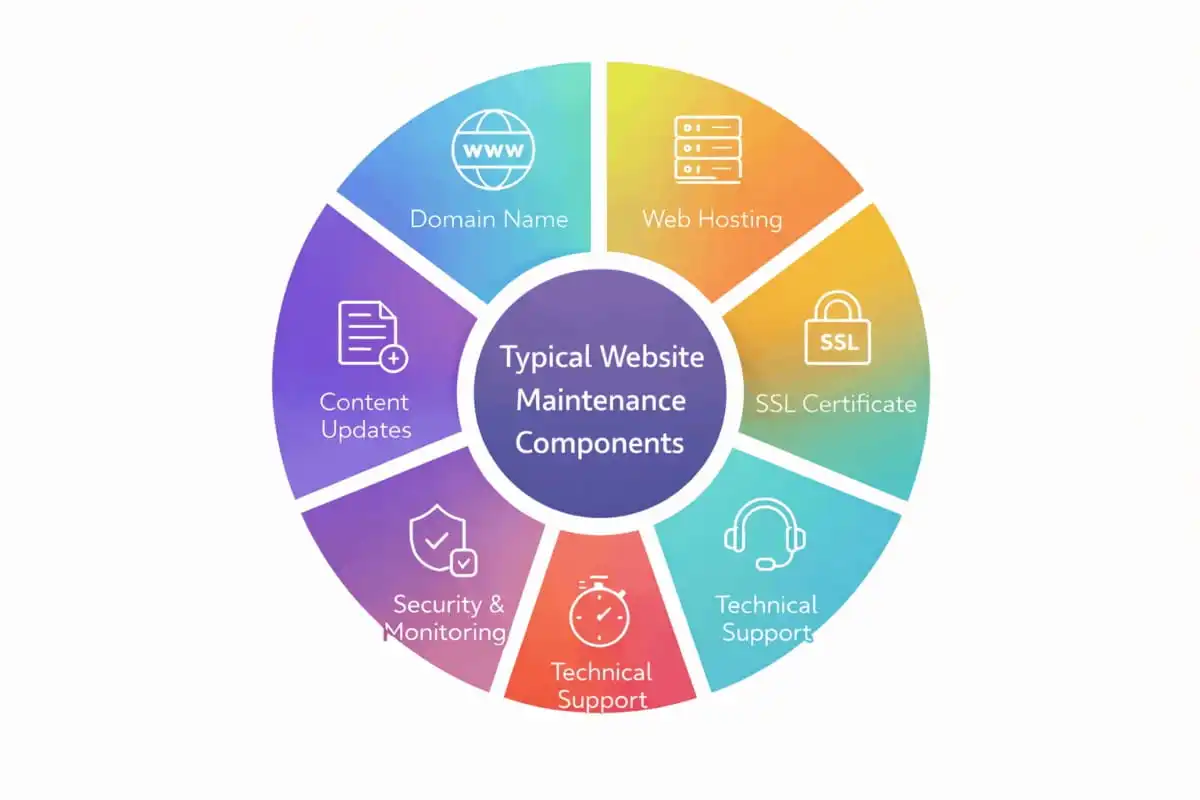
When budgeting for website maintenance, it helps to break down the core components that almost every website will need to pay for. Here are the common maintenance cost components and their typical price ranges:
Domain Name
 Domain Name
This is your website’s address (e.g., yourbusiness.com). Domains are paid annually, and renewal fees typically range from about $10 up to $50 per year for standard domains. Specialized or premium domain extensions can cost more. (Example: a .com might cost ~$15/year to renew.)
Web Hosting
Hosting is the server space and resources needed to keep your site online. Hosting costs can vary widely. A basic shared hosting plan can be as cheap as $3–$10 per month, suitable for small sites, while high-performance dedicated or cloud hosting for large sites can run $100+ per month. Many small business sites use mid-range managed hosting in the $20–$50/month range for better performance and support.
SSL Certificate
An SSL certificate enables HTTPS, encrypting data between your site and visitors (crucial for security, especially if you accept logins or payments). Fortunately, many hosts include basic SSL for free. If not, basic certificates can cost around $8–$100/year, while advanced EV (Extended Validation) certificates or wildcard certificates (covering subdomains) might cost up to a few hundred dollars per year. Most small sites can use a free SSL with no issues.
Software Updates (CMS/Plugins)
Websites built on a CMS like WordPress require regular updates to the core software, plugins, and themes. These updates are usually free to perform yourself, but the cost is in the time and technical effort. If you neglect updates, you risk security holes. Some companies purchase maintenance tools or services to handle updates (for example, a service that auto-updates and tests your site), which could be $10–$50 per month, or they include this in a maintenance contract.
Security & Monitoring
To keep your site safe, you may invest in security solutions. This includes malware scanning, firewall services (WAF), and regular backups. Some services offer daily malware scans and backups for anywhere from $20 to $100+ per month. At minimum, you’ll want a backup solution (many hosts provide basic backups; third-party backup services or plugins might cost a fee if you need more frequent backups or off-site storage).
Technical Support
If you are not personally a web developer, having access to technical support is valuable. Some hosting plans or maintenance plans include support in the package. Otherwise, you might set aside a budget for occasional developer help or emergency fixes. This could be hourly or a retainer: standard website support rates range roughly $150–$250 per hour for most agencies or professionals, and urgent, after-hours support can be even more. (Many businesses instead opt for a monthly maintenance service plan so they don’t pay high hourly rates each time an issue arises.)
Content Updates
Keeping content fresh is part of maintenance. This might involve adding new blog posts, updating product info, or refreshing page content regularly. You might handle content updates in-house (costing only staff time) or outsource to a content writer or web admin. Outsourcing content updates could cost a few hundred dollars per month, depending on volume (for example, up to ~$190/month per some estimates for a moderate update workload). If your site requires frequent content changes, include this in your budget.
Design and UX Tweaks
Over time, you may need to make design improvements or adjustments for usability. Minor design maintenance (like tweaking layouts, updating banners, improving mobile view) might be included in a maintenance plan or done ad hoc by hiring a web designer/developer as needed. Costs for design updates vary widely – you might allocate a few hours of a designer’s time per month (at $50–$100/hour) if constant design work is anticipated.
Email and Other Services
If your website’s domain is used for professional email (e.g., [email protected]), you might pay for an email hosting service or suite (like Google Workspace, Microsoft 365, etc.). This is indirectly a website maintenance cost to keep your business communication running. These services can range from $5 to $15 per user per month, though some web hosting plans include basic email hosting for free. Other possible recurring costs include marketing/SEO tools or integrations that help maintain your site’s online presence (for example, paid SEO plugins, analytics tools, or marketing automation linked with your site).
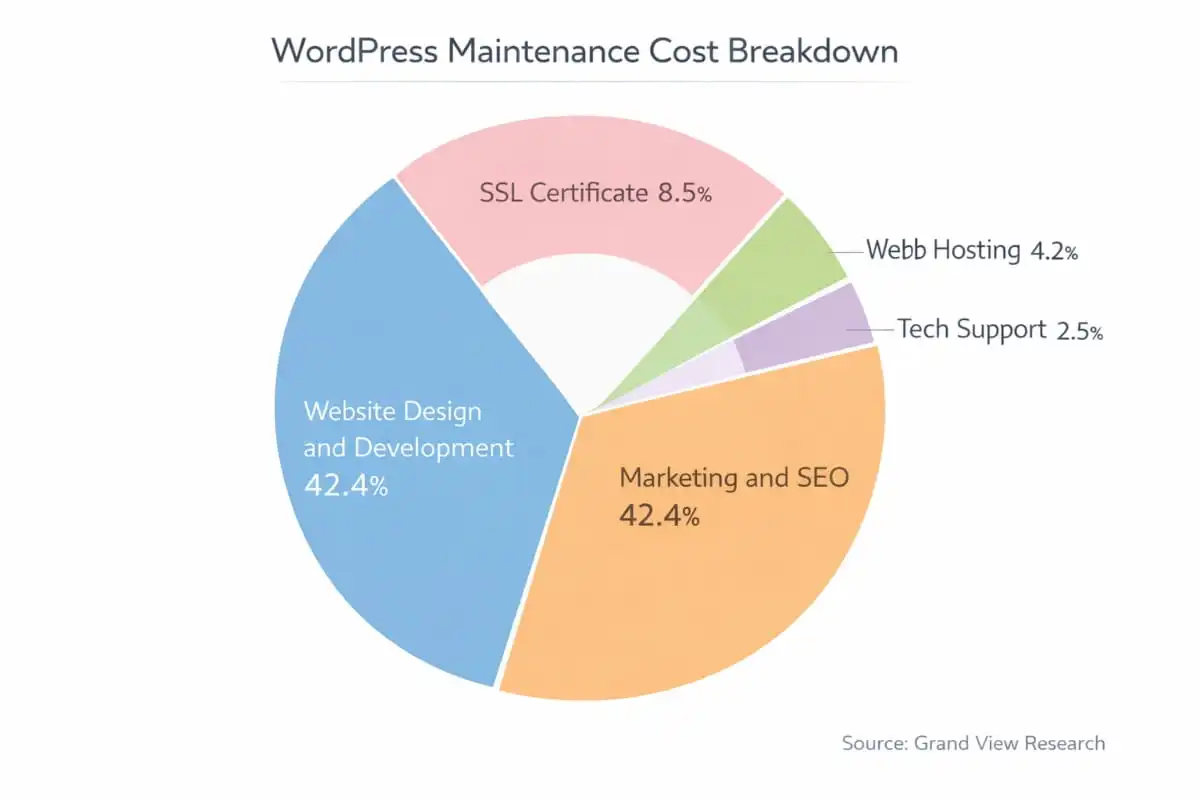
As you can see, some of these costs are infrastructure (domain, hosting, SSL), while others are ongoing services and labor (updates, support, content changes). The total maintenance cost for your website will be the sum of these components relevant to you. For a hobbyist’s personal site, you can only pay for the domain and hosting and do everything else yourself (totaling $20 per month). For a business, you may need to budget for many of these items.
How Much Do Different Types of Websites Spend on Maintenance?
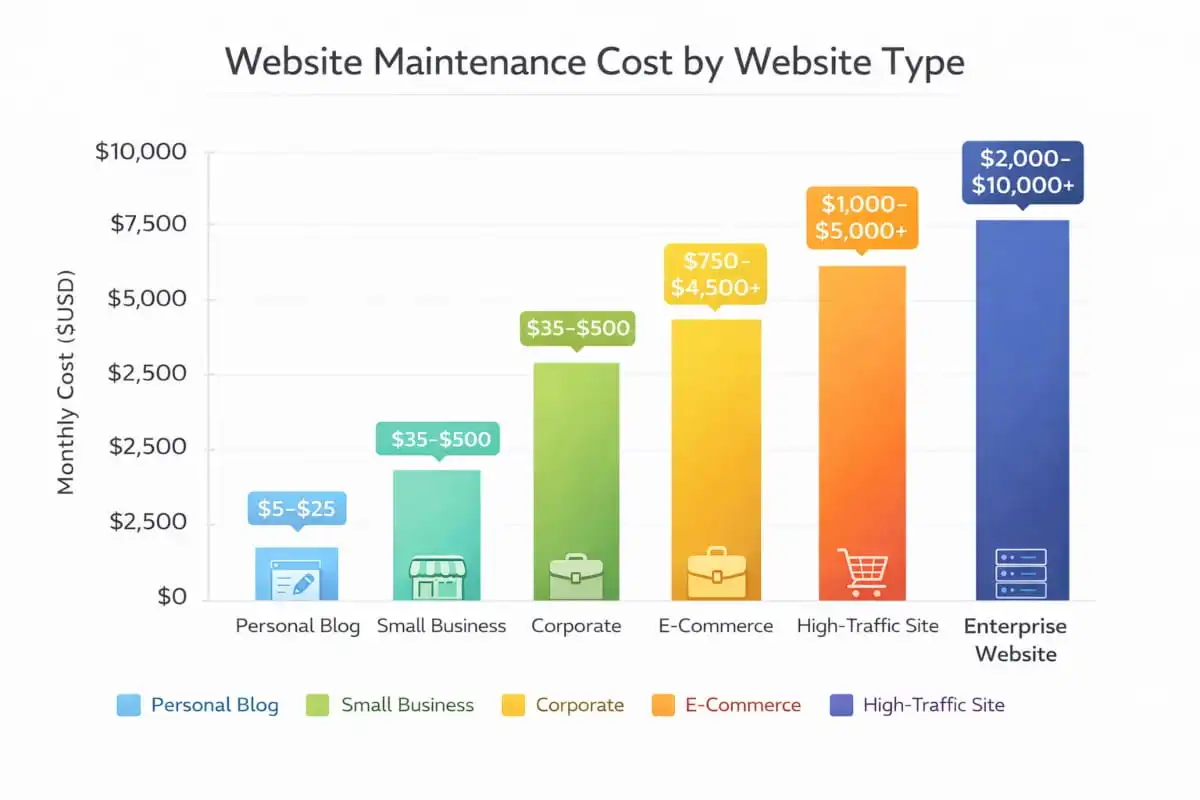
Another way to estimate your maintenance budget is by comparing it to industry averages for your type of website. A complex site will naturally fall on the higher end of the cost spectrum, while a simple site falls on the low end. Here are some ballpark monthly maintenance cost ranges by website type, based on industry data:
Personal Websites or Blogs
 Personal Websites or Blogs
Approximately $5 – $25 per month (very low traffic, simple sites). These costs assume you are doing it yourself and mainly paying for basic hosting and a domain. If you hire help, even a simple site could cost more.
Professional Blogs or Small Business Websites
Around $35 – $500 per month on average. This wide range accounts for small brochure-style sites at the low end, up to larger small-business sites or active blogs that might need more support and features. Many standard business sites will fall in the low hundreds per month if using some professional services.
Corporate Websites
Roughly $200 – $4,500 per month. Large company websites, especially those with heavy traffic or custom functionality, require significant resources. This often includes high-end hosting, security monitoring, and a contracted maintenance agency or team to handle ongoing changes, which drives costs into the thousands for robust support.
E-Commerce Websites
Approximately $750 – $5,000+ per month. Online stores tend to have some of the highest maintenance needs. There are additional expenses unique to e-commerce, such as platform fees (if using Shopify or similar), payment gateway costs, more frequent security scans (due to handling credit card info), inventory management integrations, etc. For instance, beyond the basics, an e-commerce site might spend extra on advanced SSL certificates, PCI compliance services, and continuous performance optimizations to handle shopping traffic spikes. It’s not unusual for a thriving online store to allocate a substantial monthly budget to maintenance and support in order to ensure uptime and secure transactions.
High-Traffic or Enterprise Websites
Can be $1,000 – $5,000+ per month. Enterprise-level sites (including large enterprise WordPress deployments) often need custom maintenance arrangements. They might have dedicated server infrastructure, 24/7 support contracts, and ongoing development. For example, some sources note enterprise WordPress sites starting around $500/month just for basic maintenance, scaling upwards depending on needs.
These ranges are broad, but they illustrate a key point: the more complex and critical the website, the higher the maintenance cost. A simple site managed by one person can be extremely cheap, while a mission-critical site supported by an agency will be at the higher end. Your own site might not fit exactly in one category, but use the above as a reference to gauge where you fall.
It’s also worth noting that these expenses can be viewed annually as well. Some businesses prefer to plan in yearly terms. For instance, a small business might spend on the order of $1,000–$5,000 per year on upkeep, whereas a busy e-commerce site could be looking at tens of thousands per year in maintenance investment.
DIY vs. Professional Maintenance: Weighing the Costs
When it comes to who actually performs the maintenance, you generally have two paths: handle it yourself (in-house) or hire professionals (outsourced). This choice significantly affects your cost structure and the effort required on your part. Let’s compare:
Do-It-Yourself (Self-Maintenance)
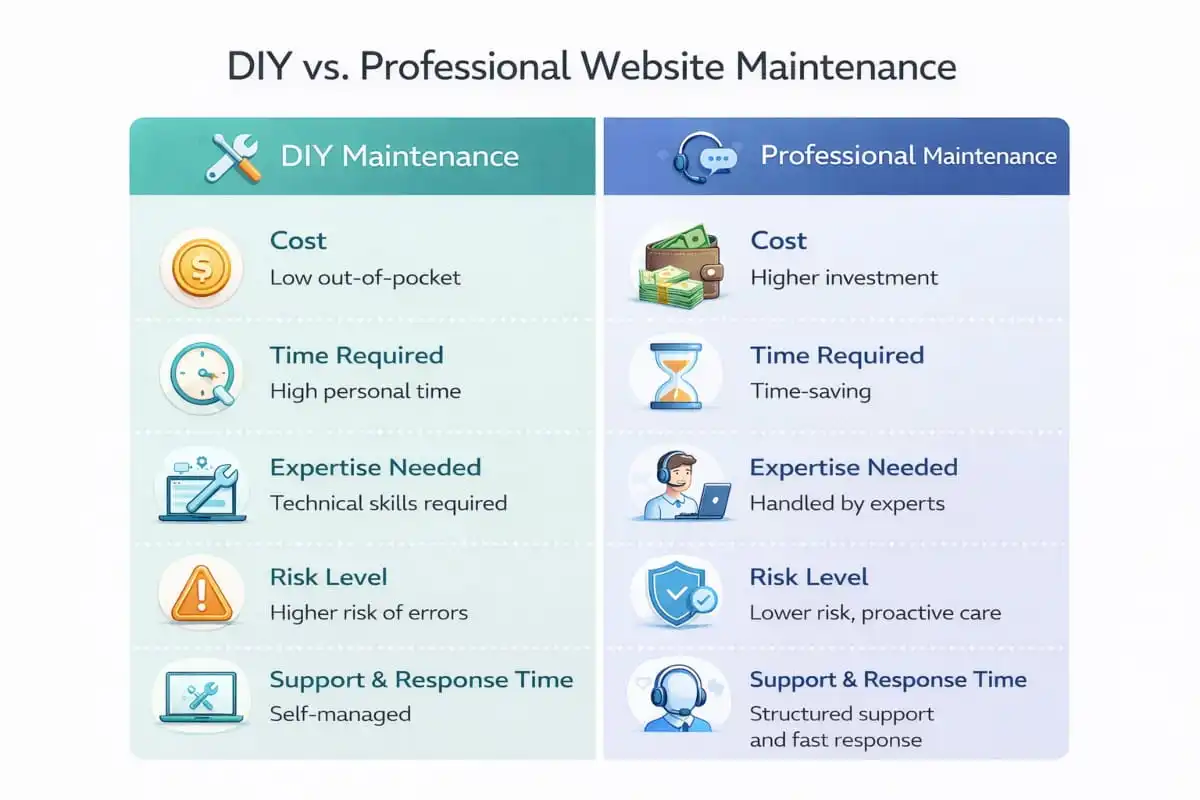
If you have the technical skills (or are willing to learn), maintaining your website yourself can save a lot of money. The out-of-pocket costs of a DIY approach are typically low – often just your domain, hosting, and perhaps a few tools or plugins. In fact, the cost of a DIY approach is usually well under $100 per month (often much less), since you avoid paying any service fees. You have full control over configurations and schedules.
However, your time becomes the major investment. Handling updates, backups, troubleshooting errors, and improvements requires a time commitment and a learning curve. You’ll need to stay on top of maintenance tasks regularly. Missing an update or overlooking a security measure can have consequences, so DIY website owners must be vigilant.
This approach is best suited for smaller sites (personal blogs, hobby sites, very small businesses) where the budget is tight and the site is not too complex. Modern website platforms and builders do make it easier, for example, some all-in-one site builders automatically handle a lot of maintenance in the background. However, you still need to monitor your site’s health.
Hiring a Professional (Outsourcing)
 Hiring a Professional (Outsourcing)
This could mean hiring a freelance web developer on an as-needed basis or subscribing to a monthly website maintenance services plan through an agency. Going the professional route will increase your costs, but in exchange, you get expert help and save your own time. The average cost for professional website maintenance ranges from $200 to $4,500 per month, depending on the level of service.
There are a couple of common options here: you might work with a dedicated website maintenance agency (a company with a team that manages sites for many clients), or you might hire an individual freelancer/contractor.
A website maintenance agency typically offers packaged plans (often tiered). They tend to cost more – sometimes on the order of a few hundred to a few thousand dollars per month – because you get a team of experts and a comprehensive service package. An agency will handle everything from routine updates and security audits to content changes and technical support.
This all-inclusive approach is great for businesses that want peace of mind and a “hands-off” solution, allowing you to focus on your business while the agency keeps your site running smoothly. Agencies are ideal if you have a critical website where downtime or issues could seriously impact your business, and you need the reliability of a full team on call.
A freelance website professional might charge an hourly rate anywhere from about $25 up to $150 per hour, depending on their expertise and the tasks needed. Some freelancers or smaller agencies also offer monthly retainers (for example, you pay a set fee for a certain number of hours of maintenance each month).
Hiring a freelancer can be more flexible and sometimes more budget-friendly than a large agency, especially if you only need occasional help. However, keep in mind that relying on one person means that if they are unavailable or if an issue is outside their skill set, you might face delays. Also, hours can add up quickly if a lot of work is needed – at $100+ per hour, a significant problem can get expensive fast.
Which Should You Choose?
It depends on your budget, your own capabilities, and how critical your website is. If you’re technically savvy and time-rich, DIY maintenance with minimal costs suffices for a small site. On the other hand, if your website is a key business asset – generating leads, sales, or serving customers – investing in professional maintenance is often worth it. Many companies choose a middle ground: they handle small content updates in-house but rely on a professional maintenance service for the heavy technical lifting and security. This way, they ensure important tasks are done right without burning too much of their own time.
Importantly, if you do opt to outsource, make sure to get a clear maintenance agreement or contract. Know what services are included (updates, backups, monitoring, support response times, etc.) and how much is covered per month. This helps avoid surprises and lets you budget consistently. A good maintenance provider should also communicate and report on what they’ve done regularly, so you see the value of their work.
Website Maintenance Cost – Per Hour, Per Month, and Per Year Explained
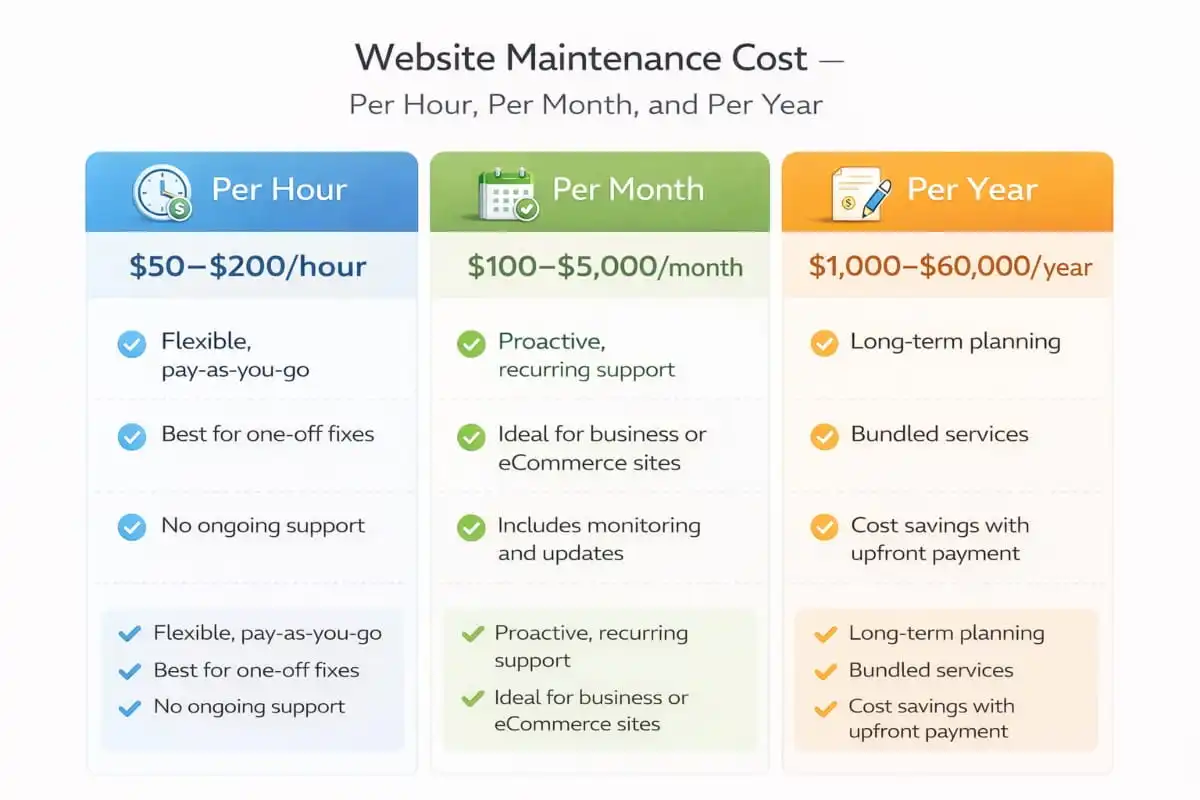
Maintaining a website is an ongoing necessity, much like servicing a car or home. Website maintenance costs can vary widely depending on how you choose to pay for these services. Some site owners pay by the hour for occasional fixes, others opt for monthly retainers for continuous support, and larger organizations might even budget annually for comprehensive upkeep. In this article, we break down website maintenance cost per hour, per month, and per year – including typical price ranges, when each pricing model is used, their pros and cons, and examples of which businesses benefit from each approach.
Regular website maintenance covers critical areas like hosting, security updates, performance optimizations, and content changes. These ongoing tasks ensure your site remains secure, fast, and up-to-date, but the cost of website maintenance can be structured in different ways to suit your needs.
Website Maintenance Cost Per Hour
 Website Maintenance Cost Per Hour
Billed by Actual Work Time
Hourly website maintenance means paying only for the time spent on specific tasks like updates, fixes, or troubleshooting. Rates depend on provider experience and location.
Typical Pricing Range
Regional Differences
When is hourly pricing used?
Hourly website maintenance is most common for freelancers or small web agencies doing ad-hoc work. It’s ideal if you have infrequent or unpredictable maintenance needs. For example, a small business with a simple brochure website might only need help a few times a year to update plugins or fix the occasional issue. Rather than committing to a contract, they can hire a professional at an hourly rate whenever a task arises. Hourly billing is also useful for one-off fixes (e.g., repairing a broken contact form or cleaning up a malware infection) when the scope is limited to a few hours of work.
Advantages of Hourly Pricing:
- Pay-as-you-go flexibility: You only pay for the actual time spent on maintenance. This can be cost-effective for sites with minimal needs, since you’re not paying for idle time.
- No long-term commitment: Hourly agreements let you engage help only when required, without ongoing fees. This is great for organizations that handle most updates in-house and occasionally need expert assistance.
- Transparent workload-based cost: It’s easy to tie the cost directly to specific tasks completed. If a fix takes 2 hours and the rate is $75/hour, you know what you’ll be billed.
Disadvantages of Hourly Pricing:
- Unpredictable expenses: Maintenance issues can be unpredictable – one month you might pay $0, the next month a critical problem could require 10 hours of work. This model makes it harder to budget, as costs can spike unexpectedly.
- No guaranteed availability: Relying on a freelancer‘s schedule can be risky. If your site breaks at a critical time, your go-to person might be busy or on vacation. There’s no assured response time unless you arrange it separately.
- Reactive, not proactive: Hourly work is often requested after something needs attention. It typically doesn’t include continuous monitoring or preventative care. This means potential issues might only be fixed once they become problems (e.g., delays in applying security patches), which could impact your site’s uptime or security.
Website Maintenance Cost Per Month
Ongoing Monthly Support
Monthly website maintenance involves paying a fixed recurring fee for regular upkeep, often delivered through a retainer or service package. Plans typically include updates, backups, security checks, and technical support.
Cost Based on Site Complexity
E-Commerce and High-Traffic Sites Pay More
Due to continuous content updates, payment systems, and performance demands, eCommerce and corporate sites often require more intensive monthly plans ranging from $750 to $5,000+.
Regional Variations Exist
When Is Monthly Website Maintenance a Good Fit?
Ideal for Ongoing Needs
Common Use Cases
This model is popular among eCommerce retailers, agencies, law firms, nonprofits, and schools that rely on up-to-date, secure websites. Monthly plans typically include updates, monitoring, backups, and limited support hours.
Flexible Plan Structures
Advantages of Monthly Pricing:
- Predictable budgeting: A flat monthly fee makes it easy to plan your expenses. You know exactly how much to allocate for website maintenance each month, avoiding the surprise spikes that come with purely hourly billing.
- Consistent, proactive care: Monthly maintenance often implies ongoing monitoring. The provider will regularly check your site, apply updates, and fix issues before they become major problems. This proactive approach helps prevent downtime and security incidents through routine care.
- Priority support & SLA: Many monthly plans come with guaranteed response times or Service Level Agreements. As a subscriber, you’re a priority client, meaning if something goes wrong, the maintenance team will address it promptly (often faster than ad-hoc clients).
- Bundled services: You typically get a bundle of services in one package – such as hosting support, CMS updates, security scans, backups, and some content edits – which might be more cost-effective than purchasing each service on demand. For example, a monthly package might include things that would cost extra if done separately (SEO monitoring, small design tweaks, etc.).
Disadvantages of Monthly Pricing:
- Paying for unused services: If your website doesn’t require many changes in a given month, you still pay the full fee. Some months, you might not fully utilize the included hours or services, which could feel like you’re overpaying.
- Contract commitments: Providers may require a minimum commitment (e.g., 3-month or 6-month contracts). If you decide to cancel early, there might be penalties. You’re also often on auto-billing, which requires active cancellation if you want to stop.
- Scope limitations: A monthly plan will have defined parameters. Major projects (like a full redesign or adding a new feature) might not be covered and could incur extra charges. It’s important to know what is and isn’t included; otherwise, you might assume something is covered by your monthly fee when it’s actually outside the scope.
- Cost for small sites: For very small or static sites, even a “low“ monthly fee might not be justified. For example, a personal blog owner paying $200/month for maintenance might realize they rarely need that level of service. In such cases, hourly or annual on-demand support could be cheaper, but the monthly model could become an unnecessary expense.
Examples of Monthly Website Maintenance Use Cases
Business-Critical Operations
Small to medium businesses often adopt monthly maintenance once their website supports key operations like a restaurant managing promotions or online orders, or a blog with frequent content updates.
E-Commerce and Content-Driven Sites
Freelancer and Agency Support
Freelance developers may offer care plans (e.g., $150/month) for routine WordPress maintenance. Agencies provide tiered support, typically more comprehensive for high-traffic or 24/7 environments.
Geographic Cost Differences
Website Maintenance Cost Per Year
Annual Contracts Offer Simplicity and Savings
Yearly website maintenance involves paying upfront for a full year of service, often at a discounted rate compared to monthly billing. This approach is common when a site is built by an agency that also offers ongoing support.
Cost Ranges by Business Type
Flexible Inclusions and Scopes
Some annual contracts bundle in quarterly or monthly task allowances, while others offer continual development and performance monitoring. Pricing reflects the level of customization, site size, and uptime or SLA expectations.
Market Rates Vary Widely
When is Annual Pricing Used?
Annual maintenance pricing is often chosen by organizations that prefer long-term planning or have procurement processes that work yearly. For instance, some companies have an annual budget for IT or web services – it’s easier for them to sign a yearly contract and pay once, rather than manage monthly invoices. Government agencies, universities, or larger corporations often operate this way, where they issue an RFP and hire a vendor for a one-year (or multi-year) website maintenance contract.
Small businesses might also opt for a yearly plan if it’s offered at a discount or for convenience. For example, a business owner might not want the hassle of a recurring monthly payment and chooses to pay $1,000 once for the whole year’s coverage. Additionally, if you build a website via an agency, that agency may include 1 year of maintenance in the project or offer a post-launch maintenance package billed annually.
Advantages of Annual Pricing:
- Potential cost savings: Many providers offer a discount for paying annually. The effective monthly rate might be lower when you pay upfront. For example, a maintenance service that is $100 per month might be offered at, say, $1,080 per year (giving you one month free) to encourage an upfront commitment.
- Simplified billing: One payment per year means less administrative overhead. This can be easier for accounting – you’re not juggling monthly bills, and it’s a “set and forget“ arrangement for the year. This is particularly handy for organizations that have to justify expenses once annually.
- Long-term partnership: An annual contract often fosters a stronger relationship with the maintenance provider. They know you’re committed for a year, and in turn, they are committed to supporting you. You might get more consistent service and priority because you’re a long-term client. It also means the provider can plan resources knowing they have you as a client for the year.
- Covers the full cycle: Over a year, your site will need all kinds of maintenance (seasonal updates, major version upgrades, audits, etc.). An annual plan ensures these are all budgeted for. It often includes a more comprehensive set of services (some providers bundle in an annual security audit or a yearly performance tune-up as part of the package).
Disadvantages of Annual Pricing:
- High upfront cost: Paying, say, $2,000 or $5,000 in one go can strain cash flow, especially for small businesses. Not everyone can afford to put a lump sum toward maintenance, even if it might be cheaper over 12 months than paying monthly.
- Less flexibility: Once you’ve paid for the year, you’re committed. If you become unhappy with the service, switching providers could be tricky (you may not get a refund for the remaining months). You also might be locked into a certain scope; if your needs change mid-year, you might have to renegotiate or purchase addons.
- Under-utilization risks: Similar to monthly plans, if you prepay for a year of service and then realize you didn’t actually need that much work, you can’t get your money back. For example, if you paid for an “advanced“ support package expecting heavy development, but your plans changed, and you hardly used it, the money is already spent.
- Renewal time crunch: When the year is up, you’ll have to decide whether to renew and come up with another large payment. Some organizations might end up delaying or skipping critical maintenance after a contract lapses because they didn’t get a new contract in place in time, which can leave a site unsupported. Monthly plans, by contrast, roll over, but annual ones need an active decision to renew.
Examples of Annual Website Maintenance Use
Ideal for Budget-Cycle Planning
Mid-sized companies and nonprofits often prefer annual maintenance contracts that align with yearly budgeting or grant cycles. For instance, a regional bank may allocate $10,000/year for ongoing site updates and security, while a nonprofit may commit $500–$5,000/year through a bundled all-in-one plan.
Post-Launch Support for Small Businesses
Enterprise and Critical Systems
Large eCommerce or enterprise platforms may sign custom contracts up to $50,000/year for 24/7 monitoring, performance optimization, and emergency response, often including on-call developer availability.
Global Pricing Flexibility
Choosing the Right Maintenance Billing Model
Align Billing with Business Needs
Hourly, monthly, and annual billing models each suit different scenarios. Small, low-maintenance sites benefit from hourly plans, while monthly or annual agreements better serve business-critical or frequently updated sites.
Growth-Driven Flexibility
Weigh Cost Against Coverage
Upfront costs can be justified if they include vital services like security monitoring or daily backups. Comparing what’s included is key to ensuring cost-effectiveness.
Support Should Match Website Goals
| Plan Type | Suitable For | Average Cost | Key Pros | Key Cons |
|---|---|---|---|---|
| Hourly | Personal sites / rare fixes | $50–$200/hr | Pay-as-you-go, no commitment | Unpredictable, reactive only |
| Monthly | Small to mid-sized business sites | $100–$5,000/month | Predictable billing, proactive care | Might underutilize, scope limits |
| Annual | Enterprises or planned budgeting | $1,000–$60,000/year | Cost-effective over time, one contract | High upfront cost, less flexibility |
Getting the Most Value from Your Maintenance Budget
Regardless of whether you maintain in-house or pay an expert, you’ll want to get the best bang for your buck. Here are some tips to maximize the value of your website maintenance spend:
Plan Maintenance Tasks on a Schedule
Create a checklist of daily, monthly, and quarterly maintenance tasks. For example, some security checks and backups should be done daily/weekly, most updates and scans at least monthly, and deeper reviews (analytics, site speed, SEO audits) quarterly. Sticking to a schedule prevents oversight and emergencies. It’s more cost-effective to catch issues early through routine checks than to fix a major breakdown later.
Use Reliable Hosting and Tools
Spending more on quality hosting or plugins can reduce maintenance headaches. A well-managed host can handle many technical optimizations automatically (caching, updates, security monitoring), which means you have less to manage manually. Similarly, reputable plugins and tools are less likely to cause conflicts or fail, saving you time troubleshooting.
Keep a Maintenance Log
Track what updates and changes are made and when. This is useful for accountability (especially if you have an agency – you can see what you’re paying for) and for diagnosing problems (knowing what changed recently if something breaks). It doesn’t have to be fancy; even a shared document noting the maintenance activities each month can help.
Prioritize Critical Updates
If on a limited budget or time constraint, prioritize security and functionality. Always address security patches and any bugs that actively hurt user experience first. Cosmetic changes can be scheduled for later. This ensures vital issues are fixed before they can escalate into costly incidents.
Combine Maintenance with Improvements
Ideally, your maintenance routine isn’t just about fixing or updating, but also about continuous improvement. For instance, while updating your site’s software, you can also improve page load speeds or SEO tweaks. Incremental improvements during maintenance add up to a much better site over time – without requiring a separate large project or budget.
Finally, remember that website maintenance is an investment, not just an expense. Regular maintenance protects the money and effort you’ve already put into your website. It keeps your site profitable by ensuring customers can always access it safely and smoothly. In contrast, a neglected website can quickly become slow, get hacked, or lose search ranking – resulting in lost revenue that far exceeds the savings from cutting maintenance corners.
Platform-Specific Maintenance Costs: WordPress, WooCommerce, Shopify, Wix, GoDaddy
Your choice of website platform significantly impacts long-term maintenance requirements. Each platform has its own update cadence, security profile, and operational complexity, so that the website maintenance cost will vary accordingly. Choosing the right approach depends on how your site is built, how frequently it changes, and how costly downtime is to your business.
WordPress: Flexible but Demanding
WordPress is the world’s most popular CMS for a reason: it offers unmatched flexibility. But that flexibility comes with a price: frequent core updates, plugin compatibility checks, theme maintenance, and vulnerability management. Left unchecked, even a small plugin conflict can result in major issues.
To mitigate risks and ensure optimal performance, many businesses partner with a website maintenance agency that specializes in WordPress. For example, IT Leadz provides expert WordPress website maintenance services tailored to business-critical needs. These go beyond basic updates, offering structured website support and maintenance services designed to prevent issues before they affect your site’s performance or security.
 WooCommerce and E-Commerce Sites: Maintenance that Protects Revenue
 WooCommerce and E-Commerce Sites: Maintenance that Protects Revenue
E-commerce platforms like WooCommerce require more than just routine upkeep, because every error or delay can directly impact revenue. Product updates, cart flows, payment gateway reliability, and third-party integrations all introduce complexity that must be carefully managed.
This is where e-commerce website maintenance services become essential. Proactive monitoring, zero-downtime testing, and fast response times are key to maintaining a frictionless shopping experience. A single broken checkout can mean thousands in lost sales, so a robust maintenance strategy isn’t optional; it’s a business safeguard.
Shopify, Wix, and GoDaddy: Managed, But Not Maintenance-Free
Platforms like Shopify, Wix, and GoDaddy Website Builder simplify hosting and core updates, but they don’t eliminate the need for maintenance. Businesses still need help with tasks like content changes, SEO monitoring, conversion tracking, plugin and app management, and performance tuning.
Professional website maintenance services ensure your site remains functional, optimized, and aligned with business objectives. As your needs grow, working with a dedicated website maintenance agency provides strategic oversight, performance accountability, and peace of mind that your digital presence is in expert hands.
Small Business Website Maintenance Cost
For most smaller companies, small business website maintenance cost isn’t driven by the website’s complexity; it’s shaped by internal capacity. When in-house teams can’t consistently manage updates, backups, security patches, or minor fixes, even small issues like broken contact forms, slow-loading pages, or plugin conflicts can quickly lead to lost leads and frustrated visitors.
That‘s why many small businesses choose to outsource. Rather than reacting to problems as they arise, outsourcing to a website maintenance agency provides structure and predictability. With a reliable partner handling day-to-day upkeep, teams avoid surprises, and the monthly website maintenance cost becomes a stable, budgetable line item instead of an unpredictable emergency expense.
Partnering with a professional provider of website support and maintenance services offers real advantages: quicker response times, proactive issue resolution, and clear accountability. Whether you’re running a brochure site or an online store, access to specialist support, like ecommerce website maintenance services, ensures your site remains secure, fast, and ready to generate leads or revenue without interruption.
Website Development, Design, and Maintenance Cost: When Maintenance Includes Improvements
For many businesses, the true website maintenance cost goes beyond security patches and plugin updates; it evolves into a strategic investment that includes ongoing development and design enhancements. In this model, maintenance isn’t just about keeping the site running; it’s about continuously improving it to meet business goals.
Maintenance vs. Improvement: A Dual Investment
When your plan includes both technical upkeep and planned enhancements, you’re operating under an “operate and improve“ model. This involves two distinct but complementary streams:
- Maintenance: Routine updates, security patches, backups, monitoring, and performance tuning.
- Development and Design: New page creation, UX and layout adjustments, feature rollouts, A/B testing, and ongoing optimization for conversions and functionality.
Because of this overlap, website development and maintenance costs often get bundled, especially for businesses launching a new site and planning long-term growth. Similarly, when design is part of the maintenance plan, the scope expands to include visual and UX improvements that go beyond cosmetic tweaks, directly impacting user engagement and conversion rates.
Why Design Matters in Maintenance
When treated as part of ongoing support, design-related tasks might include:
- Updating landing page layouts
- Refining site navigation or calls to action (CTAs)
- Improving mobile responsiveness
- Enhancing visual consistency with evolving branding
These updates require creative and UX expertise, which increases cost but also improves results. Businesses that view website design and maintenance costs as a growth investment typically benefit from stronger user experiences, better engagement, and more reliable lead generation over time.
Global Pricing Considerations
In outsourced or distributed teams, geography plays a major role in pricing. Many companies evaluate the cost of website development and maintenance in India versus local providers, especially for long-term support. For example:
- A U.S.-based agency might charge $3,000–$5,000/month for combined development and maintenance.
- The same scope in India may cost $500–$2,000/month, depending on turnaround times, complexity, and service structure.
Whether you’re considering website creation and maintenance costs as a bundled project or exploring ongoing development retainers, pricing varies widely based on deliverables, expectations, and location. But the principle remains the same: the more your maintenance plan includes strategic design and development, the more it becomes a driver of digital performance, not just a cost center.
A single number doesn’t determine the true website maintenance cost; it’s shaped by multiple variables that impact the scope, complexity, and responsiveness of your support. Rather than focusing solely on price, businesses should consider which factors drive value and align with their operational needs.
Understanding these variables helps ensure you choose the right level of service, from basic upkeep to full-spectrum website support and maintenance services, so your website stays secure, fast, and aligned with business goals.
Key Factors That Influence Website Maintenance Cost
Update Frequency
How often your website requires updates to the core platform, plugins, themes, and third-party integrations directly impacts ongoing cost. Sites that evolve frequently, such as blogs, eCommerce platforms, or news portals, need more active maintenance than static brochure sites.
Security Requirements
Businesses that store sensitive data, run online transactions, or operate in regulated industries typically need stronger security. This includes continuous monitoring, proactive hardening, malware scanning, and vulnerability patching, services often delivered through WordPress website maintenance services or custom security layers.
Performance Expectations
High-performing websites require ongoing optimization, including page speed improvements, uptime monitoring, and server-level configurations. The more performance-critical your site is, the more you’ll likely invest in optimization as part of your maintenance plan.
Volume of Change
Frequent content updates, landing page creation, or changes to SEO and analytics tracking can significantly increase maintenance time. Sites with ongoing marketing campaigns or seasonal content often require higher-touch service from a website maintenance agency.
Technical Complexity
Advanced features like dynamic forms, custom APIs, CRM or ERP integrations, and multilingual frameworks require specialized knowledge and ongoing attention. Complexity increases both the scope and the cost of maintenance.
Support Response Time
Businesses that rely on their website for lead generation or transactions may need same-day or priority support. Premium website maintenance services often include guaranteed SLAs, while lower-cost providers may offer only “best-effort“ support windows.
E-commerce Dependencies
For online stores, maintenance directly affects revenue. Checkout issues, payment gateway bugs, product syncing, and shipping rule errors must be addressed quickly. This is why many merchants invest in dedicated e-commerce website maintenance services that emphasize speed, stability, and conversion continuity.
| Business Type / Website Need | Recommended Plan Type | Monthly Cost (USD) | Key Features Included | Best For |
|---|---|---|---|---|
| Personal Blog / Portfolio | Basic / DIY | $10 – $50 | Hosting, domain, occasional plugin updates | Individuals managing their own simple site with minimal support |
| Small Business (Brochure) | Standard Maintenance | $100 – $500 | CMS updates, backups, basic support | Local businesses needing reliability and occasional help |
| Growing Business | Professional Retainer | $500 – $1,500 | Monitoring, content updates, speed/security optimization | SMEs with active marketing or growing content |
| WordPress-Heavy Site | WordPress Maintenance | $200 – $1,000 | Theme/plugin updates, malware scanning, priority WP support | Businesses on WordPress needing stability and security |
| E-Commerce / WooCommerce | Ecommerce Maintenance | $750 – $5,000+ | 24/7 monitoring, checkout testing, inventory sync | Online stores where uptime and transaction flow are revenue-critical |
| Enterprise / High-Traffic | Custom Agency SLA | $2,000 – $10,000+ | Full dev support, SLAs, performance tuning, custom integrations | Corporates requiring guaranteed response times and improvements |
Which level fits your needs? Our website maintenance agency can help you find the right plan, whether you’re looking for structured website support and maintenance services
Choosing the Right Service Model: What to Look For
When evaluating website maintenance services, it’s important to align the service model with your risk tolerance, operational needs, and growth goals, not just the lowest price on a proposal. A well-structured maintenance plan should protect your website as a business asset, not simply react when something breaks.
Key elements to look for in a reliable service model include:
- Clear inclusions and exclusions: A defined scope that explains exactly what is covered, so there are no surprises later.
- Defined response times and escalation: Transparent timelines for handling urgent issues and critical incidents
- Proactive security and performance practices: Ongoing monitoring, updates, and optimisation rather than reactive fixes
- Meaningful reporting: Documentation that shows what was done, why it matters, and how it supports site stability and performance
If your business requires continuous support across updates, fixes, and ongoing improvements, consider website support and maintenance services that are designed for consistency and accountability. This is especially important when your website plays a central role in lead generation or sales, where downtime, slow performance, or unresolved issues can directly impact revenue.
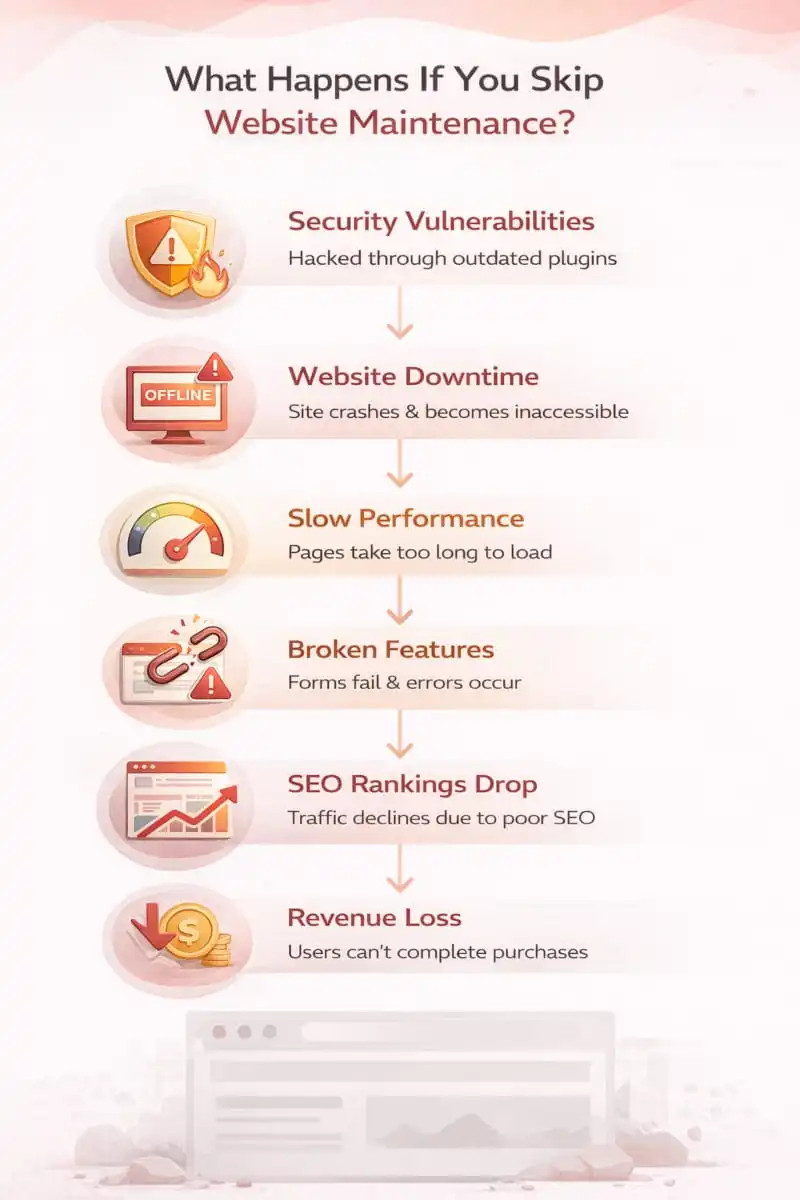
What Happens If You Skip Website Maintenance?
Skipping website maintenance might seem harmless in the short term, but over time, it can create compounding issues that hurt performance, security, search rankings, and ultimately, revenue. Understanding the risks of neglect helps businesses see why investing in website maintenance services is not just a technical decision; it’s a business-critical one.
 Security Vulnerabilities Increase
 Security Vulnerabilities Increase
Outdated software is the #1 entry point for hackers. If you delay updates to your CMS (like WordPress), plugins, or themes, you leave known vulnerabilities open. Skipping even a single update can expose your site to malware injections, data breaches, or spam attacks. For e-commerce sites, this could mean compromised payment systems or leaked customer data, making e-commerce website maintenance services especially vital.
Performance Degrades Over Time
Without regular optimization, your website becomes bloated. Old or unused plugins, large media files, and outdated scripts slow down page load times. A sluggish website leads to higher bounce rates and lower conversion rates, especially on mobile devices. Speed is also a direct SEO ranking factor, which means performance decay can push your site down in search results.
User Experience Suffers
Broken links, non-functional forms, outdated content, and inconsistent design all accumulate when maintenance is skipped. These issues damage trust and credibility. For small businesses, even a broken contact form can mean lost leads. For online retailers, a non-functional cart button equals lost sales.
SEO Rankings Drop
Search engines prioritize secure, fast, and up-to-date websites. Neglecting updates, failing to fix 404 errors, or leaving mobile issues unresolved can all lead to ranking drops. Maintenance tasks like fixing crawl errors, updating sitemaps, and refreshing content are key to long-term SEO performance. Without them, your visibility shrinks while competitors outrank you.
Recovery Costs Are Higher
Emergency fixes are almost always more expensive than proactive maintenance. A hacked website might require hours of recovery work, traffic loss during downtime, reputational damage, or even penalties from Google. By contrast, structured website support and maintenance services help catch and resolve issues before they escalate, saving time, money, and stress.
Lost Business Opportunities
Ultimately, your website is a revenue channel. Neglect can quietly erode its effectiveness. Downtime during a campaign, a broken lead form, or a poor mobile experience during a peak sales period could directly impact your bottom line. With WordPress website maintenance services or tailored plans from a trusted website maintenance agency, your business stays online, competitive, and conversion-ready.
Where IT Leadz Fits
If you want predictable upkeep and faster resolution when something breaks, a specialized website maintenance agency helps you avoid the hidden costs of downtime, security issues, and slow performance.
Explore IT Leadz’s website maintenance services to see how a structured maintenance plan can protect your site, support growth, and reduce operational friction, whether you need general coverage or deeper WordPress website maintenance services and e-commerce website maintenance services.