Building a website on WordPress is just the beginning. It’s a powerful platform, but simply installing WordPress does not guarantee that your website will rank well on search engines. While WordPress is designed to be SEO-friendly, achieving competitive rankings requires more than just the basic setup. You need the right SEO tools to optimize your website effectively.
In the competitive online landscape, ranking high on Google and other search engines can make or break your business. Without the right WordPress SEO strategy and tools, your site could remain buried on the 5th or 6th page of search results, far from the eyes of potential visitors. But don’t worry, that’s where a WordPress SEO plugin comes in.
This guide will walk you through the importance of using the right SEO plugins, how they can improve your search engine ranking, and how to get started with WordPress SEO optimization.
Best SEO Plugins for WordPress
When it comes to optimizing your WordPress website, selecting the right SEO plugin for WordPress is crucial. The plugin you choose will directly influence how effectively you can optimize your content, improve your rankings, and enhance your site’s visibility on search engines. At IT Leadz, we understand that the right WordPress SEO services start with powerful tools, let’s explore the best SEO plugins that can help elevate your website’s performance.
 What Makes the Best SEO Plugin for WordPress?
 What Makes the Best SEO Plugin for WordPress?
The best SEO plugins for WordPress provide an array of features designed to streamline the optimization process and drive better search engine results. Here’s what makes these plugins stand out and why you should consider integrating them into your website strategy:
Ease of Use
A top-tier SEO plugin should be user-friendly, with an intuitive interface and setup wizard that simplifies the optimization process for both beginners and experts alike. The easier it is to navigate, the faster you can implement essential changes.
Comprehensive Features
The plugin should include a robust set of tools that cover all aspects of on-page SEO, from optimizing meta descriptions and titles to generating XML sitemaps, breadcrumb navigation, and integrating with social media platforms. These features are essential for improving search engine rankings and enhancing the overall user experience.
Content Optimization
Effective SEO for WordPress hinges on your ability to optimize content effectively. Look for plugins that allow you to refine titles, meta descriptions, headings, and content readability. These tools ensure that your website is not only search-engine friendly but also user-friendly.
Performance Optimization
SEO is not just about content, it’s also about performance. The best SEO plugins help improve website speed and performance, both of which are critical ranking factors for search engines like Google. A fast-loading site enhances user experience and reduces bounce rates.
Regular Updates
SEO best practices evolve rapidly, and search engine algorithms are constantly changing. The most reliable SEO plugins offer regular updates to stay aligned with these shifts, ensuring your website continues to meet the latest optimization standards.
Choosing the right SEO plugin can significantly impact your WordPress SEO services, making your site more visible, user-friendly, and faster. Whether you opt for free plugins like Yoast SEO or invest in premium options like Rank Math, selecting a plugin that aligns with your website’s needs is a crucial first step in a successful SEO strategy. Let IT Leadz guide you through the setup process to ensure maximum impact on your site’s SEO performance.
Top Recommended SEO Plugins for WordPress
When it comes to choosing the right SEO plugin for your WordPress site, it’s essential to go for a tool that provides comprehensive features, easy integration, and a proven track record of success. Here are some of the top-rated SEO plugins for WordPress that can elevate your site’s SEO performance and help you achieve better rankings and visibility on search engines.
Yoast SEO
 Yoast SEO
Yoast SEO is one of the most widely used SEO plugins for WordPress, and for good reason. This plugin offers a complete SEO toolkit that simplifies the process of optimizing your site. Key features of Yoast SEO include:
- Content Analysis: Yoast provides real-time feedback on your content’s SEO performance, helping you fine-tune titles, meta descriptions, and keywords.
- Breadcrumbs: It allows for easy implementation of breadcrumb navigation, improving site structure and user experience.
- Internal Linking Suggestions: Yoast SEO automatically suggests internal links as you write, helping to improve your site’s architecture and SEO.
Yoast SEO is an excellent choice for those who want a comprehensive and user-friendly plugin that covers all essential SEO elements. It’s perfect for WordPress SEO services that aim to maximize both technical and on-page SEO.
Rank Math
Rank Math is a fast, feature-rich SEO plugin that integrates seamlessly with WordPress, providing powerful tools for optimizing your site. This plugin stands out because of its advanced features, which include:
- Automated Image SEO: Rank Math automatically adds alt text and titles to your images, ensuring search engines properly index them.
- Schema Markup: With built-in schema markup support, Rank Math helps you add rich snippets to your pages, improving visibility in search results.
- Advanced Google Analytics Integration: Rank Math integrates with Google Analytics, allowing you to track your SEO performance directly from your WordPress dashboard.
For businesses seeking an SEO plugin for WordPress that offers both advanced functionality and ease of use, Rank Math is a standout option.
All in One SEO Pack
All in One SEO Pack is a comprehensive plugin that has been trusted by WordPress users for years. It’s designed to optimize critical SEO elements such as:
- Titles and Meta Tags: Easily optimize your page and post titles, meta descriptions, and other important tags to improve SEO rankings.
- XML Sitemaps: Automatically generate and submit XML sitemaps to search engines for better indexing of your content.
- Advanced Canonical URLs: Help prevent duplicate content issues with advanced features like canonical URLs.
All in One SEO Pack is known for its simplicity and user-friendly interface, making it an ideal choice for those who want to handle SEO without the steep learning curve.
These plugins not only simplify the SEO process but also deliver measurable results that contribute directly to your site’s success. Whether you’re looking for an all-in-one solution like Yoast SEO, an advanced plugin like Rank Math, or a straightforward option like All in One SEO Pack, integrating one of these tools into your WordPress site will ensure your SEO efforts are optimized for success. For a tailored approach to your SEO needs, consider leveraging our WordPress SEO services to unlock your website’s full potential.
Comparison of Top SEO Plugins for WordPress
Here’s a comparison table of the top contenders for WordPress SEO plugins: Yoast SEO, Rank Math, and All in One SEO (AIOSEO).
| Feature | Yoast SEO | Rank Math | All in One SEO (AIOSEO) |
|---|---|---|---|
| Best For | Reliability & Content Writers | Advanced Users & Agencies | Beginners & Business Owners |
| Ease of Use | Very Easy (Traffic Light System) | Moderate (Feature-rich Dashboard) | Easy (Streamlined Setup) |
| Free Version | Basic (1 Focus Keyword) | Excellent (5 Focus Keywords) | Good (Basic On-page SEO) |
| Keyword Optimization | 1 Focus Keyword (Free) | Up to 5 Keywords (Free) | 1 Focus Keyword (Free) |
| Readability Analysis | Industry Leading | Good (Integrated Checklist) | Basic (TruSEO Score) |
| Schema Markup | Basic (Blocks only) | Advanced (Built-in Generator) | Smart (Next-Gen Generator) |
| Redirect Manager | Premium Only | Free | Premium Only |
| Local SEO | Paid Extension | Included (Free) | Premium Only |
| Performance | Heavier code footprint | Very Lightweight | Moderate |
| Best Unique Feature | Readability & Internal Linking | Built-in Rank Tracker & AI | Link Assistant & Site Audit |
Free SEO Plugins for WordPress
Not every WordPress website needs to invest in premium SEO plugins. Several high-quality free SEO plugins for WordPress can help you optimize your site without stretching your budget. These free tools offer a range of essential features, allowing you to boost your site’s visibility and improve rankings without the need for expensive plans.
Best Free SEO Plugin Options for WordPress
If you’re looking to optimize your site without the cost of a premium plugin, here are some great free WordPress SEO plugins to consider:
Rank Math (Free Version)
This free, all-in-one SEO plugin offers a robust set of features that rivals many premium tools. With Rank Math, you can track keywords, implement schema markup, and optimize your content directly within WordPress. It also provides a setup wizard to guide you through the installation process and get your site fully optimized from the start.
Yoast SEO (Free Version)
While the premium version of Yoast offers more advanced features, the free version is still one of the most reliable SEO plugins for WordPress. It covers essential on-page SEO tasks, such as optimizing titles, meta descriptions, and readability, making it a great starting point for those new to SEO.
How to Optimize Your Site with Free SEO Plugins
Using free SEO plugins for WordPress is a cost-effective way to boost your site’s rankings. Here’s how to make the most out of these tools:
- Install the Plugin: Start by choosing a free plugin that suits your website’s needs, such as Rank Math or Yoast SEO. You can easily install these plugins through the WordPress plugin directory.
- Optimize Content: Once the plugin is installed, take advantage of its content optimization features. Focus on enhancing your page titles, meta descriptions, and content readability. These elements are crucial for SEO and user engagement.
- Create an XML Sitemap: Many free plugins, including Rank Math and Yoast, automatically generate an XML sitemap for your site. This helps search engines index your content more efficiently, which can lead to better rankings over time.
- Focus on Local SEO: Some free SEO plugins also offer basic features for local SEO, such as integrating your business’s name, address, and phone number (NAP) into your website’s structure. Optimizing for local search results ensures that your business is visible to local customers when they search for relevant services.
Even with free plugins, adhering to SEO best practices for on-page optimization can lead to noticeable improvements in your website’s search rankings. By following these steps and using a free SEO plugin, you can maximize your website’s potential and drive more traffic to your site, without the need for costly premium plans.
At IT Leadz, we offer expert WordPress SEO services to help you make the most of your chosen SEO tools, whether free or premium, ensuring that your site is optimized for success. Let us help you take your website’s SEO to the next level.
Local SEO Plugins for WordPress
For businesses aiming to attract local customers, optimizing your website for local search results is crucial. Local SEO plugins for WordPress are powerful tools that help ensure your site is properly optimized for local searches, driving more foot traffic, leads, and customers from your surrounding area. At IT Leadz, we understand the importance of targeting local searchers effectively, and we specialize in providing tailored SEO services for WordPress that can elevate your local visibility.
How Local SEO Plugins Enhance Your WordPress Site
 H
HLocal SEO plugins offer several key features that can boost your visibility in local search results and make it easier for nearby customers to find your business:
Optimizing Your Contact Information
Plugins like Yoast Local SEO help ensure that your business’s Name, Address, and Phone number (NAP) are correctly formatted and consistent across your website. This is important for local SEO because search engines use this information to match users with relevant local businesses.
Integrating Google Maps
Many local SEO plugins allow you to embed a Google Maps widget on your contact or about pages. This makes it easier for local customers to find your business, especially if you have a physical storefront. A well-placed map can also improve user experience, keeping visitors on your site longer.
Optimizing for Local Keywords
Local SEO plugins assist you in targeting location-based keywords within your meta tags, headings, and content. By focusing on local terms, such as the city or neighborhood your business serves, you increase your site’s visibility in local search results, ultimately driving more relevant traffic to your website.
Best Local SEO Plugin for WordPress
When it comes to local SEO, Yoast Local SEO stands out as one of the best plugins to optimize your WordPress site for local search. It offers a host of powerful features, including:
Schema Markup for Local Businesses
Yoast Local SEO helps you implement structured data (schema markup) specifically tailored for local businesses. This enables search engines to understand your business’s location, services, and contact details, improving the chances of appearing in local search results and Google’s local pack.
Customizable Google Maps Widget
This plugin provides an easy way to embed a Google Maps widget on your website, giving customers an interactive and seamless way to find your business location.
Enhanced Local Search Performance
With Yoast Local SEO, you can further improve your site’s visibility by ensuring your structured data is in line with Google’s best practices for local search. This optimization improves your chances of appearing in Google’s local search results and maps.
Local SEO is an essential part of any business that serves a specific geographic area, and using the right plugin is crucial for ensuring that your business is easily discoverable by local customers. By integrating Yoast Local SEO or a similar plugin into your WordPress site, you can enhance your local search rankings and increase foot traffic, helping you grow your customer base.
If you’re looking to enhance your local SEO strategy further, IT Leadz’s WordPress SEO services can provide you with customized solutions to maximize your local search presence and reach your target audience effectively. Let us help you optimize your site for success in local search results.
SEO Optimization Plugins for WordPress
Effective SEO optimization is essential for improving your website’s overall performance and visibility in search engine results. SEO optimization plugins for WordPress help manage everything from basic on-page SEO to advanced optimization tactics, ensuring your site is fully optimized for both search engines and users. At IT Leadz, we specialize in WordPress SEO services, offering tailored strategies to boost your website’s rankings and overall performance.
Why SEO Optimization Plugins Matter
 Why SEO Optimization Plugins Matter
SEO optimization plugins are critical for a variety of reasons, as they ensure your site is not only search-engine friendly but also user-friendly. Here’s why these plugins are indispensable:
Improve Your Site’s Speed
Website speed is a key ranking factor for search engines like Google. Fast-loading websites rank higher in search results, which means faster load times can directly lead to better rankings. SEO optimization plugins can help reduce page load times by compressing images, minifying scripts, and caching content. Plugins like WP Rocket or Autoptimize specialize in performance optimization, improving page speed and boosting SEO.
Enhance User Experience
A well-optimized website ensures a smoother browsing experience for users. With SEO optimization plugins, you can streamline your site’s navigation, improve mobile responsiveness, and ensure that your pages load quickly. A positive user experience reduces bounce rates and encourages users to engage with your content. This, in turn, signals to search engines that your site is valuable, which can help improve your rankings.
Improve Content Visibility
SEO optimization plugins help ensure that your content is structured correctly, making it easier for search engines to crawl and index your pages. These plugins can assist with optimizing headings, meta tags, alt attributes for images, and structured data. By ensuring that your content is properly optimized, these plugins increase the likelihood of your website ranking higher in search engine results and improving visibility.
How to Improve Your WordPress Website’s SEO Performance
To maximize your website’s SEO performance, follow these steps:
- Optimize Your Site Speed: Install an SEO optimization plugin like WP Rocket or Autoptimize to compress images, minify CSS/JS files, and improve caching.
- Focus on User Experience: Ensure that your website is mobile-friendly, easy to navigate, and fast-loading. A positive user experience can help lower bounce rates and increase engagement.
- Optimize Content: Use your SEO optimization plugin to improve meta tags, headings, alt attributes for images, and structured data. This ensures your content is search-engine ready and user-friendly.
- Leverage Caching: Use caching plugins to store static versions of your pages, reducing the time it takes to load your website. This improves both user experience and SEO.
- Monitor SEO Performance: Keep track of your website’s SEO performance with built-in analytics tools in your plugin or through Google Analytics integration to make data-driven decisions.
By implementing these strategies and leveraging SEO optimization plugins, you can significantly improve your website’s performance, user experience, and rankings. For those who want to take their SEO to the next level, IT Leadz’s WordPress SEO services offer customized solutions that ensure your site is fully optimized for success. Let us help you boost your site’s SEO and achieve your business goals.
Best SEO Optimization Plugins for WordPress
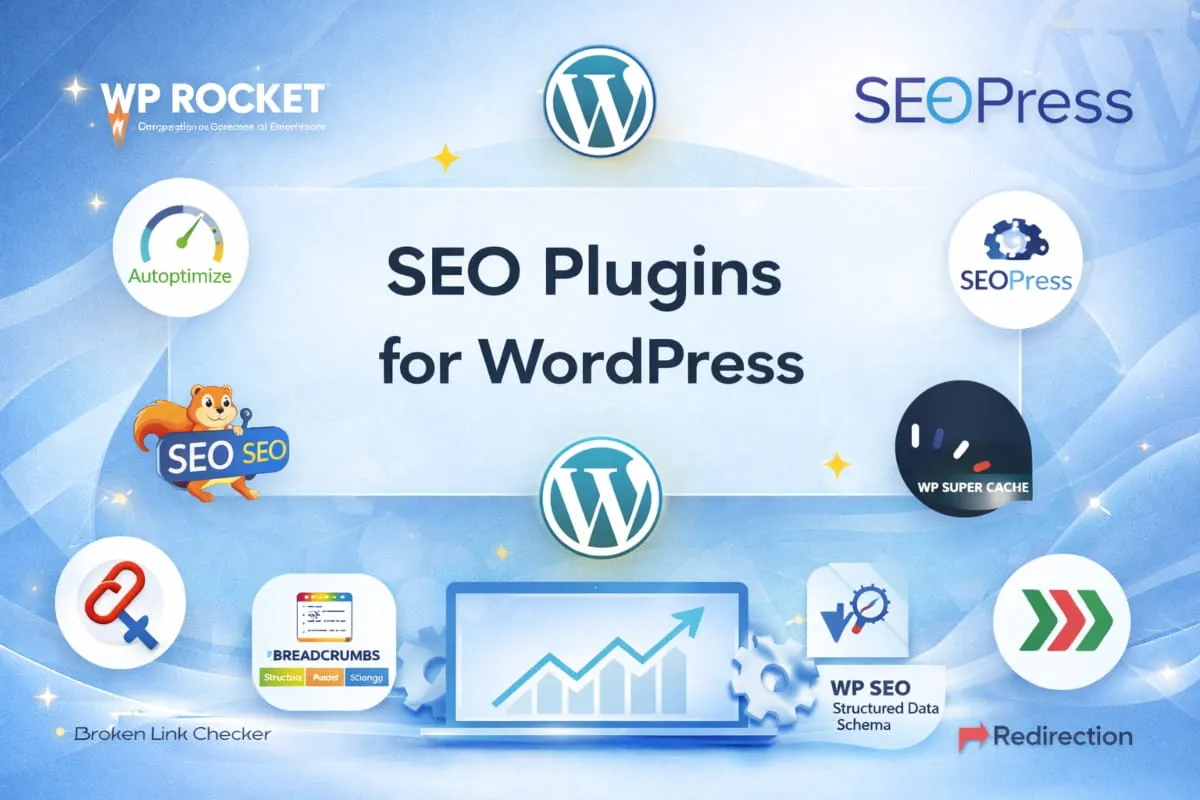
When it comes to SEO optimization, several high-performing plugins offer a range of powerful features to help improve your website’s search engine performance. While Rank Math, Yoast, and All in One SEO are some of the most popular choices, many other plugins can also provide excellent SEO results. Here are the top 10 SEO optimization plugins for WordPress, excluding the mainstream options:
1. WP Rocket
WP Rocket is a premium plugin known for its performance-enhancing capabilities. It focuses on improving your website’s speed, which is a critical ranking factor for search engines.
Key features include:
- Caching to speed up page loading times.
- Lazy loading of images to improve user experience and site performance.
- Database optimization to reduce the size of your WordPress database.
- Preloading cache and GZIP compression for faster load times.
WP Rocket is ideal for those who want a comprehensive performance optimization tool that also boosts SEO rankings by improving site speed.
2. Autoptimize
 2. Autoptimize
Autoptimize is a free plugin that focuses on optimizing your site’s HTML, CSS, and JavaScript, improving page load times by reducing file sizes. This lightweight plugin is perfect for improving website performance and speed without the need for premium plans.
Key Features:
- Minifies and concatenates CSS, JavaScript, and HTML files.
- Improves Google PageSpeed Insights scores.
- Integrates with other caching plugins for enhanced performance.
Autoptimize is a great option for WordPress users looking for a free and easy-to-use solution for basic optimization needs.
3. SEOPress
SEOPress is an all-in-one SEO plugin that provides both free and premium versions, offering powerful tools to optimize your WordPress site. It’s known for its simplicity and ease of use.
Key Features:
- On-page SEO optimization tools (titles, meta descriptions, schema markup).
- XML and HTML sitemaps for better search engine crawling.
- Social media integration for sharing optimization.
- Google Analytics integration for performance tracking.
SEOPress is a solid choice for those who want a versatile SEO plugin with powerful features and an intuitive user interface.
6. Squirrly SEO
Squirrly SEO is a great plugin for beginners and advanced users alike. It offers advanced SEO tools but presents them in an easy-to-understand format, making it a great choice for those new to SEO.
Key Features:
- Real-time SEO recommendations as you create content.
- Content audit and keyword analysis for better optimization.
- Google Analytics integration for performance monitoring.
- SEO audits to track and improve your site’s SEO health.
Squirrly is perfect for users who want a plugin that combines ease of use with powerful features for improving site performance.
5. WP Super Cache
WP Super Cache is a free caching plugin that helps improve site speed, which in turn boosts SEO rankings. It generates static HTML files from your dynamic WordPress blog, resulting in faster loading times for your users.
Key Features:
- Caching of static HTML pages for faster page load.
- Support for CDN integration for even faster site delivery.
- Simple settings and easy configuration for beginners.
This plugin is a great option for anyone looking to improve site speed without investing in premium performance optimization tools.
6. Broken Link Checker
Broken links can hurt your SEO performance by affecting user experience and causing search engines to crawl errors. Broken Link Checker helps you identify and fix broken links on your website, ensuring a smoother experience for both users and search engines.
Key Features:
- Automatically detects broken links on your website.
- Sends email notifications for broken links.
- Allows you to edit links directly from the plugin dashboard.
By keeping your site free from broken links, you improve your site’s user experience and SEO health.
7. WP SEO Structured Data Schema
WP SEO Structured Data Schema focuses specifically on structured data and schema markup, which helps search engines understand the context of your content and display it more effectively in search results.
Key Features:
- Automatic integration of schema markup for articles, events, products, and more.
- Helps improve visibility in search results with rich snippets.
- Fully customizable schema types for various content.
For websites focused on enhancing their structured data and appearing in rich snippets, this plugin is a must-have.
8. Redirection
Redirection is a plugin that helps you manage 301 redirects and track 404 errors, ensuring that users and search engines are directed to the correct pages. Broken or missing pages can hurt your SEO, and this plugin helps maintain your site’s SEO health.
Key Features:
- Easily set up 301 redirects to avoid broken links.
- Monitor 404 errors to fix issues promptly.
- Import/export redirection rules for ease of management.
Maintaining proper redirects and resolving 404 errors can greatly enhance your site’s SEO performance and overall user experience.
These SEO optimization plugins for WordPress provide a variety of powerful tools to help improve your website’s SEO performance, from enhancing site speed to optimizing content structure. Whether you’re looking for a comprehensive all-in-one solution or specific tools to target performance and schema markup, these plugins offer plenty of options to suit every WordPress site.
For businesses seeking professional SEO guidance, IT Leadz’s WordPress SEO services can help you maximize the potential of your site with tailored optimization strategies designed for long-term success. Let us help you improve your rankings, enhance user experience, and drive more organic traffic to your website.
Can You Rank Without a WordPress SEO Plugin?
The short answer is yes, but with certain caveats. While SEO plugins undoubtedly make the process smoother and faster, it’s still possible to achieve solid search engine rankings without them, especially if you’re willing to dive into manual optimization methods.
However, if you have the time and expertise to optimize your site manually, ranking without a plugin is absolutely achievable. Manual optimization methods, such as optimizing meta tags, improving site speed, and adding schema markup, can still help you achieve strong rankings and drive organic traffic to your WordPress site.
When setting up a WordPress website, the first step for many is installing an SEO plugin. After all, tools like Yoast SEO, Rank Math, and All in One SEO (AIOSEO) make optimization easy, offering automated features like meta tags, sitemaps, and readability analysis.
In this section, we’ll explore the pros and cons of ranking without a plugin, discuss the manual optimization techniques you can employ, and help you understand when a plugin is necessary and when you can go plugin-free.
Pros and Cons of Ranking Without an SEO Plugin
Pros:
- Full Control Over Code: Without an SEO plugin, you’re handling every aspect of optimization yourself. This means you have total control over your website’s metadata, titles, and schema markup, allowing for a more customized approach.
- Less Overhead: SEO plugins can add extra code to your website, which can impact page speed. By avoiding plugins, you’re reducing the chances of bloat, which could slightly improve loading times.
- Learn and Understand SEO: Without relying on plugins, you will gain a deeper understanding of SEO principles and how they work. You’ll be forced to learn about things like meta tags, schema markup, and Google Search Console, which will improve your overall SEO knowledge.
Cons:
- Time-Consuming: Manually adding SEO elements to each page, like meta tags, structured data, and title tags, can be time-consuming. The advantage of plugins is that they automate these tasks for you, saving time and effort.
- Risk of Human Error: When optimizing manually, there’s always the risk of missing an important SEO element, such as forgetting to add a title tag, description, or alt text for images. Plugins automate these steps and provide reminders, reducing the risk of errors.
- Lack of Advanced Features: SEO plugins offer advanced features, such as content analysis, readability checks, and automatic XML sitemaps, that can help you quickly optimize your content. Without a plugin, you’ll need to manually implement these features, which could be overwhelming for those new to SEO.
How to Achieve SEO Without Plugins
While plugins offer convenience, achieving SEO without a plugin is possible with some manual effort. Here are some key steps to help you optimize your WordPress website without relying on an SEO plugin:
1. Title and Meta Tags Optimization
One of the most basic yet crucial aspects of SEO is ensuring your pages have optimized title tags and meta descriptions. These elements tell search engines and users what your page is about. Here’s how to do it manually:
- Title Tags: These should be concise, descriptive, and include the primary keyword. Ideally, title tags should be between 50 and 60 characters.
- Meta Descriptions: While not a direct ranking factor, meta descriptions impact click-through rates. Write compelling descriptions (under 160 characters) that summarize the content and encourage users to click.
You can add title tags and meta descriptions by editing the HTML in your theme or by using WordPress’s native Custom Fields feature. For pages and posts, add these elements directly into the <head> section of your theme’s header.php file.
2. Speed Optimization
Website speed is a critical ranking factor. Without an SEO plugin, you’ll need to rely on other methods for speed optimization:
- Image Optimization: Use external tools like TinyPNG or ImageOptim to compress images before uploading them to your site. Large image files can slow down your site, affecting user experience and rankings.
- Minify CSS, JavaScript, and HTML: Manually compress your code to reduce the file size, which helps your website load faster. This can be done using tools like HTML Minifier or CSS Minifier.
- Leverage Browser Caching: Set proper caching headers for your website. This will help your site load faster for returning visitors. You can implement this by modifying your .htaccess file or using server-side configurations.
3. Structured Data (Schema Markup)
Schema markup helps search engines understand your content better, leading to enhanced search results with rich snippets (e.g., star ratings, product prices). Implementing schema manually requires adding structured data in JSON-LD format.
For example, here’s a basic JSON-LD for a blog post:
{
  "@context": "https://schema.org",
  "@type": "BlogPosting",
  "headline": "Your Blog Post Title",
  "description": "A short description",
  "author": {
    "@type": "Person",
    "name": "Author Name"
  },
  "datePublished": "2022-12-25",
  "image": "URL of image"
}
You can add this code to the <head> section of your theme or on individual pages where schema is relevant.
4. Manual XML Sitemap
XML sitemaps are essential for search engines to crawl and index your site. Without a plugin, you’ll need to manually generate an XML sitemap. There are online tools like XML-sitemaps.com that can generate a sitemap for your website. Once created, upload it to the root directory of your WordPress site and submit it via Google Search Console.
5. Internal Linking
Internal linking helps search engines crawl your website more effectively and also provides a better user experience by guiding visitors to related content. Without plugins, you will need to add internal links between related pages and posts manually. When writing content, ensure that each post or page links to other relevant content within your site, helping both users and search engines navigate your website.
6. Mobile Optimization
Since Google uses mobile-first indexing, ensuring that your WordPress site is responsive is crucial. You can manually optimize your site by using a mobile-friendly theme or customizing your theme’s CSS to make it responsive.
When Should You Use an SEO Plugin?
Although it is possible to rank without an SEO plugin, there are cases where using one is essential:
- For Beginners: If you’re new to SEO, plugins like Yoast SEO or Rank Math will save you time and effort by automating many tedious tasks.
- For Teams: If you have multiple contributors or a team working on content, plugins like Yoast SEO offer features like readability analysis, which ensure content consistency and optimization across the board.
- For Advanced Features: For websites needing complex configurations, like schema markup, social media integration, or advanced redirect management, plugins like Rank Math or Yoast SEO offer these features with ease.
Ready to get started on your WordPress SEO journey? Whether you choose to use a plugin or go plugin-free, optimizing your website for search engines is essential to improving visibility and driving traffic. If you’d like a head start, consider getting a Free WordPress SEO Audit to identify areas of improvement for your site’s SEO.
How to Install SEO Plugins for WordPress
Installing an SEO plugin on your WordPress site is a straightforward process. However, it’s essential to follow each step carefully to ensure the plugin is properly set up and optimized for your website. With the right SEO plugin, you can significantly improve your website’s visibility and performance in search engines. Below is a simple, step-by-step guide for installing and configuring your chosen SEO plugin.
Step-by-Step Guide for Installing SEO Plugins
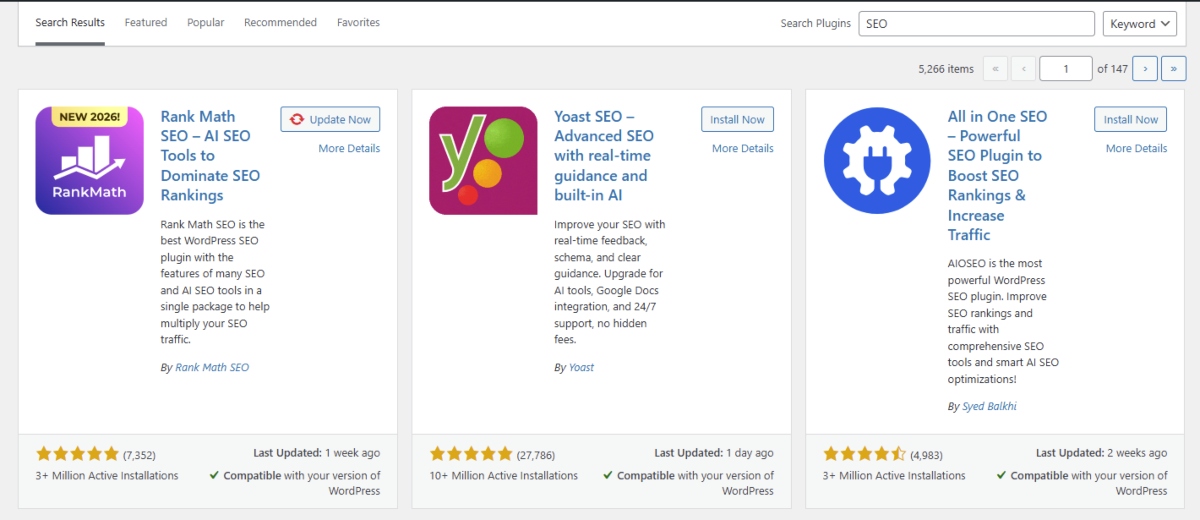
Go to Plugins > Add New in Your WordPress Dashboard
- Start by logging into your WordPress admin panel.
- In the left sidebar, navigate to the Plugins menu and click on Add New. This will open the page where you can search for and install new plugins.
Search for Your Desired SEO Plugin
- In the search bar located at the top-right corner, type in the name of the SEO plugin you want to install (e.g., Yoast SEO, Rank Math, or any other SEO plugin of your choice).
- The search results will display the plugin you’re looking for. Make sure to choose the correct plugin from a reputable source, usually verified by WordPress.
Click Install and Then Activate
- Once you find the desired plugin, click the Install Now button next to it.
- After the installation is complete, the Install Now button will change to Activate. Click Activate to enable the plugin on your website.
Configure the Plugin Settings According to Your Website’s Needs
- After activation, most SEO plugins will take you to a setup wizard that helps you configure the basic settings for the plugin.
- Follow the prompts to customize the plugin’s settings according to your website’s needs. For example, you may be asked to specify your website’s type (business, blog, etc.) or to integrate your site with Google Search Console.
Take your time to review all the settings and options available, adjusting them to align with your SEO goals.
By following these simple steps, you’ll have your SEO plugin for WordPress up and running in no time. Whether you’re using Yoast SEO, Rank Math, or another plugin, it’s important to configure the settings to ensure optimal performance. For a seamless, results-driven SEO strategy, consider pairing your plugin with IT Leadz’s WordPress SEO services to help take your site’s optimization to the next level. Let us help you unlock your website’s full SEO potential.
Quick Checklist for WordPress SEO Optimization
To ensure that your WordPress website is fully optimized for search engines and users, follow this quick checklist to keep your site in top SEO shape:
- Install a Reliable SEO Plugin: Choose a trusted SEO plugin like Yoast SEO, Rank Math, or others to handle the majority of your on-page SEO tasks.
- Optimize Your Meta Tags: Make sure your meta titles and meta descriptions are clear, engaging, and keyword-optimized to improve click-through rates from search engine results.
- Use an XML Sitemap for Search Engine Indexing: Generate and submit an XML sitemap to search engines to ensure that all your pages are crawled and indexed efficiently.
- Optimize Images to Enhance Site Speed: Compress and optimize your images to reduce file sizes without sacrificing quality. This improves page load speed, a key ranking factor for SEO.
- Implement Schema Markup for Rich Snippets: Add schema markup to your pages and posts to help search engines better understand your content and display it as rich snippets in search results.
- Use Local SEO Features to Target Regional Audiences: If applicable, use local SEO features like NAP (Name, Address, Phone Number) consistency, Google Maps integration, and location-based keywords to target local customers.
- Regularly Update Your SEO Plugin: Keep your SEO plugin up to date to ensure you’re taking advantage of the latest features, optimizations, and compliance with search engine algorithm changes.
By following this checklist, you can ensure that your WordPress website is optimized for higher rankings, better user experience, and improved visibility in search engine results. For a more customized approach, IT Leadz’s WordPress SEO services are here to help take your optimization to the next level. Let us guide you toward SEO success.
Plugins are tools, but Strategy is King
While plugins can show you the way, real rankings come from expert configuration and a tailored SEO strategy. Let IT Leadz’s WordPress SEO Services help you unlock the full potential of your website. Reach out today for a Free WordPress SEO Audit and take your site to the next level!
Conclusion
Optimizing your WordPress website for SEO is essential for improving visibility, attracting organic traffic, and staying ahead of competitors. By implementing the right plugins, optimizing your content, and following best SEO practices, you can significantly boost your website’s performance in search engine results.
At IT Leadz, we offer expert WordPress SEO services tailored to your unique needs. Whether you’re starting from scratch or looking to refine your existing SEO strategy, we’re here to help you achieve lasting results. Let us take your website’s SEO to the next level,contact us today for a Free WordPress SEO Audit!
Frequently Asked Questions (FAQ’s)
What is WordPress SEO?
WordPress SEO refers to the process of optimizing a WordPress website to improve its visibility and rankings on search engines. It involves techniques such as optimizing content, using SEO plugins, improving site speed, and implementing schema markup to enhance user experience and search engine indexing.
How do SEO plugins help WordPress?
SEO plugins for WordPress help optimize your site by providing tools for on-page SEO, such as generating meta tags, creating XML sitemaps, and analyzing content for keywords. These plugins simplify SEO tasks and improve your site’s overall search engine performance by ensuring best practices are followed.
Why is site speed important for SEO?
Site speed is a critical factor in SEO as search engines, particularly Google, prioritize fast-loading websites in their rankings. A fast site improves user experience, reduces bounce rates, and enhances overall engagement, all of which positively impact your search engine rankings.
What is schema markup, and how does it affect SEO?
Schema markup is a type of structured data that helps search engines understand the content on your website. By adding schema markup, you increase the chances of your content appearing as rich snippets in search results, which can improve visibility and click-through rates.
How can I improve my WordPress SEO without a plugin?
To improve WordPress SEO without a plugin, focus on optimizing your content with relevant keywords, improving page load speed, and using proper HTML tags for headings and meta descriptions. Additionally, creating high-quality content that answers user queries and building backlinks can also boost SEO.
What are backlinks, and why are they important for SEO?
Backlinks are links from other websites pointing to your site. They are important for SEO because they signal to search engines that your content is valuable and trustworthy. High-quality backlinks can improve your site’s authority and help it rank higher in search results.
What are meta descriptions, and how do they impact SEO?
Meta descriptions are short summaries of a page’s content, displayed in search engine results below the page title. A well-written meta description can improve click-through rates by providing a compelling reason for users to visit your site. However, it does not directly affect rankings.
What is an XML sitemap, and how does it help SEO?
An XML sitemap is a file that lists all the pages on your website, helping search engines crawl and index your content more efficiently. Submitting an XML sitemap to search engines ensures that all your pages are discovered and included in search engine indexes.
How does mobile optimization affect WordPress SEO?
Mobile optimization is crucial for SEO because search engines like Google use mobile-first indexing, meaning they prioritize the mobile version of a site for rankings. A mobile-friendly website improves user experience, reduces bounce rates, and helps your site rank better on search engines.
What is local SEO, and how can I optimize my WordPress site for it?
Local SEO involves optimizing your website to appear in local search results, helping businesses attract customers in their specific geographic area. To optimize your WordPress site for local SEO, include location-based keywords, ensure NAP (Name, Address, Phone) consistency, and add local business schema markup.