If your pages aren’t ranking, the problem is rarely your domain authority or your backlink count. Most of the time, it comes down to what’s actually on the page, and whether Google can clearly understand it.
That’s exactly where on-page SEO tools come in.
These tools analyze your content, structure, and HTML elements against what Google’s top-ranking pages are doing, and then tell you precisely what needs to change. No guesswork, no manual research, no wasted hours wondering why a competitor is outranking you on a keyword you’ve been targeting for months.
Whether you’re a blogger publishing your first article, a business owner trying to drive organic traffic, or an SEO professional managing multiple client sites, the right on-page SEO tool gives you a clear, actionable picture of where your page stands and what it takes to move it higher.
This guide covers everything you need to know, from what these tools actually do to the best free and paid options available in 2026, to how to use them effectively regardless of your experience level or budget. By the end, you’ll know exactly which tool fits your situation and how to start getting results with it.
What Are On-Page SEO Tools? (And Why They Matter)
If you want your website to rank higher on Google, on-page SEO is where it all starts. And on-page SEO tools are what make that process faster, smarter, and more effective.
On Page SEO Tools Explained
On-page SEO tools are software or web-based applications that help you analyze, optimize, and improve the content and HTML elements of individual web pages to improve their ranking in search engines.
These tools look at things like:
- Keyword usage and placement
- Title tags and meta descriptions
- Heading structure (H1, H2, H3)
- Content quality and readability
- Internal linking
- Image alt text
- Page speed signals
In short, they tell you what’s wrong with your page and exactly how to fix it.
How On-Page SEO Tools Differ from Technical & Off-Page Tools
People often confuse the three types of SEO tools. Here’s a quick breakdown:
| Type | Focus |
|---|---|
| On-Page SEO Tools | Content, keywords, HTML tags, page structure |
| Technical SEO Tools | Site speed, crawlability, indexing, Core Web Vitals |
| Off-Page SEO Tools | Backlinks, domain authority, brand mentions |
On-page tools focus entirely on what’s on the page itself, the content and code that you fully control.
Why Every Website Needs an On-Page SEO Tool
Without an on-page SEO tool, you’re essentially guessing. You might write great content, but still miss critical optimization signals that Google looks for.
A good on-page SEO tool removes the guesswork. It gives you a clear, actionable roadmap to improve your page’s visibility, whether you’re a blogger, a business owner, or an SEO professional.
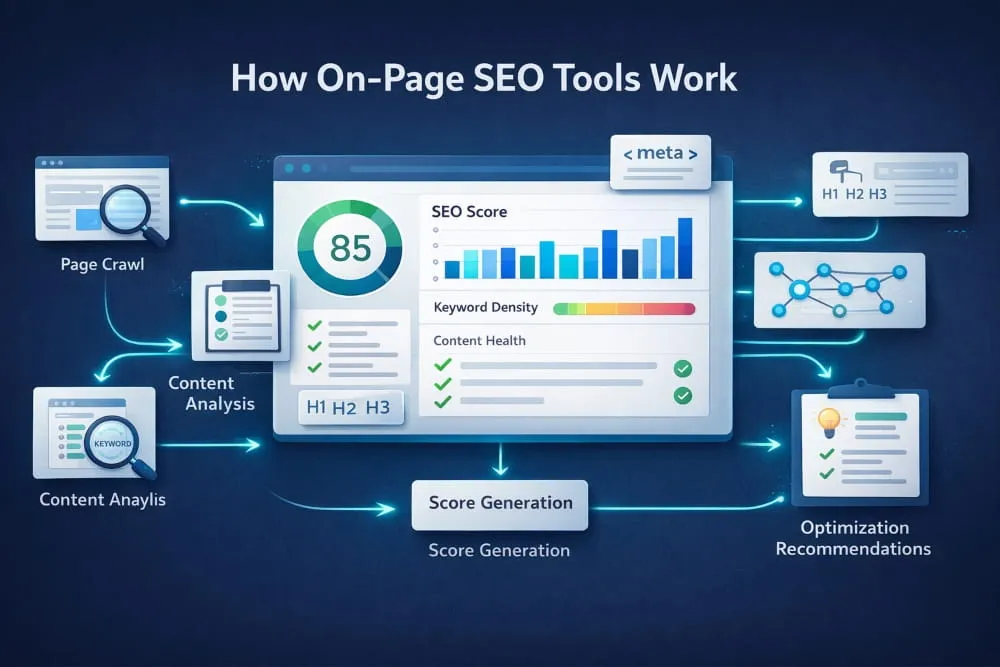
How On-Page SEO Tools Work: Core Features to Look For
Not all on-page SEO tools are built the same. Here are the key features that separate great tools from average ones.
Content Analysis & Keyword Optimization
The core function of any on-page SEO tool is to analyze your content around a target keyword. It checks:
- Whether your keyword appears in the right places (title, H1, first paragraph, meta description)
- Keyword density, not too high, not too low
- Related keywords and semantic terms you should include
- Content length compared to top-ranking pages
On-Page SEO Audit Capabilities
An on-page SEO audit goes deeper than just keyword checks. It scans your entire page for SEO issues, including broken links, missing alt text, duplicate content signals, thin content warnings, and poor internal linking. Think of it as a full health checkup for your page.
Real-Time On-Page SEO Checking & Scoring
Many tools now offer a live SEO score as you write or edit content. This is especially useful in content editors like WordPress. You get instant feedback, green means good, red means fix it, without having to run a separate audit every time.
SERP Monitoring & AI-Powered Suggestions
Advanced tools connect your on-page data with real SERP (Search Engine Results Page) data. They show you what the top-ranking pages are doing and suggest specific improvements based on what’s actually working in Google’s results today.
On-Page SEO Testing & Reporting Features
For agencies and teams, reporting matters. Look for tools that let you generate white-label reports, track optimization progress over time, and compare your page’s performance before and after changes.
Best On-Page SEO Tools in 2026 (Free & Paid)
Here are the most reliable and widely used on-page SEO tools available today.
Best Overall On-Page SEO Tools
1. Surfer SEO Surfer is one of the most powerful on-page optimization tools available. It analyzes your content against the top 20 ranking pages and gives you a detailed content score with keyword suggestions, heading recommendations, and Word count targets. Ideal for content writers and SEO professionals.
2. Semrush On-Page SEO Checker Semrush offers a dedicated on-page SEO checker that audits your pages and provides prioritized recommendations based on your target keywords and competition. It covers everything from content quality to technical signals.
3. Ahrefs Site Audit + SEO Toolbar Ahrefs combines a powerful site audit tool with a browser toolbar that gives you instant on-page SEO data for any URL you visit, including title tags, Word count, metadata, and heading structure.
4. Yoast SEO (WordPress) For WordPress users, Yoast is the go-to on-page SEO plugin. It provides real-time scoring for keyword optimization, readability, and technical elements such as canonical tags and XML sitemaps.
5. Rank Math (WordPress) Rank Math is a strong Yoast alternative that offers more features in its free version, including schema markup, multi-keyword optimization, and a built-in content AI module.
Best On-Page SEO Checker Tools
- Screaming Frog SEO Spider, a desktop tool for bulk on-page audits across hundreds of URLs
- SE Ranking, Clean, beginner-friendly on-page checker with a clear scoring system
- Mangools KWFinder + SiteProfiler, Good for small businesses needing basic on-page insights
- Seobility, a straightforward on-page SEO checker with a free tier
Best On-Page SEO Audit Tools
- Semrush Site Audit is an industry standard for comprehensive page-level audits
- Ahrefs Site Audit, Excellent crawl-based audit with clean visual reports
- Screaming Frog, Best for technical on-page audits at scale
- Sitechecker, a user-friendly audit tool, is great for beginners and small business owners
Best AI-Powered On-Page SEO Tools
- Surfer SEO, AI content scoring, and real-time SERP-based suggestions
- Clearscope is an enterprise-grade AI content optimization focused on topical relevance
- Frase.io, AI-powered content briefs, and on-page optimization in one tool
- NeuronWriter, Affordable AI on-page optimizer with strong NLP-based recommendations
Best On-Page SEO Tools for Small to Mid-Sized Businesses 2026
| Tool | Best For | Free Plan? | Starting Price |
|---|---|---|---|
| Rank Math | WordPress sites | Yes | Free / $6.99/mo |
| Seobility | Beginners | Yes | Free / $50/mo |
| SE Ranking | Growing businesses | Trial | $65/mo |
| Surfer SEO | Content-heavy sites | No | $89/mo |
| Semrush | Full SEO suite | Limited | $139.95/mo |
Free On-Page SEO Tools: Full Breakdown
Budget shouldn’t stop you from optimizing your pages. There are several genuinely useful free on-page SEO tools available.
Top Free On-Page SEO Analysis Tools
Google Search Console is the most important free tool for any website. It shows you which keywords your pages rank for, click-through rates, and indexing issues. Not a traditional on-page tool, but essential for data-driven optimization.
Rank Math (Free Version) is arguably the best free on-page SEO plugin for WordPress. Covers keyword optimization, schema, readability, and more at zero cost.
Seobility Free Plan allows you to run a full on-page SEO audit on one website with up to 1,000 pages crawled per month.
Google’s Rich Results Test checks the structured data on your page to ensure Google can correctly read your schema markup.
AnswerThePublic (Free Tier) helps you find the questions your audience is searching for, so you can structure content around real user intent.
Free On-Page SEO Checkers Worth Using
- SmallSEOTools On-Page Checker, Quick, free page analysis with basic scoring
- SEOquake Browser Extension, Free on-page data overlay for any website you visit
- MozBar (Free Version) shows on-page elements and authority metrics in your browser
- Woorank Free Report: One-time free on-page SEO report per website
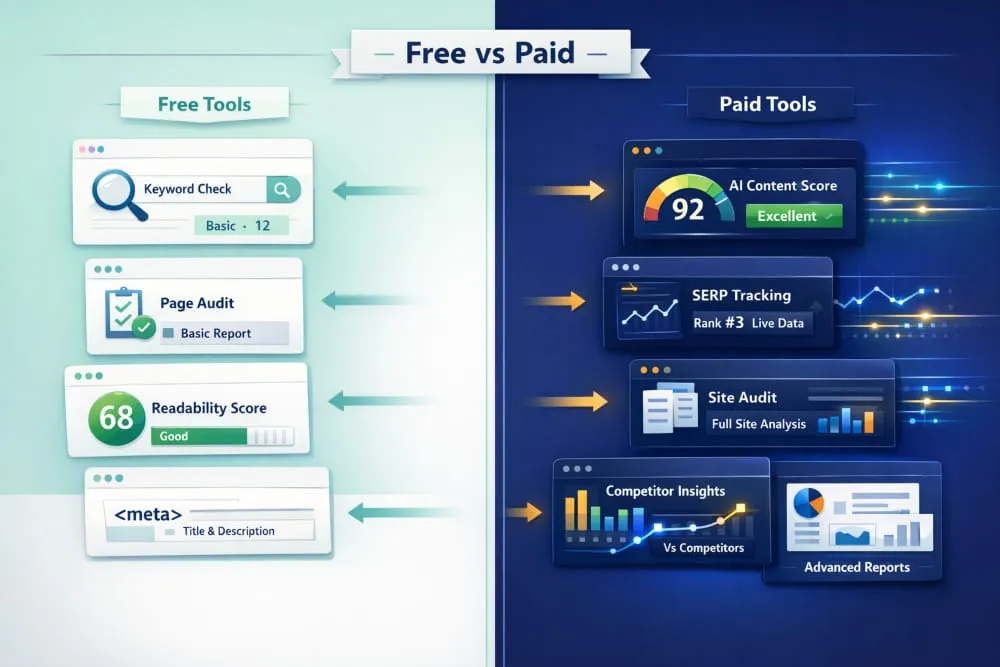
Limitations of Free vs. Paid On-Page SEO Tools
Free tools are great for getting started, but they have real limitations:
- Fewer keywords tracked per page
- No competitor comparison in most cases
- Limited crawl depth for audits
- No AI-driven suggestions or content scoring
- Basic reporting without historical data
If SEO is a serious priority for your business, investing in a paid tool will deliver significantly better results and save you hours of manual work.
AI-Powered On-Page SEO Tools: The New Standard
AI has fundamentally changed how on-page SEO optimization works. The tools that used to require hours of manual research now deliver intelligent recommendations in minutes.
How AI Is Changing On-Page SEO Optimization
Traditional on-page SEO tools followed fixed rules: check keyword density, count words, and flag missing meta tags. AI-powered tools go much further. They analyze patterns across thousands of top-ranking pages, understand semantic relationships between topics, and give you content recommendations based on what Google is actually rewarding right now.
The result is more accurate, more relevant optimization, not just rule-following.
Best AI Tools for On-Page Content Quality
Surfer SEO uses Natural Language Processing (NLP) to analyze your content structure, topic coverage, and keyword usage against competitors. Its Content Score tells you in real time how well-optimized your page is.
Clearscope focuses on topical authority. It scans top-ranking content and suggests terms and concepts your page should cover to be considered comprehensive by Google.
Frase.io combines AI content generation with on-page SEO. You can research, write, and optimize all in one place, with suggestions pulled directly from SERP data.
NeuronWriter offers strong NLP-based recommendations at a more affordable price, making it a great option for freelancers and growing businesses.
Real-Time SERP Monitoring with AI-Driven On-Page Suggestions
Some tools now integrate live SERP data directly into the writing process. As you create or edit content, the tool updates its recommendations based on what’s currently ranking, not what ranked six months ago. This is a major advantage because Google’s results shift constantly.
Tools like Surfer SEO and SE Ranking’s Content Editor offer this capability, making your optimization efforts more dynamic and accurate.
Intelligent vs. Traditional On-Page SEO Tools: Key Differences
| Feature | Traditional Tools | AI-Powered Tools |
|---|---|---|
| Keyword checking | Rule-based | Context-aware |
| Content suggestions | Generic | SERP-driven |
| Competitor analysis | Manual | Automated |
| Updates | Static | Real-time |
| Learning curve | Low | Low to Medium |
On-Page SEO Tools by Use Case
Different users need different things. Here’s how to match the right tool to your situation.
On-Page SEO Tools for Bloggers & Content Creators
Best pick: Rank Math or Yoast SEO
If you’re running a WordPress blog, these plugins handle on-page SEO directly inside your editor. They’re beginner-friendly, effective, and either free or low-cost. Combine with Google Search Console to track what’s actually ranking.
On-Page SEO Tools for Agencies & Freelancers
Best pick: Semrush or Ahrefs
Agencies need scale, reporting, and multi-client management. Semrush’s On-Page SEO Checker and Ahrefs Site Audit both support multiple projects, generate professional reports, and provide the depth of data needed to manage client expectations and results.
On-Page SEO Tools for E-Commerce Sites
Best pick: Screaming Frog + Surfer SEO
E-commerce sites often have hundreds or thousands of pages. Screaming Frog handles bulk crawling and on-page audits efficiently. Surfer SEO helps optimize category pages and product descriptions against real search competitors.
On-Page SEO Optimization Tools for Small Businesses
Best pick: SE Ranking or Seobility
Both tools offer a clean, straightforward interface that doesn’t overwhelm beginners. They cover keyword optimization, audit reports, and basic competitor tracking at a price point that works for small business budgets.
How to Use On-Page SEO Tools Effectively
Having the right tool is only half the job. Here’s how to actually use them to drive results.
Running an On-Page SEO Audit: Step-by-Step
- Enter your URL into your chosen audit tool (Semrush, Ahrefs, or Seobility)
- Select your target keyword for that page
- Review the audit report, prioritize critical errors first (missing title tags, broken links, duplicate content)
- Fix technical issues before touching content
- Optimize your content based on keyword and readability suggestions
- Re-run the audit to confirm improvements
- Monitor rankings in Google Search Console over the following weeks
Using an On-Page SEO Checker: What the Score Really Means
Most tools give your page a score out of 100. Here’s a realistic interpretation:
- 90–100, Well-optimized. Minor improvements are possible.
- 70–89, Good foundation. Several areas to improve.
- 50–69, Needs meaningful optimization work.
- Below 50, Significant issues. Prioritize this page immediately.
Don’t obsess over achieving a perfect 100. The goal is to be better optimized than your competition, not perfect in a vacuum.
On-Page SEO Tools and Techniques That Drive Rankings
The tools are only as effective as the techniques behind them. The highest-impact on-page SEO actions are:
- Placing your primary keyword in the title tag, H1, and the first 100 words
- Writing a compelling meta description (this improves click-through rate)
- Using related keywords naturally throughout the content
- Structuring content with clear H2 and H3 headings
- Adding internal links to relevant pages on your site
- Optimizing images with descriptive alt text
- Ensuring mobile-friendliness and fast page load speed
How to Optimize a Page Using Analysis Tool Data
When your tool flags a keyword gap, don’t just stuff the missing term into your content. Instead, add a natural section that addresses the topic behind that keyword. Think of each suggestion as a topic your reader also cares about, not just a Word to insert.
This approach improves both your SEO score and your content quality simultaneously.
On-Page SEO Tools Comparison: Head-to-Head
| Tool | Content Optimization | Site Audit | AI Features | Free Plan | Best For |
|---|---|---|---|---|---|
| Surfer SEO | ⭐⭐⭐⭐⭐ | ✘ | ✔ Strong | ✘ | Content teams |
| Semrush | ⭐⭐⭐⭐ | ⭐⭐⭐⭐⭐ | ✔ Moderate | ✔ Limited | Agencies |
| Ahrefs | ⭐⭐⭐⭐ | ⭐⭐⭐⭐⭐ | ✔ Basic | ✘ | SEO professionals |
| Rank Math | ⭐⭐⭐⭐ | ⭐⭐⭐ | ✔ Basic | ✔ Full | WordPress users |
| SE Ranking | ⭐⭐⭐⭐ | ⭐⭐⭐⭐ | ✔ Moderate | ✔ Trial | SMBs |
| Seobility | ⭐⭐⭐ | ⭐⭐⭐ | ✘ | ✔ Full | Beginners |
| Clearscope | ⭐⭐⭐⭐⭐ | ✘ | ✔ Strong | ✘ | Enterprise content |
| Frase.io | ⭐⭐⭐⭐ | ✘ | ✔ Strong | ✘ | Writers + SEOs |
Pricing Comparison: Free vs. Paid On-Page SEO Tools
| Tool | Free Option | Paid Starting Price |
|---|---|---|
| Rank Math | ✔ Full free plugin | $6.99/month |
| Seobility | ✔ 1 website free | $50/month |
| SE Ranking | ✔ 14-day trial | $65/month |
| Surfer SEO | ✘ | $89/month |
| Ahrefs | ✘ | $129/month |
| Semrush | ✔ Limited free | $139.95/month |
| Clearscope | ✘ | $199/month |
Which On-Page SEO Tool Is Right for Your Needs?
- Just starting? → Rank Math (free) + Google Search Console
- Running a content blog? → Surfer SEO or Frase.io
- Managing client SEO? → Semrush or Ahrefs
- Small business on a budget? → SE Ranking or Seobility
- E-commerce site? → Screaming Frog + Rank Math
- Enterprise content team? → Clearscope or Surfer SEO
Choosing the Right On-Page SEO Tool for Your Goals
On-page SEO tools are not a luxury; they’re a necessity if you’re serious about ranking in today’s competitive search environment.
The right tool depends on where you are:
- Beginners need simplicity and clear guidance → Start with Rank Math or Seobility free
- Content creators need real-time optimization feedback → Surfer SEO or Frase.io
- SEO professionals and agencies need depth, audits, and reporting → Semrush or Ahrefs
- AI-focused teams need semantic content scoring → Clearscope or NeuronWriter
The most important thing is to start using one consistently. Even a free tool used well beats an expensive tool used occasionally.
Pick your tool, run your first audit, fix the issues it surfaces, and repeat. That consistent process, guided by reliable on-page SEO tools, is what moves pages up in the rankings over time.
Frequently Asked Questions (FAQ’s)
What is the best free on-page SEO tool?
Rank Math (for WordPress sites) and Google Search Console (for all websites) are the two strongest free options. For non-WordPress sites, Seobility’s free plan offers solid audit capabilities without any cost.
What are the most reliable on-page SEO tools for beginners?
Rank Math, Yoast SEO, and SE Ranking are consistently recommended for beginners. They offer clear guidance, simple interfaces, and actionable recommendations without requiring deep SEO knowledge to understand.
Can I do on-page SEO analysis without paid tools?
Yes, absolutely. A combination of Google Search Console, Rank Math (free), MozBar (free browser extension), and AnswerThePublic gives you a solid free on-page SEO workflow. You won’t get competitor analysis or AI suggestions, but you can still make meaningful improvements.
What’s the difference between an on-page SEO checker and an audit tool?
An on-page SEO checker analyzes a single page against a target keyword and gives you an optimization score. An on-page SEO audit tool crawls your entire website, finds all pages with SEO issues, and prioritizes fixes by impact. Both are useful, checkers for page-level work, audits for site-wide health.
How often should I run an on-page SEO check?
Run a full site audit once a month. Run a page-level check every time you publish new content or make significant edits to an existing page. If you’re actively building links or running a content campaign, check more frequently.
Are AI-powered on-page SEO tools worth it in 2026?
Yes, for most content-focused websites, the answer is clearly yes. AI tools like Surfer SEO and Clearscope don’t just check boxes; they analyze what’s actually ranking in real time and give you content-level guidance that would take hours to replicate manually. For teams producing regular content, the time savings alone justify the cost.