How to Do SEO for Shopify? To do SEO for Shopify, you optimize your store structure, page content, and technical health so search engines can find, understand, and rank your products and collections. Shopify handles the basics for you, but ranking still depends on the decisions you make about keywords, page setup, site speed, and content.
That effort pays off. Organic search drives 43% of all ecommerce traffic, and those visitors arrive already looking for what you sell. Unlike paid ads, that traffic does not disappear the moment you stop spending.
This guide walks through the full process in the order you should tackle it, how Shopify SEO works, what the platform does well and where it falls short, and how to optimize collection pages, product pages, and technical settings. You will also get a practical checklist, the most common mistakes that hold stores back, and a 30-day plan to put it all into action.
You can follow every step yourself. If you’d rather hand the work to specialists, our team offers Shopify SEO services built around the same framework.
What Is Shopify SEO? And How It Works
Shopify SEO is the practice of improving your Shopify store pages, structure, and technical setup so they appear higher in search results for the products and topics your customers look up. It works by helping search engines understand what each page offers and giving them reasons to trust it enough to rank it.
Shopify SEO meaning in plain English
Shopify SEO means making your online store easy for Google, Bing, and AI search tools to find, read, and recommend. When someone searches for a product you sell, search engines compare thousands of stores and pick the pages that best match the search, load quickly, and look credible. Your job is to make your pages the obvious match.
It follows the same principles as SEO on any website, but Shopify adds its own quirks. Fixed URL patterns, theme-generated code, and app-injected scripts all influence how your store performs. That is why general SEO advice often needs adjusting before it fits a Shopify store.
The stakes are real. Shopify holds roughly 10% of the global ecommerce market, so the competition for visibility in almost every product category is heavy.
How search engines crawl and rank Shopify stores
Search engines discover Shopify pages by following links and reading your sitemap, then store what they find in an index. When a shopper searches, the engine ranks indexed pages by relevance to the query, content quality, page experience, and the authority signals your store has earned, such as links from other reputable sites.
For a Shopify store, that process depends on a few practical things. Your collection and product pages need clear titles and descriptive copy, your internal links should lead crawlers to every important page, and your pages must load fast on mobile. Stores that get these right tend to be crawled more efficiently and ranked more consistently. If you want a specialist to handle the heavy lifting, our SEO services cover the technical and content work that drives these signals.
Does Shopify have built-in SEO features?
Yes, Shopify includes a solid SEO foundation out of the box, though it does not do the whole job for you. The platform automatically creates a sitemap and a robots.txt file, adds canonical tags to reduce duplicate content, and provides an SSL certificate and mobile-friendly themes. It also lets you edit page titles, meta descriptions, URL handles, and image alt text on products, collections, pages, and blog posts.
The limits matter just as much. Shopify locks some URL prefixes, such as /products/ and /collections/, and speed depends heavily on your theme and installed apps. The built-in tools give you a strong starting point, but rankings still come from the keyword targeting, content, and technical care you add on top.
Is Shopify Good for SEO? Pros and Cons
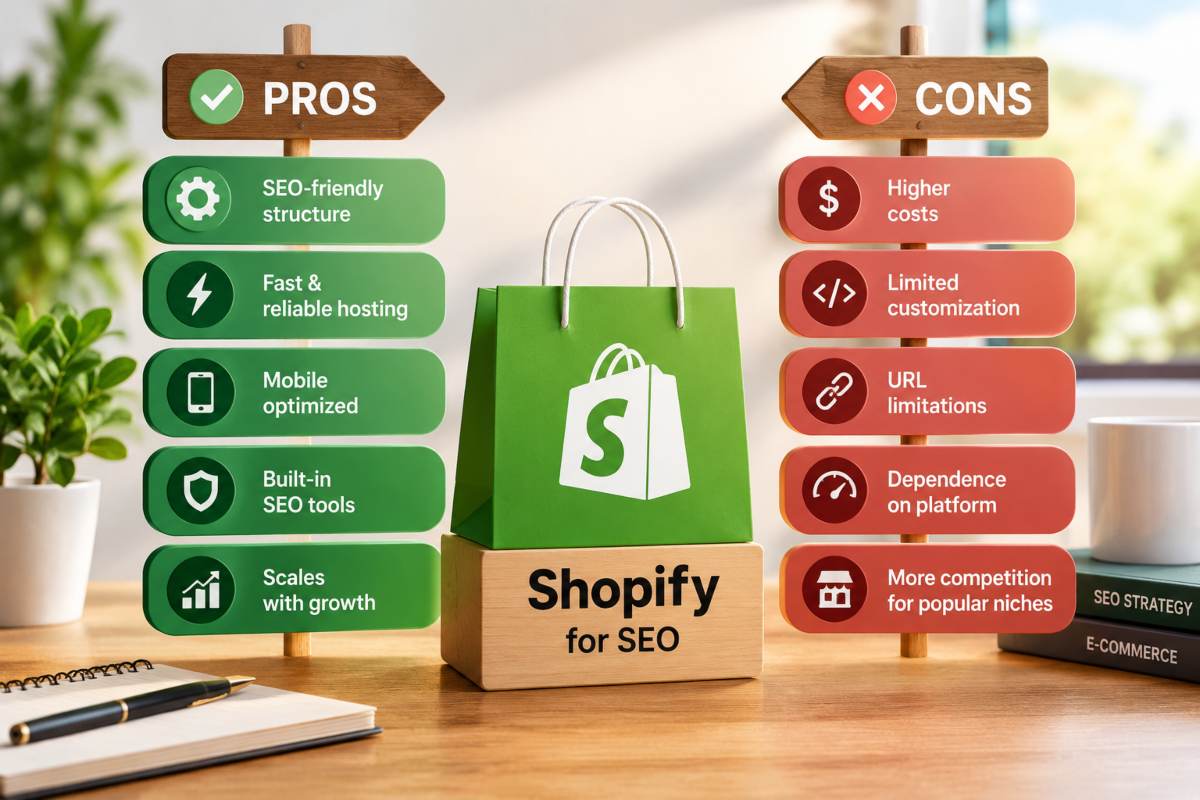
Yes, Shopify is good for SEO. It gives you a fast, secure, crawlable foundation with the essential settings built in, though its rigid URL structure and app-heavy ecosystem create limits you need to manage.
What Shopify does well out of the box
Shopify removes many of the technical hurdles that hold back other store builders. Every store runs on hosted, CDN-backed infrastructure with SSL included, so pages load securely without any server setup. The platform generates an XML sitemap automatically, adds canonical tags to reduce duplicate content, and lets you edit titles, meta descriptions, URL handles, and image alt text without touching code.
Mobile readiness is another strength, and it matters more than most owners realize. Around 79% of Shopify store traffic comes from mobile devices, and modern Shopify themes are built responsive from the start, which aligns with how Google evaluates pages. For a store owner without a developer, that means the technical baseline is largely handled before you publish your first product.
Platform limitations to work around
Shopify’s convenience comes with a few fixed rules. You cannot remove the /products/, /collections/, /pages/, or /blogs/ prefixes from your URLs, which limits how clean or flat your site architecture can be. Products can also be reached through more than one path, such as through a collection, and while canonical tags point search engines to the main version, those duplicate paths still need monitoring.
Speed is the other common weak spot. Every installed app can add scripts that slow your pages, and heavy themes make it worse. You also have no access to server log files, which technical SEOs often rely on to see how crawlers behave. The robots.txt file is editable through a theme template, but the options are narrower than on a self-hosted platform. None of these are dealbreakers, but they call for deliberate choices about themes, apps, and structure.
Who gets the most from Shopify SEO
Shopify SEO suits store owners who want strong technical defaults and would rather spend their time on content, product pages, and link building than on infrastructure. Small and mid-sized direct-to-consumer brands with a manageable catalog benefit most, since the built-in setup covers the essentials and the remaining gains come from keyword targeting and page quality.
It is a weaker fit for teams that need full control over URL architecture, server level configuration, or highly custom technical builds. For those merchants, the platform constraints may outweigh its convenience and they may need workarounds or a different setup entirely. For most online stores, though, Shopify offers a practical balance of ease and ranking potential.
Shopify SEO Basics for Beginners
The basics of Shopify SEO come down to three steps, find the search terms your customers actually use, assign each term to the right page, and set up free tools that show whether your efforts are working. Get these right first, and every later optimization builds on solid ground.
Keyword research for an online store
Keyword research for a Shopify store means finding the exact phrases shoppers type when they are looking for what you sell, then choosing the ones you can realistically rank for. Start with your products and categories, then expand with the modifiers buyers add, such as materials, sizes, use cases, and price cues. Google autocomplete, the “People also ask” box, and your own customer questions are all free sources of ideas.
Choosing well matters because clicks concentrate at the top. The first organic result captures around 40% of clicks, so a keyword you cannot realistically reach page one for will bring little traffic. New stores usually do better targeting specific, lower competition phrases, like “waterproof hiking backpack for women,” before chasing broad terms like “backpack.” Group your final list by intent, some searches signal a ready-to-buy shopper, while others come from people still researching.
Matching keywords to page types (home, collection, product and blog)
Each keyword belongs on one page, and the right page depends on what the searcher wants. Broad brand and category-level terms fit the homepage. Shopping-oriented terms that cover a group of items, such as “leather crossbody bags,” belong on collection pages. Specific, high-intent terms tied to one item, like a model name or exact variant, belong on product pages. Questions and comparison searches, such as “how to choose a running shoe,” belong on blog posts.
Keeping one primary keyword per page prevents your own pages from competing against each other in search results. Once a page has its target, apply clean titles, headings, and copy to match it, which is the core of On Page SEO. A simple spreadsheet listing each URL beside its primary keyword is enough to keep the whole store organized.
Setting up Google Search Console and analytics
Google Search Console and Google Analytics are the two free tools every Shopify store should connect before doing anything else. Search Console shows which queries bring impressions and clicks, which pages Google has indexed, and any crawl or mobile problems it finds. Analytics shows what visitors do after they arrive, including which pages they view and which sources lead to sales.
To set up Search Console, add your store domain as a property, verify ownership through your domain provider or a Shopify-supported method, and submit your sitemap, which Shopify generates at /sitemap.xml. For analytics, connect Google Analytics through Shopify’s sales channel settings so purchase data flows in automatically. Give both tools a few weeks to collect data, and then use them as your baseline for measuring every change you make.
The Shopify SEO Strategy Framework
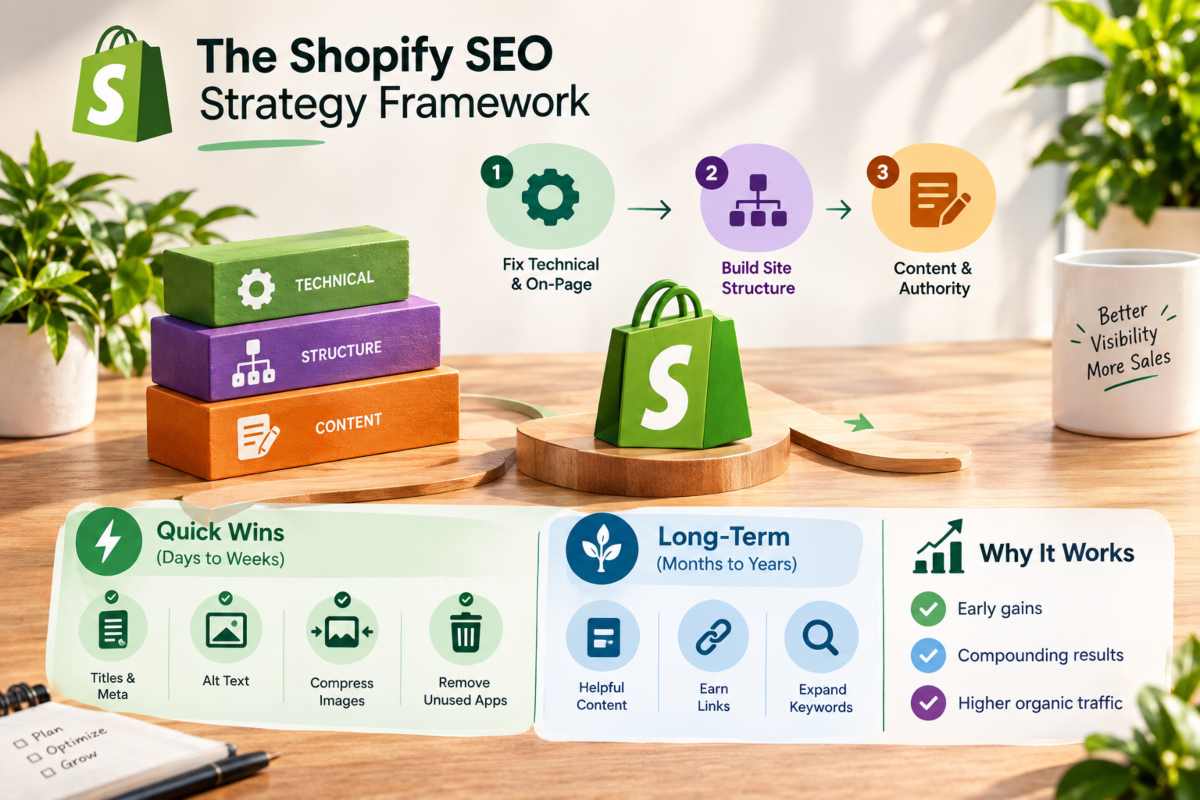
A strong Shopify SEO strategy sequences the work, fix quick technical and on-page issues first, build a clear site structure next, and then invest steadily in content and authority. Doing it in that order gives you early gains while the slower, compounding work catches up.
Prioritizing quick wins vs long-term work
Quick wins are changes you can make in days that remove obvious barriers. Rewriting weak page titles and meta descriptions, fixing missing image alt text, compressing oversized images, and removing unused apps all fall into this group. They cost little, carry low risk, and often lift visibility on pages that already have some traction.
Long-term work is where the biggest returns sit, but it takes patience. One industry analysis puts organic search at a 317% return on investment with a break-even point around nine months, which is a useful reminder that SEO rewards consistency over speed. Publishing helpful content, earning links, and expanding your keyword coverage all build slowly. A practical split is to spend the first month on quick wins, then move most of your effort into content and authority, reviewing results in Search Console every month.
Store structure and site architecture
Site architecture is how your pages connect, and for a Shopify store it should be simple and shallow. A clean structure runs from the homepage to main collections, then to subcollections, and finally to products, so that any product sits no more than three clicks from the homepage. This helps search engines find every page and passes authority down from your strongest URLs.
Good navigation reinforces that structure. Link your main collections from the menu, add breadcrumbs so shoppers and crawlers can see where a page sits, and link related products and collections to each other. Shopify fixed URL prefixes limit how flat the structure can be, so the internal links you control matter even more. Give each collection a distinct purpose and avoid near-duplicate collections that compete for the same search.
Building topical authority around your products
Topical authority means becoming the store search engines trust most on a subject, not just a seller of individual products. You build it by covering your niche in depth, strong collection pages for your core categories, supporting blog content that answers pre-purchase questions, and buying guides that link back to the products they discuss.
For example, a store selling coffee equipment might publish guides on grind size, brewing methods, and machine maintenance, each linking to the relevant collections. This depth signals expertise and captures shoppers earlier in their decision. External trust matters too, and that is where Off Page SEO comes in, since links and mentions from reputable sites confirm your authority beyond your own pages. Start with one core category, build it out fully, and then expand to the next.
On Page SEO Step by Step
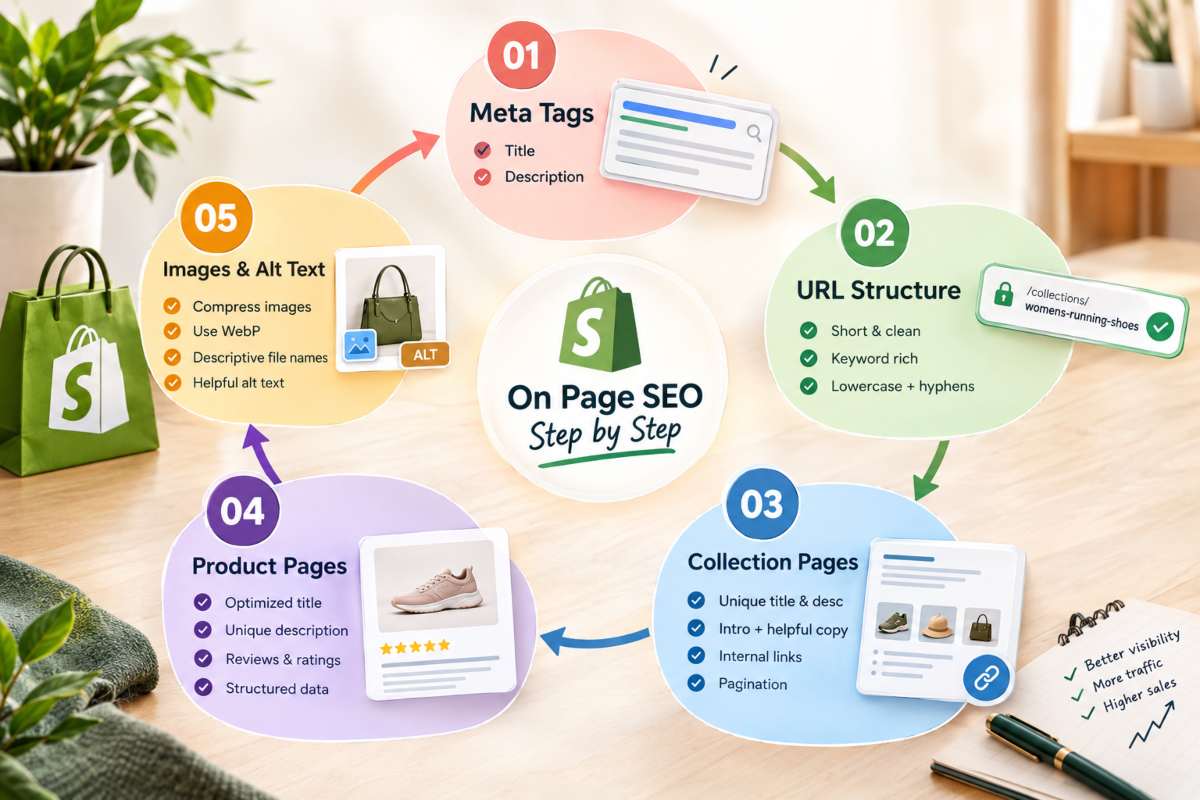
On-page SEO on Shopify means optimizing what you control on each page, the title and meta description, the URL, the visible copy, and the images. Work through them in that order, page type by page type, starting with your highest-value collections and products.
Meta titles and descriptions in Shopify
A meta title is the clickable headline in search results, and the meta description is the short summary beneath it. In Shopify, you edit both in the “Search engine listing” section at the bottom of any product, collection, page, or blog post, and the same fields for your homepage sit in your online store preferences.
Keep titles to roughly 55 to 60 characters, and place the main keyword near the front, followed by a benefit or brand name. Write descriptions of about 150 to 160 characters that state what the page offers and give the shopper a reason to click. If you leave these fields empty, Shopify fills them from the page content, which is rarely as sharp as the copy you write yourself. Every page should have a unique title and description, because repeated ones make pages harder for search engines to tell apart.
Shopify URL structure best practices
Good Shopify URLs are short, readable, and built around the page main keyword. You can edit the “URL handle” for any product, collection, or page, while Shopify controls the fixed prefix, such as /products/ or /collections/. A handle like /collections/womens-running-shoes is clearer than one with dates, codes, or filler words.
Choose handles carefully before launch and avoid changing them later without a reason. When you do change one, keep the “Create a URL redirect” option ticked so the old address forwards to the new one and existing rankings and links carry over. Use lowercase words separated by hyphens, and keep handles free of unnecessary stop words and variant details.
Collection page SEO
Collection pages often have the best chance of ranking because they match broad, high-intent shopping searches. Give each collection a title built around its main category keyword, a unique meta description, and a short intro paragraph above the product grid that explains what shoppers will find. A second block of helpful copy below the products, covering sizing, materials, or buying advice, adds depth without pushing products out of view.
Write original descriptions for every collection and avoid copying manufacturer text. Link each collection to related subcollections and to a supporting guide where it makes sense. Keep the grid crawlable by using standard pagination instead of hiding products behind scripts that search engines cannot read.
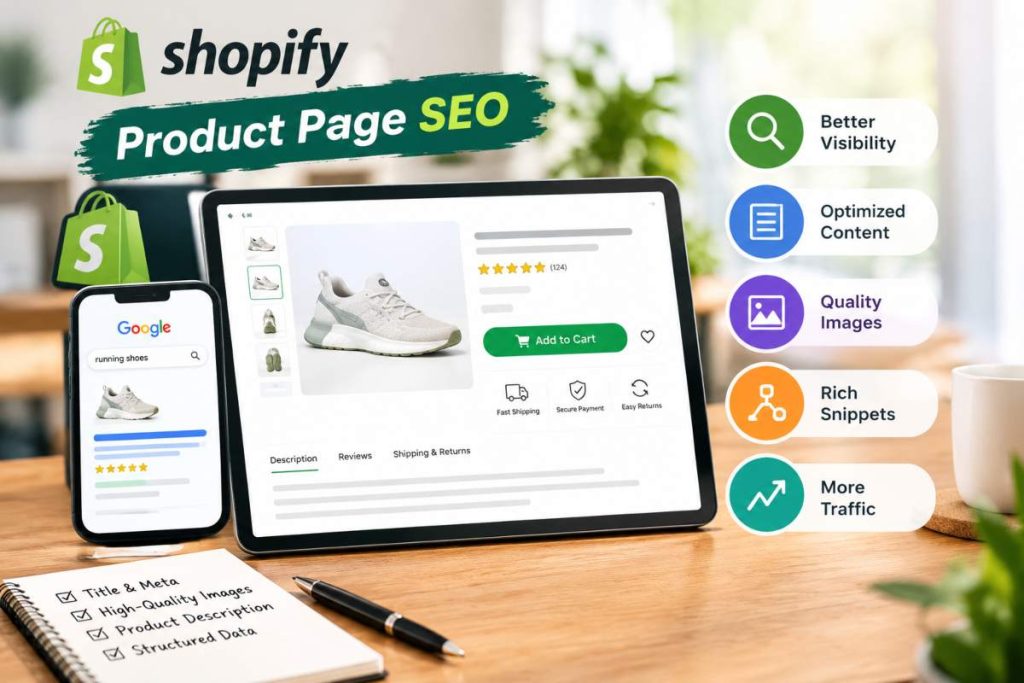
Product page SEO (titles, descriptions and reviews)
Product pages convert well when they are optimized properly. Organic search traffic converts at around 3.0% on Shopify stores, so each visitor who lands on a strong product page is worth more than a casual browser. Start with a clear product title that includes the product name and one or two defining details, such as material or model, without keyword stuffing.
Write descriptions that are unique to your store, covering features, benefits, sizing, and care in plain language. Manufacturer copy is shared by every other retailer selling the item, so it gives search engines no reason to prefer yours. Add customer reviews, since they supply fresh, relevant text and can enable star ratings in search results. If your theme or review app supports structured data, confirm the ratings and price are marked up correctly.
Image optimization and alt text
Images help products sell and can bring traffic from image search, but they also slow pages when left oversized. Compress photos before uploading, choose modern formats such as WebP where possible, and let Shopify built-in image delivery serve appropriately sized versions to each device.
Name files descriptively before you upload them, so “black-leather-crossbody-bag.jpg” replaces a camera code. Then add alt text to every image, describing what it shows in a short, natural sentence, such as “black leather crossbody bag with gold zipper.” Alt text supports accessibility and helps search engines understand the image, so write it for people first and add a keyword only when it fits. Skip alt text on purely decorative images. For a deeper look at the wider practice, see our guide to On Page SEO.
Technical SEO for Shopify
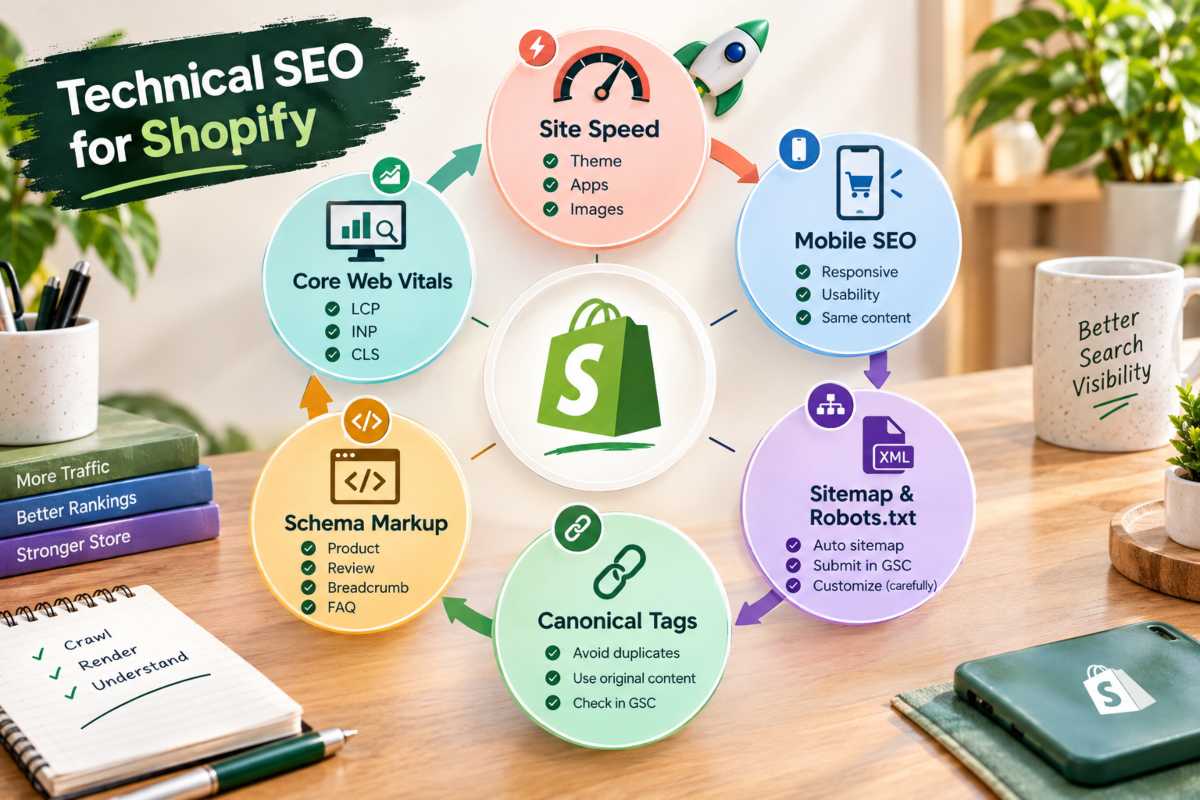
Technical SEO on Shopify means making sure search engines can crawl, render, and understand your store without friction. Shopify handles much of this by default, so your work centers on speed, mobile experience, crawl controls, duplicate content, and structured data.
Site speed and Core Web Vitals
Core Web Vitals are Google measures of page experience, how fast the main content loads, how quickly the page responds to taps, and how stable the layout stays. Google “good” thresholds are a Largest Contentful Paint of 2.5 seconds or less, an Interaction to Next Paint of 200 milliseconds or less, and a Cumulative Layout Shift of 0.1 or less.
On Shopify, the biggest speed factors are your theme and your apps. Choose a lightweight, well-coded theme, remove apps you no longer use (some leave scripts behind after uninstalling), and compress images. Limit heavy sliders, autoplay video, and third-party widgets above the fold. Test your key templates, meaning the homepage, a collection, and a product page, in PageSpeed Insights and check the Core Web Vitals report in Search Console for real-user data.
Mobile SEO
Google indexes the mobile version of your pages first, so the mobile experience is the version that gets ranked. Shopify themes are responsive by default, but a responsive theme is not the same as a well-optimized mobile store.
Check that text is readable without zooming, buttons are easy to tap, pop-ups do not cover the content, and product images load quickly on cellular connections. Make sure the content and structured data on mobile match the desktop version, since anything hidden or missing on mobile may not be counted. Review the Mobile Usability findings in Search Console and test your checkout path on a real phone.
Sitemap and robots.txt
Shopify generates your XML sitemap automatically at /sitemap.xml, and it updates as you add or remove products, collections, pages, and blog posts. You cannot edit the sitemap directly, so the way to control what appears in it is to manage the pages themselves, for example by unpublishing content you don’t want indexed. Submit the sitemap in Google Search Console so Google can find it.
Your robots.txt file also comes with sensible defaults, such as blocking cart, checkout, and internal search pages. You can customize it by adding a robots.txt.liquid template to your theme, which lets you add or adjust rules. Edit it carefully, because a wrong rule can block important pages from being crawled. Most stores are best served by the default file and should change it only for a clear reason.
Canonical tags and duplicate content
A canonical tag tells search engines which version of a page is the main one when similar content exists at several URLs. Shopify adds these automatically. The clearest case is a product that can be reached through a collection path, such as /collections/shoes/products/runner, which canonicalizes to the standard /products/runner address.
Duplicate content problems usually come from other sources, manufacturer descriptions reused across pages, near-identical collections, filtered or sorted URLs with parameters, and product variants with copied text. Write original copy for each page, merge or remove overlapping collections, and check Search Console page indexing report for URLs flagged as duplicates. Only override a canonical tag when you understand why the default is wrong.
Schema markup (Product, Review, Breadcrumb and FAQ)
Schema markup is structured code that describes your content to search engines in a standard format. It can qualify your pages for rich results, such as prices, availability, and star ratings shown directly in search listings. Most current Shopify themes output basic Product markup automatically, including name, image, price, and availability.
Check what your theme already provides before adding more, since duplicate or conflicting markup can cause errors. Review markup usually comes from your reviews app, and Breadcrumb markup helps search engines read your site hierarchy. FAQ markup is still valid, but Google now limits FAQ rich results to a small set of sites, so treat it as an aid to clarity rather than a guaranteed listing feature. Validate your pages with Google Rich Results Test and monitor the enhancements reports in Search Console. Our guide to Technical SEO covers the wider checks that keep a store healthy.
Shopify SEO Best Practices and Tips
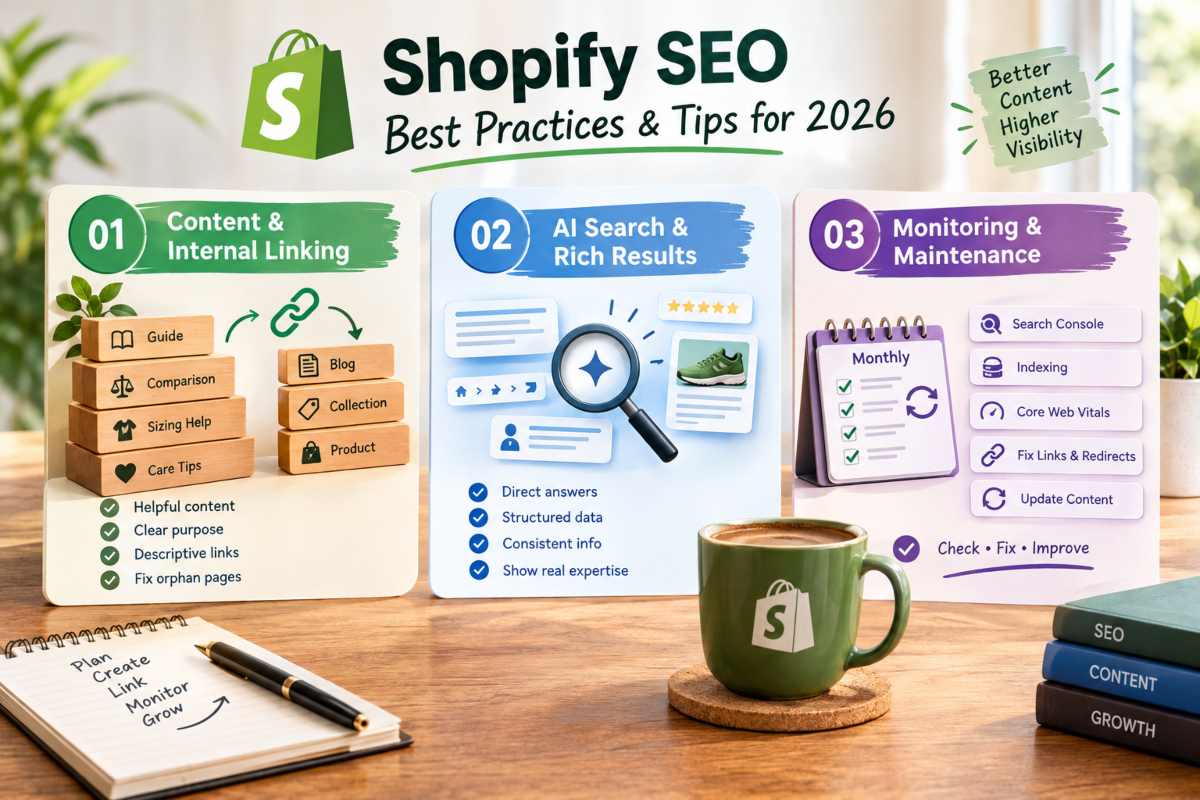
The best Shopify SEO practices for 2026 are to publish original, helpful content, link your pages together deliberately, structure answers so both search engines and AI tools can extract them, and review performance every month. Consistency beats one-off fixes, because rankings reward stores that keep improving.
Content and internal linking habits
Strong Shopify content answers the questions shoppers ask before they buy. Buying guides, comparisons, sizing help, and care instructions give you pages that attract searchers earlier in their decision and lead them to your products. Write each piece for a clear purpose, assign it one main keyword, and update it when products, prices, or advice change. Refreshing an existing page often does more than publishing a new one.
Internal links carry that traffic where you want it to go. Link every blog post to the relevant collection or product, link collections to related collections, and use descriptive anchor text such as “waterproof hiking backpacks” rather than “click here.” Add links from your best-performing pages to newer ones so authority flows through the store. Then check for orphan pages, meaning pages with no internal links pointing to them, since crawlers and shoppers struggle to find them.
Optimizing for AI search and rich results
AI search tools and rich results both favor pages that give clear, well-organized answers. Open key sections with a direct one- or two-sentence answer, follow with supporting detail, and use descriptive headings that match how people phrase questions. Keep each section understandable on its own, since AI systems often lift a single passage rather than a whole page.
Support that clarity with accurate structured data for products, reviews, and breadcrumbs, and keep facts such as prices, availability, shipping terms, and return policies consistent across your store. Add real expertise where you can, named authors, original photos, first-hand testing, and customer reviews all signal trust. Rich results and AI citations are not guaranteed, but pages that are accurate, specific, and easy to parse have the best chance of being selected.
Ongoing monitoring and maintenance
SEO is never finished, and the payoff justifies the upkeep. Organic search accounts for roughly 23.6% of ecommerce orders, so a slow decline in search visibility shows up directly in revenue. A monthly routine catches problems before they compound.
In Search Console, review the queries and pages gaining or losing clicks, check the page indexing report for new errors, and watch your Core Web Vitals data. Fix broken links and redirect chains, add redirects when you retire a product, and confirm that new apps or theme updates have not slowed your pages. Every quarter, revisit your keyword map, refresh outdated content, and look for collections or guides worth expanding. Keep a simple log of changes and dates, so you can connect ranking shifts to the work that caused them.
The Complete Shopify SEO Checklist
A complete Shopify SEO checklist covers four stages, initial setup, on-page optimization, technical checks, and monthly maintenance. Working through them in order keeps you from skipping the basics, which matters because early traction is hard to win. One 2026 roundup reports that only about 1 in 10 new Shopify stores is still active 90 days after launch.
Setup checklist
Complete these once, before you start optimizing individual pages.
- Connect your custom domain and confirm it loads over HTTPS.
- Set your preferred store name, address, and contact details accurately.
- Verify your store in Google Search Console and submit your sitemap.
- Connect Google Analytics and confirm purchases are being tracked.
- Choose a fast, lightweight theme and remove any demo content.
- Write your homepage title and meta description around your core category.
- Research keywords and assign one primary keyword to each key page.
On page checklist
Apply these to every product, collection, page, and blog post.
- Write a unique title of roughly 55 to 60 characters with the main keyword near the front.
- Write a unique meta description of about 150 to 160 characters.
- Use one clear H1 and logical subheadings.
- Keep URL handles short, lowercase, and keyword-focused.
- Write original descriptions instead of copying manufacturer text.
- Add descriptive alt text to every meaningful image, and compress the files.
- Link to related collections, products, and guides with descriptive anchor text.
- Display customer reviews on product pages where possible.
Technical checklist
Review these after launch and again after any theme or app change.
- Test the homepage, a collection, and a product page in PageSpeed Insights.
- Keep Core Web Vitals within Google “good” range.
- Confirm the mobile experience is readable, tappable, and free of intrusive pop-ups.
- Check that your sitemap is submitted and that important pages are indexed.
- Leave robots.txt on its defaults unless you have a clear reason to change it.
- Look for duplicate content, thin pages, and overlapping collections.
- Validate Product, Review, and Breadcrumb structured data in the Rich Results Test.
- Remove unused apps and check for leftover scripts.
Monthly maintenance checklist
Set aside a fixed time each month to run through these.
- Review clicks, impressions, and top queries in Search Console.
- Check the page indexing report for new errors or excluded pages.
- Fix broken links and redirect chains.
- Add redirects whenever you delete or rename a product or collection.
- Refresh one or two underperforming pages with new copy, images, or FAQs.
- Publish or update at least one helpful guide tied to a core collection.
- Recheck page speed after installing new apps or theme updates.
- Record what you changed and when, so you can link results to actions.
Common Shopify SEO Mistakes and How to Fix Them
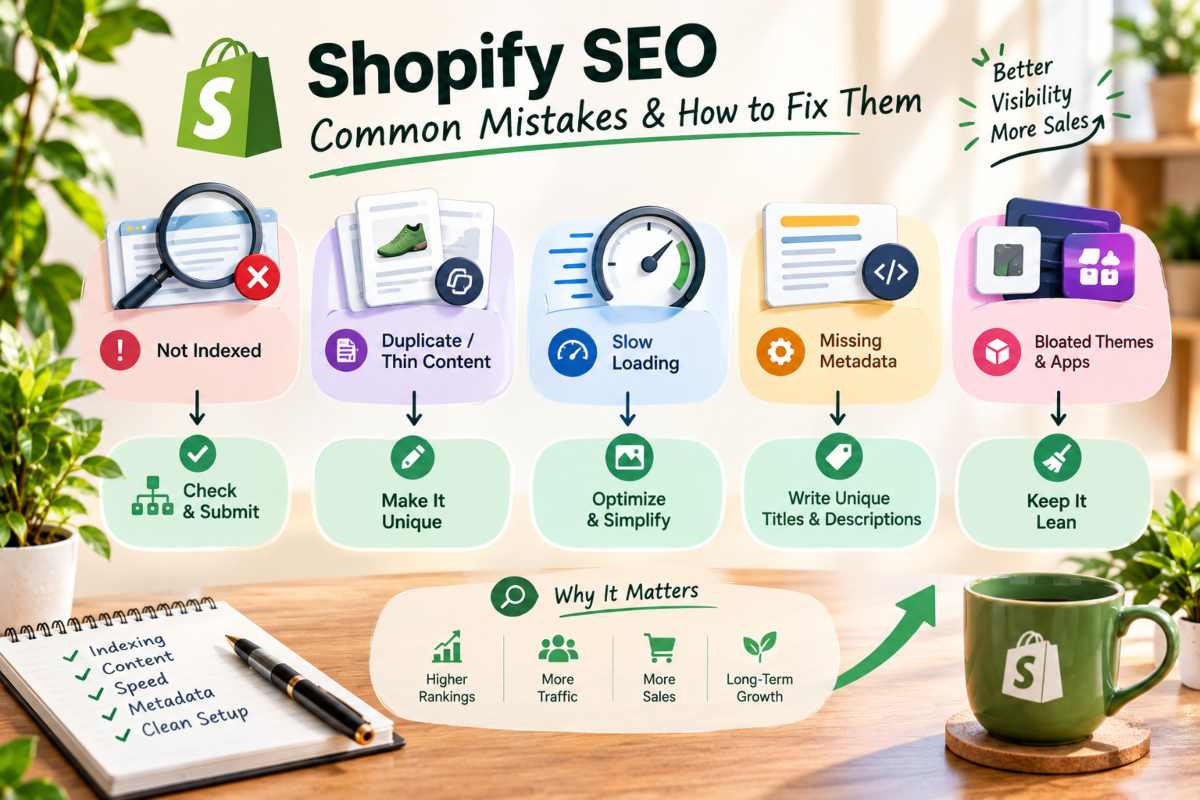
Most Shopify stores that struggle in search share the same handful of problems, pages that are not indexed, duplicate or thin content, slow loading, and missing metadata. Each has a clear diagnosis and fix, so start by finding out which one applies to you.
Why your Shopify store is not ranking
A Shopify store usually fails to rank for one of four reasons, search engines have not indexed the pages, the pages do not match what searchers want, competitors have stronger content and authority, or technical problems hold the store back. Rankings also take time, and a new store often needs several months before results appear.
Start with Search Console to see whether your pages are indexed and which queries they already appear for. If a page is indexed but sits deep in the results, compare it with the top-ranking pages for the same search. Look at how thorough their content is, how they structure the page, and what search intent they satisfy. Then close the gap with better copy, clearer headings, stronger internal links, and a keyword target you can realistically win.
Shopify not showing up on Google diagnosis steps
If your store does not appear in Google at all, the cause is almost always an indexing or visibility setting. Work through the checks in order.
First, search Google for your domain with the “site,” operator to see whether any pages are indexed. Next, confirm your store is verified in Search Console and your sitemap is submitted. Then inspect a key URL with the URL Inspection tool to see whether Google can crawl it or whether something blocks it. Finally, check that your store is not still behind a password page, since a password-protected storefront hides everything from search engines until you remove it.
If pages are indexed but only appear for your brand name, the issue is ranking rather than visibility. Stores that also serve customers in a specific area can add location signals, as covered in our guide to local SEO.
Fixing duplicate content issues
Duplicate content on Shopify usually comes from reused manufacturer descriptions, near-identical collections, product variants with copied text, and URLs created by filters and sorting. Shopify automatic canonical tags handle the collection-path versions of products, but they can not fix copy that repeats across pages.
Rewrite product descriptions so each is unique to your store, and merge or remove collections that overlap heavily. Give variants meaningful differences in copy only where the differences matter to shoppers. Check the page indexing report in Search Console for URLs marked as duplicates, and confirm the canonical URL Google chose is the one you intended. Avoid changing canonical tags manually unless you understand why the default is wrong.
Fixing slow loading pages
Slow pages lose visitors before they see your products. Google research has found that about 53% of mobile visits are abandoned when a page takes longer than three seconds to load, so speed affects both rankings and sales.
Test your homepage, a collection, and a product page in PageSpeed Insights to find the biggest delays. The usual culprits are oversized images, unused apps that leave scripts behind, heavy sliders and autoplay video, and bloated themes. Compress images, uninstall apps you don’t use, delay non-essential scripts, and consider a lighter theme if your current one loads too much code. Retest after each change so you know what actually helped.
Other frequent mistakes (thin content, missing metadata and bloated themes)
Thin content is the most common problem, product and collection pages with a line or two of text give search engines little to work with. Add helpful details such as materials, sizing, use cases, and care advice, and give collections an intro that explains what shoppers will find.
Missing or duplicated metadata is the next most frequent. Leaving title tags and meta descriptions blank, or repeating them across pages, wastes one of your easiest ranking signals, so write a unique pair for every important page.
Bloated themes and app stacks round out the list. A theme packed with features you never use slows every page, and each extra app adds weight. Choose a lean theme, keep only the apps that earn their place, and review both every few months. Fixing these three areas usually delivers more than any advanced tactic.
Next Steps Your 30 Day Shopify SEO Action Plan
A 30-day Shopify SEO plan works best when each week has one focus, measurement and setup, on-page fixes, technical cleanup, then content and authority. It won’t finish the job in a month, but it puts a working system in place. That system is worth building, because organic traffic converts at roughly 2.8% on Shopify stores, compared with about 0.8% to 1.2% for paid social.
Week by week plan
Week 1 Set up measurement and choose your targets. Verify your store in Google Search Console, submit your sitemap, and connect Google Analytics so purchases are tracked. Then research keywords and build a simple spreadsheet that lists your key URLs beside one primary keyword each. Focus on your homepage, your top five collections, and your best-selling products. By the end of the week, you should know which pages matter most and what each is meant to rank for.
Week 2 Fix on page basics. Rewrite the titles and meta descriptions for the pages on your list so each one is unique and built around its target keyword. Tidy URL handles where needed, using redirects for any you change. Replace manufacturer product copy with original descriptions, add intro text to your main collections, and write alt text for your key images. Start with the pages that earn the most traffic or revenue, since improvements there pay back fastest.
Week 3 Clean up technical issues. Test your homepage, a collection, and a product page in PageSpeed Insights, and note the biggest delays. Compress oversized images, uninstall apps you no longer use, and check that your mobile experience is smooth. Review the page indexing report in Search Console for errors, duplicate URLs, or pages that should be indexed but are not. Confirm that Product and Breadcrumb structured data validates in Google Rich Results Test.
Week 4 Publish content and strengthen internal links. Write or refresh one helpful guide tied to a core collection, such as a buying guide or comparison, and link it to the relevant products. Add internal links from your strongest pages to newer ones, and check for orphan pages that nothing links to. Begin light outreach for links or mentions from relevant sites, then record your starting numbers for clicks, impressions, and rankings.
After day 30, shift to a monthly rhythm, review Search Console, fix new errors, refresh one or two pages, and publish steadily. Expect gradual movement rather than overnight jumps, and judge progress over quarters, not days.
Conclusion
Learning how to do SEO for Shopify comes down to a repeatable order of work, set up measurement, target one keyword per page, optimize your titles, descriptions, images, and product copy, keep your technical foundation fast and clean, and then keep publishing and reviewing every month. Shopify gives you a strong head start with built-in sitemaps, canonical tags, and mobile-ready themes, but rankings still go to the stores that add original content and steady upkeep.
The effort is worth it, since organic search drives roughly 43% of ecommerce traffic and keeps delivering visitors long after a paid campaign would have stopped. Start with the quick wins in your first month, then build authority over time and judge your progress in quarters rather than days. If you’d prefer expert help carrying out the plan, the team at IT Leadz can take on the work so you can focus on running your store.
Frequently Asked Questions (FAQs)
How long does Shopify SEO take to work?
Most stores see early movement in three to six months, with stronger results after that. One industry analysis puts the break even point for organic search at around nine months, so plan for steady progress rather than quick wins.
Do I need an app to do Shopify SEO?
No. Shopify lets you edit titles, meta descriptions, URL handles, and alt text without any app. An app can help with bulk edits or structured data but it also adds weight so install one only if it solves a real problem.
Can I do Shopify SEO myself?
Yes, most of the essentials are manageable without a developer. You can handle keyword research, on page edits, and content on your own, and bring in a specialist for technical fixes or when your catalog grows too large to manage by hand.
Is Shopify SEO different from regular SEO?
The principles are the same, relevant content, a fast site, and trusted links. The difference is the platform. Shopify sets fixed URL prefixes, generates your sitemap automatically, and ties speed to your theme and apps so some tactics need adjusting.
What is the first thing to fix in a new store?
Set up Google Search Console and submit your sitemap, then write unique titles and meta descriptions for your homepage and main collections. Confirm the store is not still password protected, since that hides every page from search engines.